Here /storage/.config/hwdb.d/70-local-keyboard.hwdb To pair the remote I long pressed the home and xiaomi tv button together for some seconds, and the remote showed up in the list of bluetooth devices in CoreElec bluetooth settings (I connected wired keyboard using a USB hub to navigate)
I have done it but remote control doesn’t show up.I’m using Windows but that path is not shown, I created a folder and called storage, a sub folders called .config/hwdb.d and put that file inside.I must give some permission to tha folders?
Wrong doing
@failax72 No need to create any directories, CoreELEC already has the correct directories.
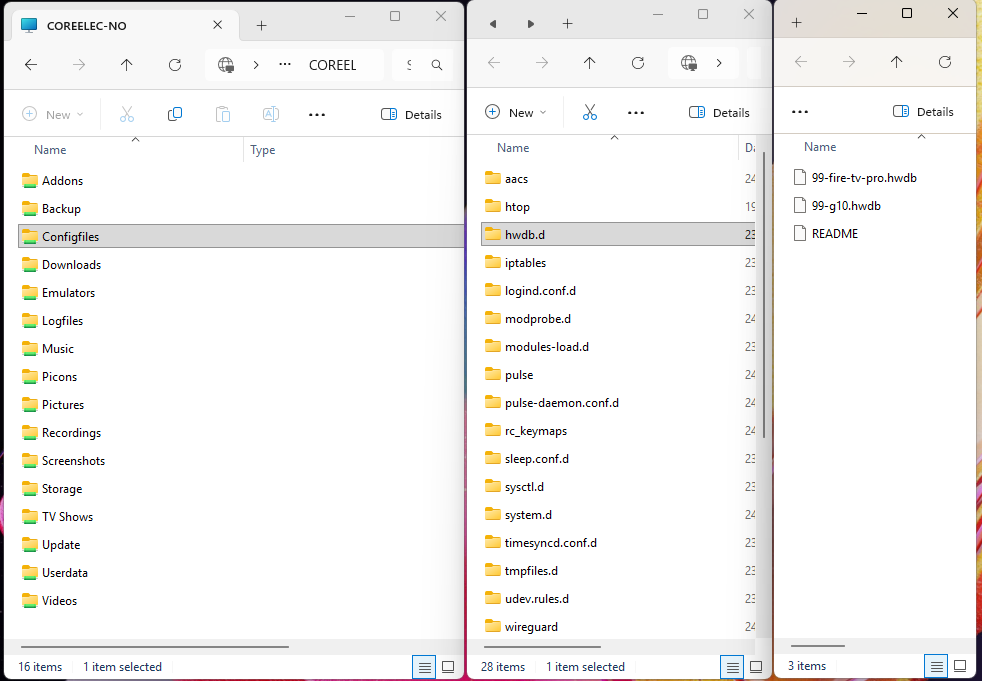
If you’re using Windows SMB to access your box then the correct location is Configfiles/hwdb.d
1 Like
it seems Coreelec team has added xiaomi remote configuration in the latest nightly.I updated on the fly but now it boots only to android tv side.I make other try.
4 posts were merged into an existing topic: Amlogic-NO discussion
Thank you very much! I have tried many ways but failed to extract this file from Ugoos SK4 firmware.
1 Like
If i try to see a hdr movie with my projector i have a blue screen.
Hello:
IIt seems that CoreELEC on the 3rd generation Xiaomi Box “freezes” frequently when using a Wi-Fi connection (for example, when trying to load the “heavy” IPTV Simple Client EPG, or when attempting to transfer a backup from the box to a PC).
However, it works quite well with a wired connection.
Thank you very much for your efforts in gradually improving it.
I ordered one of these 3rd Gen boxes to try out. I’ve been fighting with a Homatics 4K Plus - every time I reboot back into android tv Youtube videos play at about double speed and there’s no audio, and there’s no audio in amazon prime movies. The Homatics works fine if I boot it normally into ATV14. I’ve tried CE versions 21.3 ne & no and am about to give up on that device.
Well done, but playing 4k videos with wifi the Xiaomi Box just restarts.
So i can´t watch any movie with the device on wifi..
Great haha
I am pissed off that Kodi (and others) is getting stuck for seconds on Google TV, want to try CE. I have some questions though, hope someone can answer:
- I gathered that the Xiaomi remote should now work, so no need for USB hub (unless for Ethernet)?
- CE does not support HDMI-CEC, right?
- How do I switch between Google TV and CE - is there a toggle?
- CE does support CEC
- there is an app, * made by Jamal, boot to CE
Hello deen1,
you say Dolby TrueHD output is working for you in coreelec on your Xiaomi TV Box 3rd gen. Which audio settings are you using and which audio-device played the sound? I can only get Dolby AC-3 passthrough on my Denon AVR-X1300W.
thank you in advance
I have an AVR Pioneer VSX-933 which is directly connected to a Xiaomi TV Box. I play TrueHD with the default passthrough settings on the Coreelec. Most likely, the issue is with your AVR settings.
By the way, the latest Xiaomi firmware for GoogleTV, UKG3.250826.001.V816.0.7.0.UZFAABX, fixed the stuttering in TrueHD.
But large files still play more reliably on the Coreelec.
I’m using a TV Stick 4k 2nd gen which has an identical board config - save the WiFi is connected via SDIO (still W2 radio) and it has 2gb/8gb memory.
Everything is perfect with a USB ethernet connection but the wifi is a problem on 4k ISOs. It reboots regularly. I’ve tried changing the NFS and cache parameters (which made a huge difference in Kodi on the native Xiaomi ATV build) but they seem to have no impact at all, which is super odd.
For the record I upped the NFS 3 chunk size to 256k on the Xiaomi ATV to make it rock solid on wifi. Unfortunately the pass through bug is still evident on the stick as they haven’t released the same patch that they initially released for the box, probably due to the box patch introducing another bug so they pulled it.
So I can only watch 4k Videos if I boot into CE using a USB ethernet adapter which means an extra cable which sends the missus mad!
I should add I’m happy to send logs after a wifi playback crash if any of the devs are interested but I understand there any many more important things to do with Coreelec than fix wifi stacks
FWIW the DMESG I can see from my device seems to show that the W2 driver is constantly scanning across 3 interfaces (vif:0, Vif:1 and Vif:2 which correlate to Wlan0, AP0, P2P0 and appears to cause buffer overflows (scanres_payload_buf overflow, flush).
Only AP0 seems to ‘work’ as a re-usable, persistent wifi connection for me.
Hi Portisch.
I think you have a Xiaomi TV Box S 3rd Gen. The W2 drivers are working but seem to have issues mentioned in the hardware thread. I realise this is VERY low priority but I’d be happy to provide logging if you are minded to look into it and no longer have the device yourself.
My VERY amateur interpretation is that the driver creates 3 interfaces (WLAN0, AP0, P2P0) and so every Sid has three entries in the UI. Only AP0 seems to be properly active for me. All the interfaces (VIF0/1/2 respectively) appear to be constantly scanning and there are lots of DMESG entries for buffer overflow which may or may not be related.
Happy to help should you want to try to hammer this one out but understand priorities and so will leave it there
This is a self build module by AML:
To say it short: ask AML, it’s impossible for us to parse and understand thousands of code lines…
Invest in a USB WiFi or USB LAN adapter, problem solved. Next time get a device with LAN included.