Probably? Try older nightlies and confirm.
Sorry for the vague information in my answer, not probably, but definitely. I’m on build 20260601 and Dolby Vision works and the box doesn’t reboot.
I tested it step by step, the problem was on 20260606 and 20260605. Then I went straight to 20260601, I didn’t test 20250602.
And would be too hard to do that and tell exactly which version is the first problematic one?
And seems not general issue because only you reported such issue? As always replicate with test fresh build.
Just tested Dolby Vision P5, P8.1 and P7 FEL with 20260606 and no problem at all here.
Must be on your end.
I was busy, but after updating to 20260608 everything is working again.
Your TV does not support Dolby Vision.
1 Like
I thought DV does not depend on the TV in CE. Although Kodi on native WebOS plays videos in DV perfectly. But somehow none of the other players/ devices were able to play the DV files.
or, shorter answer, CE won’t even enable DV when the display doesn’t support it (unless you do an EDID hack to pretend the display supports it)
1 Like
Have you tried updating to beta1? I am planning to buy this device in a couple of days.
What USB hub are you using? I’m picking between these two:
- TP-Link UE330 USB 3.0 3-Port Hub & Gigabit Ethernet Adapter 2 in 1 USB Adapter
- UGREEN USB 3.0 to Ethernet Adapter, 5 in 1 Multiport Hub
The UGreen is the better of the two, it has optional power injection if you end up needing it.
1 Like
Ugreen works well, but sometimes my download speed is only around 170mbit*, but upload is always good (340mbit).
When the box wakes up from sleep, it tends to be slower (~170mb/s).
Doing well from cold boot, but not from sleep. This behavior is tend to android, not using CE on this box.
Disconnecting and reconnecting the LAN cable solves the problem.
I haven’t read about such an error anywhere else.
But device is (Ugreen) very good
*with CAT5e or CAT6
My box arrived first, got beta1 to boot on the Mi Box 3rd Gen with latest firmware. Only steps I did is flash the img and copy the device tree file to dtb.img.
Remote does not work though. Will I only be able to proceed with a USB hub? Still waiting for the UGreen with Ethernet I ordered for a couple of days.
cec should work. Wifi also works.
Initially thought FEL wasn’t working, I thought Across the Spider-Verse was FEL, but it is MEL.
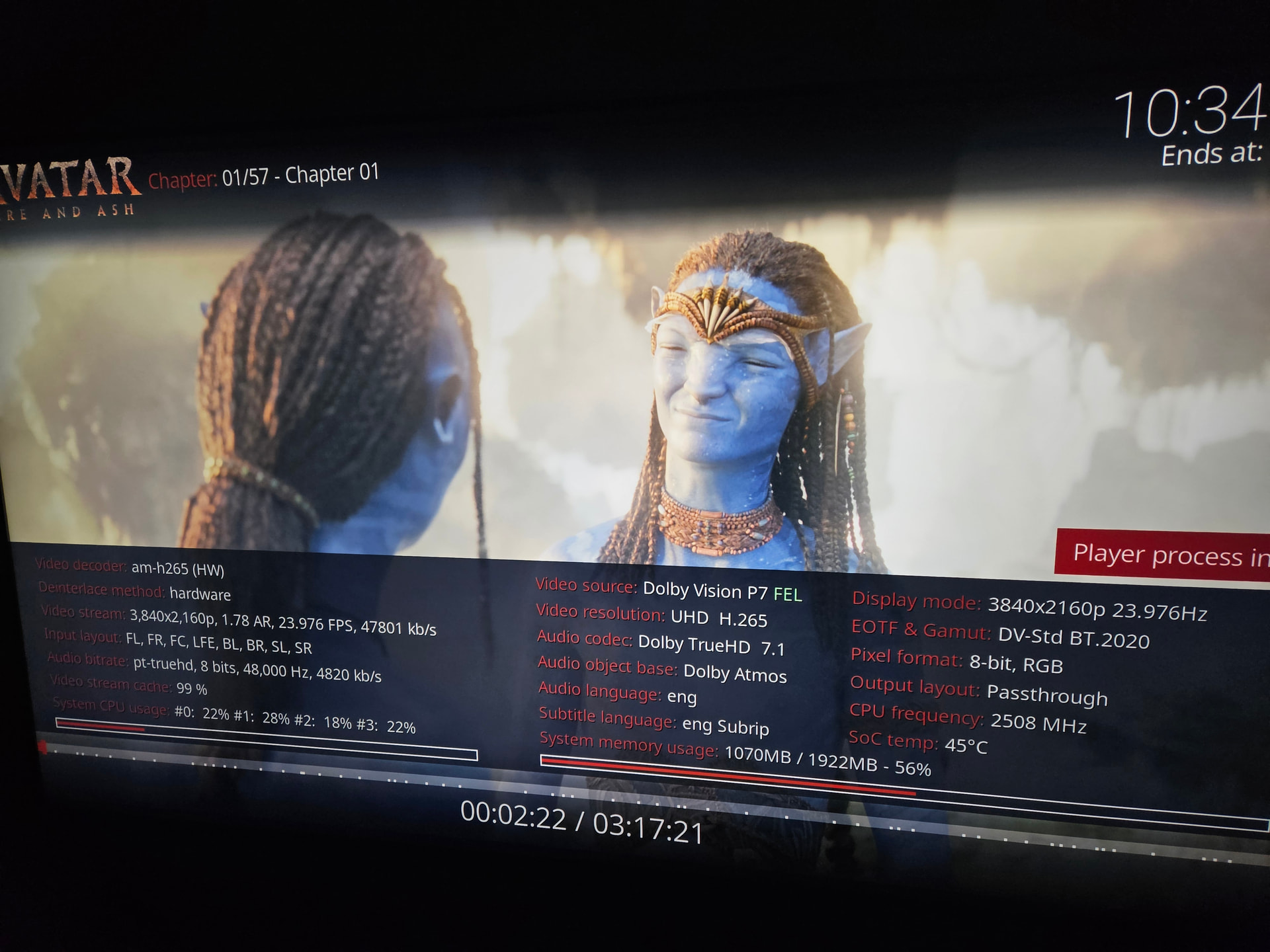
Tried Fire and Ash, and FEL works out of the box on beta1. I initially added the dovi.ko file but it made DV not work, so I removed it.
Only issue I have is the buffering when playing full 4K Blu-rays with DV and TrueHD, but I’m sure that will be fixed once I get my USB hub and use Ethernet instead of WiFi. Fairly smooth installation with minimal configuration needed
1 Like
I paired the Xiaomi remote to CE, I don’t plan to ever booting back to Google TV. Is the power button supposed to turn the device off? Can that be changed?
What is the best practice anyway, should I keep it always on or let it suspend after a while?
Absolute minimum is 100MBit/s for dolby media!
It might start but on stream peaks it might cause buffering, depends on media.
For stutter free playback minimum 300MBit/s is recommended.
2 Likes
Sharing my full experience here:
Fairly smooth installation process with minimal configuration. I initially read the whole Mi Box S 3rd Gen thread from the CoreELEC forums to check what works, what to expect and how to install it properly.
Previously, I have my Apple TV connected to the Soundbar (Samsung HW-Q800B) HDMI input, but I moved that one to the TV so that the new box can be connected there. (I have not noticed a difference on my Apple TV being connected to either ports so far)
Only step needed after flashing the image is to copy the device tree image. During the initial setup, I used the TV remote via CEC until I can enable SSH. I then used bluetoothctl to pair my Xiaomi remote (as I followed the instructions from a comment in the forum post). OK button works out of the box.
Since I cannot connect a keyboard yet, it’s a good thing I can change some simple configuration files via SSH such as specifying a token for Home Assistant Weather and editing the list of RSS feeds instead of typing via remote.
Dolby Vision FEL works out of the box!
Summary
I initially thought Across the Spider-Verse contains FEL, so I thought FEL wasn’t working when playback info shows MEL. I loaded a patched dovi.ko from the forum mentioned in the Mi Box S 3rd gen topic/post. But then after that Dolby Vision stopped working, like it was disabled/not supported and the DV toggles disappeared. So I deleted the dovi.ko file to revert it and DV worked again
But after checking a real FEL movie (Avatar: Fire and Ash), I can confirm it works, together with Dolby TrueHD Atmos!
I only have issues that I am hoping some will be fixed once I get the USB hub with Ethernet I ordered:
- Buffering on large remuxed content: I am currently using only WiFi, and ethernet will definitely be much more reliable especially on local transfers. Even though the USB port is only 2.0, it is still better to buy a USB 3.0 hub with Gigabit ethernet, because most USB 2.0 hubs I can buy only have 100Mbps ethernet. But theoretical max speed will be 480Mbps, even less I guess because the boot device would also be in the hub, but enough for remux bit rates.
- Device not waking up from Suspend via CEC: not sure if it is related to the unreliability of WiFi (and something about Kodi/CoreELEC waiting for the network connection). I see comments on the CoreELEC forum that the network interface sometimes does not start properly. Though, I can SSH into CoreELEC and I can do the reboot command there to fix being stuck in suspend.
- I have properly set up the CEC adapter peripheral to make the box suspend when switching the TV source or turning the TV off. I also set it so that my TV and Soundbar (acting as the AVR) turns off when I suspend/turn off the box
- For now, I disabled Suspend and just let the box stay awake. With this, CEC works properly: I can wake the TV/AVR using the Mi remote and auto switch to CoreELEC and I can switch between TV input sources with no hiccups. (Does anyone have information on power usage on Suspend vs always on?)
- The remote power button turns off the box. I am not sure if this can be easily changed, and so far only way I know how to boot the device again is to reconnect the power cable. My TV remote is also Google TV but with different button positions so it’s confusing to use both, maybe I’ll just control CoreELEC via CEC once everything is set up.
I don’t have a reference yet, so I’ll have just to try DV FEL and TrueHD passthrough for the first time. But as a tinkerer, I think the setup was worth it! Only took less than two hours.
(Any lightweight but modern and minimal skin recommendations that show FEL info? I read that AF3 requires better hardware)
1 Like
I was having issues playing TV shows (but not movies) with Jellyfin on Addon mode, so I switched to Native with SMB.
Another good effect is it seems that basically removed the buffering on remux content on WiFi! Testing Fire and Ash right now, and I have not noticed any buffering so far. But I will still use ethernet once my hub comes for better reliability.
I also noticed that after switching from TV-led to player-led, the Pixel format changed from 8-bit RGB to 12-bit YUV422.
that’s exactly as intended now that you’re using LLDV instead of real DV