AML-VNC Server 1.4.0 @ CoreELEC 22-Piers nightlies

Thank you for new version.
Looks like it’s working now :+1:

C4 fbdev

Mar 17 10:25:23 CoreELEC-C4 systemd[1]: Stopping service.aml-vnc.service…
Mar 17 10:25:23 CoreELEC-C4 systemctl[14362]: Warning: The unit file, source configuration file or drop-ins of service.aml-vnc.service changed on disk. Run ‘systemctl daemon-reload’ to reload units.
Mar 17 10:25:23 CoreELEC-C4 systemd[1]: service.aml-vnc.service: Deactivated successfully.
Mar 17 10:25:23 CoreELEC-C4 systemd[1]: Stopped service.aml-vnc.service.
Mar 17 10:25:23 CoreELEC-C4 systemd[1]: service.aml-vnc.service: Consumed 6.527s CPU time over 31.763s wall clock time.
Mar 17 10:25:23 CoreELEC-C4 systemctl[14369]: Removed ‘/storage/.config/system.d/kodi.target.wants/service.aml-vnc.service’.
Mar 17 10:25:23 CoreELEC-C4 systemctl[14369]: Removed ‘/storage/.config/system.d/service.aml-vnc.service’.
Mar 17 10:25:23 CoreELEC-C4 systemctl[14369]: Removed ‘/storage/.config/system.d/aml-vnc.service’.
Mar 17 10:25:24 CoreELEC-C4 systemctl[14412]: Created symlink ‘/storage/.config/system.d/service.aml-vnc.service’ → ‘/storage/.kodi/addons/service.aml-vnc/system.d/service.aml-vnc.service’.
Mar 17 10:25:24 CoreELEC-C4 systemctl[14412]: Created symlink ‘/storage/.config/system.d/aml-vnc.service’ → ‘/storage/.config/system.d/service.aml-vnc.service’.
Mar 17 10:25:24 CoreELEC-C4 systemctl[14412]: Created symlink ‘/storage/.config/system.d/kodi.target.wants/service.aml-vnc.service’ → ‘/storage/.kodi/addons/service.aml-vnc/system.d/service.aml-vnc.service’.
Mar 17 10:25:26 CoreELEC-C4 systemd[1]: Starting service.aml-vnc.service…
Mar 17 10:25:31 CoreELEC-C4 systemd[1]: Started service.aml-vnc.service.
Mar 17 10:25:31 CoreELEC-C4 aml-vnc[14458]: AML-VNC Server v1.4.0 Beta 9 (Release date: 2026-03-16)
Mar 17 10:25:31 CoreELEC-C4 aml-vnc[14458]: – Initializing DRM framebuffer device –
Mar 17 10:25:31 CoreELEC-C4 aml-vnc[14458]: DRM framebuffer ‘/dev/dri/card0’ opened.
Mar 17 10:25:31 CoreELEC-C4 aml-vnc[14458]: DRM master not owned, drop not required.
Mar 17 10:25:31 CoreELEC-C4 aml-vnc[14458]: Failed to query encoder: 0.
Mar 17 10:25:31 CoreELEC-C4 aml-vnc[14458]: Assuming headless mode, switch to the next backend.
Mar 17 10:25:31 CoreELEC-C4 aml-vnc[14458]: – Initializing FBDEV framebuffer device –
Mar 17 10:25:31 CoreELEC-C4 aml-vnc[14458]: FBDEV framebuffer ‘/dev/fb0’ opened.
Mar 17 10:25:31 CoreELEC-C4 aml-vnc[14458]: Virtual width: 1920, virtual height: 2160.
Mar 17 10:25:31 CoreELEC-C4 aml-vnc[14458]: X axis offset: 0, Y axis offset: 0.
Mar 17 10:25:31 CoreELEC-C4 aml-vnc[14458]: Stride: 7680 bytes, framebuffer size: 16588800 bytes.
Mar 17 10:25:31 CoreELEC-C4 aml-vnc[14458]: – Initializing virtual keyboard device –
Mar 17 10:25:31 CoreELEC-C4 aml-vnc[14458]: The virtual keyboard device has been created.
Mar 17 10:25:31 CoreELEC-C4 aml-vnc[14458]: – Initializing virtual pointer device –
Mar 17 10:25:31 CoreELEC-C4 aml-vnc[14458]: The virtual pointer device has been created.
Mar 17 10:25:31 CoreELEC-C4 aml-vnc[14458]: – Initializing VNC server –
Mar 17 10:25:31 CoreELEC-C4 aml-vnc[14458]: Screen resolution: 1920x1080, bit depth: 32 bpp.
Mar 17 10:25:31 CoreELEC-C4 aml-vnc[14458]: RGBA colormap: 16:8:0, length: 8:8:8.
Mar 17 10:25:31 CoreELEC-C4 aml-vnc[14458]: Screen buffer size: 8294400 bytes.
Mar 17 10:25:31 CoreELEC-C4 aml-vnc[14458]: – Starting the server –
Mar 17 10:25:31 CoreELEC-C4 aml-vnc[14458]: Debug output from libvncserver has been disabled.
Mar 17 10:25:31 CoreELEC-C4 aml-vnc[14458]: [1] Client connected from 192.168.99.2.

AM8 DRM

Mar 17 10:29:32 CoreELEC-AM8 systemd[1]: Stopping service.aml-vnc.service…
Mar 17 10:29:32 CoreELEC-AM8 systemctl[1334]: Warning: The unit file, source configuration file or drop-ins of service.aml-vnc.service changed on disk. Run ‘systemctl daemon-reload’ to reload units.
Mar 17 10:29:32 CoreELEC-AM8 systemd[1]: service.aml-vnc.service: Deactivated successfully.
Mar 17 10:29:32 CoreELEC-AM8 systemd[1]: Stopped service.aml-vnc.service.
Mar 17 10:29:32 CoreELEC-AM8 systemctl[1341]: Removed ‘/storage/.config/system.d/aml-vnc.service’.
Mar 17 10:29:32 CoreELEC-AM8 systemctl[1341]: Removed ‘/storage/.config/system.d/kodi.target.wants/service.aml-vnc.service’.
Mar 17 10:29:32 CoreELEC-AM8 systemctl[1341]: Removed ‘/storage/.config/system.d/service.aml-vnc.service’.
Mar 17 10:29:32 CoreELEC-AM8 systemctl[1384]: Created symlink ‘/storage/.config/system.d/service.aml-vnc.service’ → ‘/storage/.kodi/addons/service.aml-vnc/system.d/service.aml-vnc.service’.
Mar 17 10:29:32 CoreELEC-AM8 systemctl[1384]: Created symlink ‘/storage/.config/system.d/aml-vnc.service’ → ‘/storage/.config/system.d/service.aml-vnc.service’.
Mar 17 10:29:32 CoreELEC-AM8 systemctl[1384]: Created symlink ‘/storage/.config/system.d/kodi.target.wants/service.aml-vnc.service’ → ‘/storage/.kodi/addons/service.aml-vnc/system.d/service.aml-vnc.service’.
Mar 17 10:29:32 CoreELEC-AM8 systemd[1]: Starting service.aml-vnc.service…
Mar 17 10:29:37 CoreELEC-AM8 systemd[1]: Started service.aml-vnc.service.
Mar 17 10:29:38 CoreELEC-AM8 aml-vnc[1436]: AML-VNC Server v1.4.0 Beta 9 (Release date: 2026-03-16)
Mar 17 10:29:38 CoreELEC-AM8 aml-vnc[1436]: – Initializing DRM framebuffer device –
Mar 17 10:29:38 CoreELEC-AM8 aml-vnc[1436]: DRM framebuffer ‘/dev/dri/card0’ opened.
Mar 17 10:29:38 CoreELEC-AM8 aml-vnc[1436]: DRM master not owned, drop not required.
Mar 17 10:29:38 CoreELEC-AM8 aml-vnc[1436]: Active framebuffer: 109.
Mar 17 10:29:38 CoreELEC-AM8 aml-vnc[1436]: Ratio of framebuffer size to actual screen size: 1:1.
Mar 17 10:29:38 CoreELEC-AM8 aml-vnc[1436]: Real screen mode: 1920x1080 @ 50 Hz.
Mar 17 10:29:38 CoreELEC-AM8 aml-vnc[1436]: Framebuffer width: 1920 px, height: 1080 px.
Mar 17 10:29:38 CoreELEC-AM8 aml-vnc[1436]: Stride: 7680 bytes, FourCC format: AB24.
Mar 17 10:29:38 CoreELEC-AM8 aml-vnc[1436]: – Initializing virtual keyboard device –
Mar 17 10:29:38 CoreELEC-AM8 aml-vnc[1436]: The virtual keyboard device has been created.
Mar 17 10:29:38 CoreELEC-AM8 aml-vnc[1436]: – Initializing virtual pointer device –
Mar 17 10:29:38 CoreELEC-AM8 aml-vnc[1436]: The virtual pointer device has been created.
Mar 17 10:29:38 CoreELEC-AM8 aml-vnc[1436]: – Initializing VNC server –
Mar 17 10:29:38 CoreELEC-AM8 aml-vnc[1436]: Screen resolution: 1920x1080, bit depth: 32 bpp.
Mar 17 10:29:38 CoreELEC-AM8 aml-vnc[1436]: RGBA colormap: 0:8:16, length: 8:8:8.
Mar 17 10:29:38 CoreELEC-AM8 aml-vnc[1436]: Screen buffer size: 8294400 bytes.
Mar 17 10:29:38 CoreELEC-AM8 aml-vnc[1436]: – Starting the server –
Mar 17 10:29:38 CoreELEC-AM8 aml-vnc[1436]: Debug output from libvncserver has been disabled.
Mar 17 10:29:51 CoreELEC-AM8 aml-vnc[1436]: [1] Client connected from 192.168.99.2.
Mar 17 10:30:00 CoreELEC-AM8 aml-vnc[1436]: [1] Client authentication successful.

Only one issue still exist for me.
If I do systemctl stop kodi and after systemctl start kodi then addon doesn’t start and service aml-vnc still in stopped state.

C4 after kodi stop start

service.aml-vnc.service - Amlogic VNC Server
Loaded: loaded (/storage/.config/system.d/service.aml-vnc.service; enabled; preset: disabled)
Active: inactive (dead) since Tue 2026-03-17 10:38:13 MSK; 43s ago
Duration: 12min 42.338s
Invocation: 5dfa1359098846cc936bca5d7f73e3f3
Process: 14455 ExecStartPre=/bin/sleep 5 (code=exited, status=0/SUCCESS)
Process: 14458 ExecStart=/storage/.kodi/addons/service.aml-vnc/bin/aml-vnc.start (code=killed, signal=TERM)
Main PID: 14458 (code=killed, signal=TERM)
CPU: 1min 18.806s

Mar 17 10:25:31 CoreELEC-C4 aml-vnc[14458]: Screen resolution: 1920x1080, bit depth: 32 bpp.
Mar 17 10:25:31 CoreELEC-C4 aml-vnc[14458]: RGBA colormap: 16:8:0, length: 8:8:8.
Mar 17 10:25:31 CoreELEC-C4 aml-vnc[14458]: Screen buffer size: 8294400 bytes.
Mar 17 10:25:31 CoreELEC-C4 aml-vnc[14458]: – Starting the server –
Mar 17 10:25:31 CoreELEC-C4 aml-vnc[14458]: Debug output from libvncserver has been disabled.
Mar 17 10:25:31 CoreELEC-C4 aml-vnc[14458]: [1] Client connected from 192.168.99.2.
Mar 17 10:38:13 CoreELEC-C4 systemd[1]: Stopping service.aml-vnc.service…
Mar 17 10:38:13 CoreELEC-C4 systemd[1]: service.aml-vnc.service: Deactivated successfully.
Mar 17 10:38:13 CoreELEC-C4 systemd[1]: Stopped service.aml-vnc.service.
Mar 17 10:38:13 CoreELEC-C4 systemd[1]: service.aml-vnc.service: Consumed 1min 18.806s CPU time over 12min 47.570s wall clock time.

I checked the service file and seems this should restart vnc on kodi restart. Needs some more testing.

[Unit]
Description=Amlogic VNC Server
After=network-online.target kodi.service
Requires=kodi.service
PartOf=kodi.service

[Service]
ExecStartPre=/bin/sleep 5
ExecStart=/storage/.kodi/addons/service.aml-vnc/bin/aml-vnc.start
SyslogIdentifier=aml-vnc
TimeoutStopSec=1
Restart=always
RestartSec=2
StartLimitInterval=0

[Install]
WantedBy=kodi.service
Alias=aml-vnc.service

Greetings,

My problem was solved with the Beta-9 version. Thank you very much…

Sincerely…

It works on restart, but not on stop + start. Unfortunately kodi.target is only set on startup, so you might have to start the service from a python script when kodi is already running.
The strange thing is that this probably didn’t work before, it just didn’t occur to anyone, including me. :slight_smile:

I would appreciate the requested log.

journalctl | grep aml-vnc

Thanks.

Works here :dotted_line_face:

But I did install service manually after changing

find /storage/.config/system.d | grep vnc | xargs rm
sc enable /storage/.kodi/addons/service.aml-vnc/system.d/service.aml-vnc.service
sc daemon-reload
reboot
1 Like

HOMKELEC:~ # journalctl | grep aml-vnc
Mar 17 12:09:18 HOMKELEC systemd[1]: Starting service.aml-vnc.service…
Mar 17 12:09:23 HOMKELEC systemd[1]: Started service.aml-vnc.service.
Mar 17 12:09:23 HOMKELEC aml-vnc[1278]: AML-VNC Server v1.4.0 Beta 8 (Release date: 2026-03-12)
Mar 17 12:09:23 HOMKELEC aml-vnc[1278]: – Initializing DRM framebuffer device –
Mar 17 12:09:23 HOMKELEC aml-vnc[1278]: DRM framebuffer ‘/dev/dri/card0’ opened.
Mar 17 12:09:23 HOMKELEC aml-vnc[1278]: DRM master dropped.
Mar 17 12:09:23 HOMKELEC aml-vnc[1278]: Active DRM connector: 88.
Mar 17 12:09:23 HOMKELEC aml-vnc[1278]: Encoder in use: 89.
Mar 17 12:09:23 HOMKELEC aml-vnc[1278]: Active CRTC: 76.
Mar 17 12:09:23 HOMKELEC aml-vnc[1278]: Framebuffer object: 121.
Mar 17 12:09:23 HOMKELEC aml-vnc[1278]: PRIME fd created from GEM handle: 1.
Mar 17 12:09:23 HOMKELEC aml-vnc[1278]: Real screen mode: 1920x1080 @ 50 Hz.
Mar 17 12:09:23 HOMKELEC aml-vnc[1278]: Framebuffer width: 1920 px, height: 2160 px.
Mar 17 12:09:23 HOMKELEC aml-vnc[1278]: Stride: 7680 bytes, FourCC format: AR24.
Mar 17 12:09:23 HOMKELEC aml-vnc[1278]: – Initializing virtual keyboard device –
Mar 17 12:09:23 HOMKELEC aml-vnc[1278]: The virtual keyboard device has been created.
Mar 17 12:09:23 HOMKELEC aml-vnc[1278]: – Initializing virtual pointer device –
Mar 17 12:09:23 HOMKELEC aml-vnc[1278]: The virtual pointer device has been created.
Mar 17 12:09:23 HOMKELEC aml-vnc[1278]: – Initializing VNC server –
Mar 17 12:09:23 HOMKELEC aml-vnc[1278]: Screen resolution: 1920x2160, bit depth: 32 bpp.
Mar 17 12:09:23 HOMKELEC aml-vnc[1278]: RGBA colormap: 16:8:0, length: 8:8:8.
Mar 17 12:09:23 HOMKELEC aml-vnc[1278]: Screen buffer size: 16588800 bytes.
Mar 17 12:09:23 HOMKELEC aml-vnc[1278]: – Starting the server –
Mar 17 12:09:23 HOMKELEC aml-vnc[1278]: 17/03/2026 12:09:23 Unable to establish connection with systemd socket
Mar 17 12:09:23 HOMKELEC aml-vnc[1278]: 17/03/2026 12:09:23 Listening for VNC connections on TCP port 5900
Mar 17 12:09:23 HOMKELEC aml-vnc[1278]: 17/03/2026 12:09:23 Listening for VNC connections on TCP6 port 5900
Mar 17 12:57:08 HOMKELEC systemd[1]: Stopping service.aml-vnc.service…
Mar 17 12:57:08 HOMKELEC systemctl[4613]: Warning: The unit file, source configuration file or drop-ins of service.aml-vnc.service changed on disk. Run ‘systemctl daemon-reload’ to reload units.
Mar 17 12:57:08 HOMKELEC systemd[1]: service.aml-vnc.service: Deactivated successfully.
Mar 17 12:57:08 HOMKELEC systemd[1]: Stopped service.aml-vnc.service.
Mar 17 12:57:08 HOMKELEC systemd[1]: service.aml-vnc.service: Consumed 2.740s CPU time over 47min 49.543s wall clock time.
Mar 17 12:57:08 HOMKELEC systemctl[4618]: Removed ‘/storage/.config/system.d/aml-vnc.service’.
Mar 17 12:57:08 HOMKELEC systemctl[4618]: Removed ‘/storage/.config/system.d/kodi.target.wants/service.aml-vnc.service’.
Mar 17 12:57:08 HOMKELEC systemctl[4618]: Removed ‘/storage/.config/system.d/service.aml-vnc.service’.
Mar 17 12:57:09 HOMKELEC systemctl[4664]: Created symlink ‘/storage/.config/system.d/service.aml-vnc.service’ → ‘/storage/.kodi/addons/service.aml-vnc/system.d/service.aml-vnc.service’.
Mar 17 12:57:09 HOMKELEC systemctl[4664]: Created symlink ‘/storage/.config/system.d/aml-vnc.service’ → ‘/storage/.config/system.d/service.aml-vnc.service’.
Mar 17 12:57:09 HOMKELEC systemctl[4664]: Created symlink ‘/storage/.config/system.d/kodi.target.wants/service.aml-vnc.service’ → ‘/storage/.kodi/addons/service.aml-vnc/system.d/service.aml-vnc.service’.
Mar 17 12:57:10 HOMKELEC systemd[1]: Starting service.aml-vnc.service…
Mar 17 12:57:15 HOMKELEC systemd[1]: Started service.aml-vnc.service.
Mar 17 12:57:15 HOMKELEC aml-vnc[4721]: AML-VNC Server v1.4.0 Beta 9 (Release date: 2026-03-16)
Mar 17 12:57:15 HOMKELEC aml-vnc[4721]: – Initializing DRM framebuffer device –
Mar 17 12:57:15 HOMKELEC aml-vnc[4721]: DRM framebuffer ‘/dev/dri/card0’ opened.
Mar 17 12:57:15 HOMKELEC aml-vnc[4721]: DRM master not owned, drop not required.
Mar 17 12:57:15 HOMKELEC aml-vnc[4721]: Active framebuffer: 121.
Mar 17 12:57:15 HOMKELEC aml-vnc[4721]: Ratio of framebuffer size to actual screen size: 2:1.
Mar 17 12:57:15 HOMKELEC aml-vnc[4721]: Real screen mode: 1920x1080 @ 50 Hz.
Mar 17 12:57:15 HOMKELEC aml-vnc[4721]: Framebuffer width: 1920 px, height: 1080 px.
Mar 17 12:57:15 HOMKELEC aml-vnc[4721]: Stride: 7680 bytes, FourCC format: AR24.
Mar 17 12:57:15 HOMKELEC aml-vnc[4721]: – Initializing virtual keyboard device –
Mar 17 12:57:15 HOMKELEC aml-vnc[4721]: The virtual keyboard device has been created.
Mar 17 12:57:15 HOMKELEC aml-vnc[4721]: – Initializing virtual pointer device –
Mar 17 12:57:15 HOMKELEC aml-vnc[4721]: The virtual pointer device has been created.
Mar 17 12:57:15 HOMKELEC aml-vnc[4721]: – Initializing VNC server –
Mar 17 12:57:15 HOMKELEC aml-vnc[4721]: Screen resolution: 1920x1080, bit depth: 32 bpp.
Mar 17 12:57:15 HOMKELEC aml-vnc[4721]: RGBA colormap: 16:8:0, length: 8:8:8.
Mar 17 12:57:15 HOMKELEC aml-vnc[4721]: Screen buffer size: 8294400 bytes.
Mar 17 12:57:15 HOMKELEC aml-vnc[4721]: – Starting the server –
Mar 17 12:57:15 HOMKELEC aml-vnc[4721]: 17/03/2026 12:57:15 Unable to establish connection with systemd socket
Mar 17 12:57:15 HOMKELEC aml-vnc[4721]: 17/03/2026 12:57:15 Listening for VNC connections on TCP port 5900
Mar 17 12:57:15 HOMKELEC aml-vnc[4721]: 17/03/2026 12:57:15 Listening for VNC connections on TCP6 port 5900
Mar 17 12:59:23 HOMKELEC aml-vnc[4721]: 17/03/2026 12:59:23 Got connection from client 192.168.1.44
Mar 17 12:59:23 HOMKELEC aml-vnc[4721]: 17/03/2026 12:59:23 0 other clients
Mar 17 12:59:23 HOMKELEC aml-vnc[4721]: 17/03/2026 12:59:23 Normal socket connection
Mar 17 12:59:23 HOMKELEC aml-vnc[4721]: 17/03/2026 12:59:23 Client Protocol Version 3.8
Mar 17 12:59:23 HOMKELEC aml-vnc[4721]: 17/03/2026 12:59:23 Protocol version sent 3.8, using 3.8
Mar 17 12:59:23 HOMKELEC aml-vnc[4721]: 17/03/2026 12:59:23 rfbProcessClientSecurityType: executing handler for type 2
Mar 17 12:59:23 HOMKELEC aml-vnc[4721]: 17/03/2026 12:59:23 rfbProcessClientNormalMessage: ignoring unsupported encoding type Enc(0x00000018)
Mar 17 12:59:23 HOMKELEC aml-vnc[4721]: 17/03/2026 12:59:23 rfbProcessClientNormalMessage: ignoring unsupported encoding type Enc(0x00000016)
Mar 17 12:59:23 HOMKELEC aml-vnc[4721]: 17/03/2026 12:59:23 rfbProcessClientNormalMessage: ignoring unsupported encoding type Enc(0x00000015)
Mar 17 12:59:23 HOMKELEC aml-vnc[4721]: 17/03/2026 12:59:23 rfbProcessClientNormalMessage: ignoring unsupported encoding type Enc(0x0000000F)
Mar 17 12:59:23 HOMKELEC aml-vnc[4721]: 17/03/2026 12:59:23 rfbProcessClientNormalMessage: ignoring unsupported encoding type Enc(0xFFFFFEC6)
Mar 17 12:59:23 HOMKELEC aml-vnc[4721]: 17/03/2026 12:59:23 Enabling full-color cursor updates for client 192.168.1.44
Mar 17 12:59:23 HOMKELEC aml-vnc[4721]: 17/03/2026 12:59:23 Enabling NewFBSize protocol extension for client 192.168.1.44
Mar 17 12:59:23 HOMKELEC aml-vnc[4721]: 17/03/2026 12:59:23 Using ZRLE encoding for client 192.168.1.44
Mar 17 12:59:23 HOMKELEC aml-vnc[4721]: 17/03/2026 12:59:23 Pixel format for client 192.168.1.44:
Mar 17 12:59:23 HOMKELEC aml-vnc[4721]: 17/03/2026 12:59:23 8 bpp, depth 6
Mar 17 12:59:23 HOMKELEC aml-vnc[4721]: 17/03/2026 12:59:23 true colour: max r 3 g 3 b 3, shift r 4 g 2 b 0
Mar 17 12:59:23 HOMKELEC aml-vnc[4721]: 17/03/2026 12:59:23 Pixel format for client 192.168.1.44:
Mar 17 12:59:23 HOMKELEC aml-vnc[4721]: 17/03/2026 12:59:23 32 bpp, depth 24, little endian
Mar 17 12:59:23 HOMKELEC aml-vnc[4721]: 17/03/2026 12:59:23 true colour: max r 255 g 255 b 255, shift r 16 g 8 b 0
Mar 17 12:59:23 HOMKELEC aml-vnc[4721]: 17/03/2026 12:59:23 rfbProcessClientNormalMessage: ignoring unsupported encoding type Enc(0x00000018)
Mar 17 12:59:23 HOMKELEC aml-vnc[4721]: 17/03/2026 12:59:23 rfbProcessClientNormalMessage: ignoring unsupported encoding type Enc(0x0000000F)
Mar 17 12:59:23 HOMKELEC aml-vnc[4721]: 17/03/2026 12:59:23 rfbProcessClientNormalMessage: ignoring unsupported encoding type Enc(0x00000016)
Mar 17 12:59:23 HOMKELEC aml-vnc[4721]: 17/03/2026 12:59:23 rfbProcessClientNormalMessage: ignoring unsupported encoding type Enc(0x00000015)
Mar 17 12:59:23 HOMKELEC aml-vnc[4721]: 17/03/2026 12:59:23 rfbProcessClientNormalMessage: ignoring unsupported encoding type Enc(0xFFFFFEC6)
Mar 17 12:59:23 HOMKELEC aml-vnc[4721]: 17/03/2026 12:59:23 Enabling full-color cursor updates for client 192.168.1.44
Mar 17 12:59:23 HOMKELEC aml-vnc[4721]: 17/03/2026 12:59:23 Enabling NewFBSize protocol extension for client 192.168.1.44
Mar 17 12:59:23 HOMKELEC aml-vnc[4721]: 17/03/2026 12:59:23 Switching from ZRLE to hextile Encoding for client 192.168.1.44
Mar 17 13:05:41 HOMKELEC aml-vnc[4721]: 17/03/2026 13:05:41 Client 192.168.1.44 gone
Mar 17 13:05:41 HOMKELEC aml-vnc[4721]: 17/03/2026 13:05:41 Statistics events Transmit/ RawEquiv ( saved)
Mar 17 13:05:41 HOMKELEC aml-vnc[4721]: 17/03/2026 13:05:41 FramebufferUpdate : 288 | 0/ 0 ( 0.0%)
Mar 17 13:05:41 HOMKELEC aml-vnc[4721]: 17/03/2026 13:05:41 hextile : 290 | 105332044/756058856 ( 86.1%)
Mar 17 13:05:41 HOMKELEC aml-vnc[4721]: 17/03/2026 13:05:41 ZRLE : 2 | 1102140/ 10368000 ( 89.4%)
Mar 17 13:05:41 HOMKELEC aml-vnc[4721]: 17/03/2026 13:05:41 RichCursor : 2 | 342/ 342 ( 0.0%)
Mar 17 13:05:41 HOMKELEC aml-vnc[4721]: 17/03/2026 13:05:41 TOTALS : 582 | 106434526/766427198 ( 86.1%)
Mar 17 13:05:41 HOMKELEC aml-vnc[4721]: 17/03/2026 13:05:41 Statistics events Received/ RawEquiv ( saved)
Mar 17 13:05:41 HOMKELEC aml-vnc[4721]: 17/03/2026 13:05:41 PointerEvent : 7874 | 47244/ 47244 ( 0.0%)
Mar 17 13:05:41 HOMKELEC aml-vnc[4721]: 17/03/2026 13:05:41 KeyEvent : 48 | 384/ 384 ( 0.0%)
Mar 17 13:05:41 HOMKELEC aml-vnc[4721]: 17/03/2026 13:05:41 FramebufferUpdate : 289 | 2890/ 2890 ( 0.0%)
Mar 17 13:05:41 HOMKELEC aml-vnc[4721]: 17/03/2026 13:05:41 SetPixelFormat : 2 | 40/ 40 ( 0.0%)
Mar 17 13:05:41 HOMKELEC aml-vnc[4721]: 17/03/2026 13:05:41 SetEncodings : 2 | 112/ 112 ( 0.0%)
Mar 17 13:05:41 HOMKELEC aml-vnc[4721]: 17/03/2026 13:05:41 TOTALS : 8215 | 50670/ 50670 ( 0.0%)

1 Like

I also tried changing it from kodi.target to kodi.service, but the reloading was skipped. This seems to be the solution, thanks. :+1:

However, I noticed that the PartOf= is actually unnecessary. I sent the beta9 PR, which includes the suggested change.

Perfect, thanks. :+1:

1 Like

I’ve been using the VNC service to connect to an AM9 Pro, when the TV is off or on another input, so I can do things on it without disturbing the current viewers. I have noticed that there’s no way to get out of the screensaver via VNC and the only workaround I can find so far is to kill kodi via an ssh login, which feels a bit brutal.

Is there maybe something in /dev or /sys I can poke to cause the screensaver to stop?

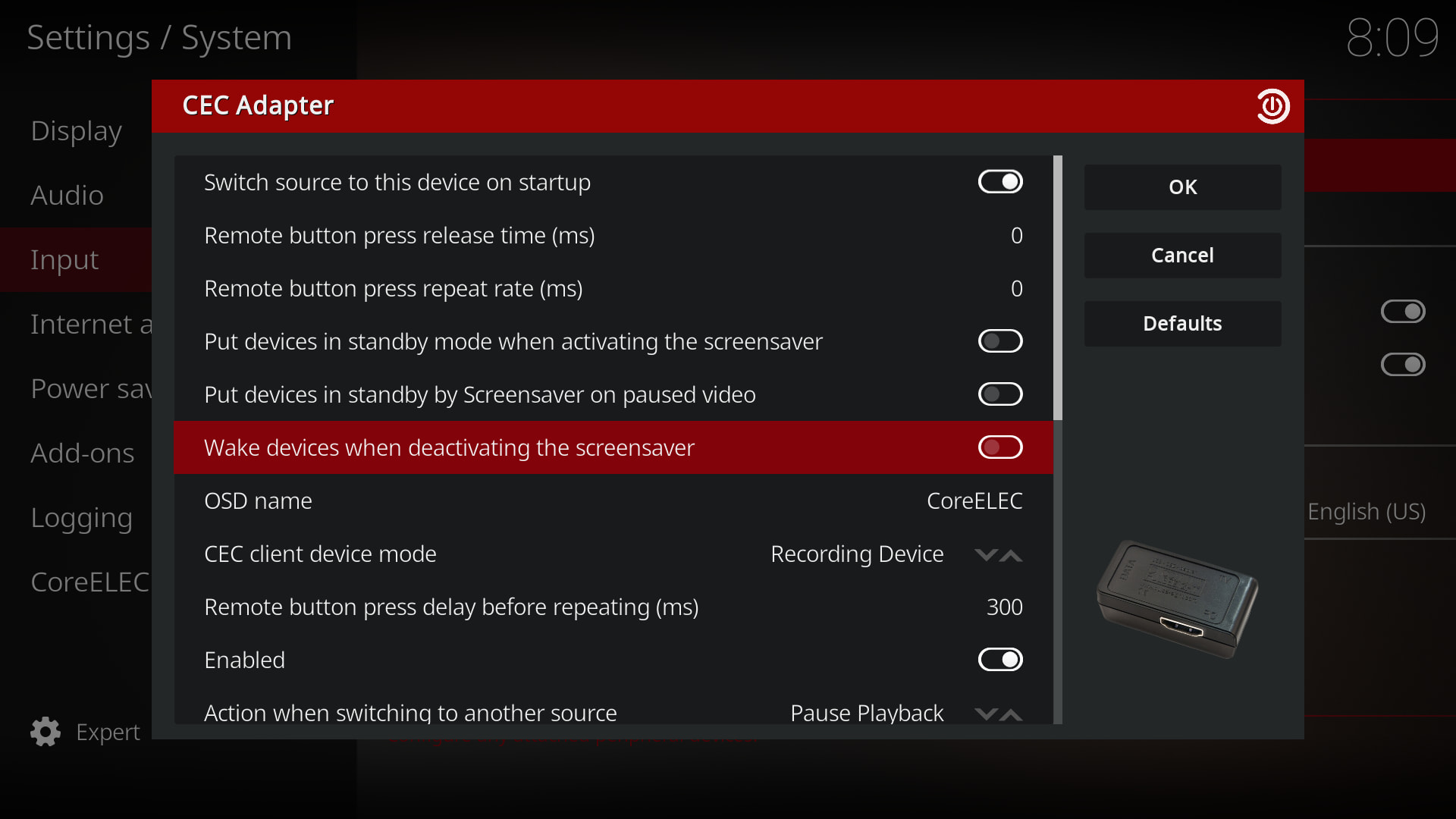
If CEC’s unreasonable source switching is causing the problem when exiting the screen saver, you can disable it here:
Settings → System → Input → Peripherals → CEC Adapter → Wake devices when deactivating the screensaver → OFF

Thanks for the reply but not quite what I was after. The TV does switch sources which is sometimes a pain and yeah, I can turn off CEC (Don’t interrupt Britain’s Got Talent Dan!). My issue is, if the device is on and the screensaver has kicked in, but the TV is on another channel, it seems the only way I can get the screensaver to “wake” when connected via VNC, is to hit a button on the remote or kill kodi - I don’t seem to be able to send a keypress/event via VNC that will cause the wake (I’m guessing because of architectural ordering of events etc). I was wondering if there was something else I could poke.

Unfortunately I only have a guess, but it may be related to the dual framebuffer capture issue that was fixed over this weekend: aml-vnc: bump package to 1.4.0_beta12 by dtechsrv · Pull Request #385 · CoreELEC/CoreELEC · GitHub

The v1.4.0 beta12 binary is attached. If this fixes the problem, that would be great, but if not, we’ll investigate further.

service.aml-vnc-22.0.10.0~beta-12.zip (550,1 kB)

1 Like

Sadly the build you posted doesn’t appear to fix it, but I have noticed that if the screensaver is set to just screen dim, it wakes up on receiving the mouse movement over VNC. If the screensaver is set to the picture slideshow using fan art, it doesn’t wake up.

I tested the Picture Slideshow Screensaver and it works completely strangely. Sometimes it exits immediately on cursor movement or click, as well as any keyboard event, but sometimes nothing happens, and only exits on ESC/Home (which is equivalent to Homescreen), or Backspace and right-click on the mouse (which is equivalent to Back). To complicate the situation, it behaves the same way for me directly with a USB remote control and via CEC, so I don’t think VNC server is the culprit here.

However, if my statement is wrong in your case, then I would like to hear concrete experiences taking into account the above cases.

I don’t have the opportunity to test an IR remote control on the affected box, but based on the USB and CEC behavior, I think what I experienced there would be irrelevant anyway.

I’m using Screen Viewer.app on macOS which may be different, but it’s usually OK with the other platforms I use it with. It doesn’t explain why the wake events work when set to Dim rather than Slideshow, though. Perhaps this is an issue with the slideshow screensaver itself as Dim behaves as expected? (it quits as soon as it gets a mouse event from VNC).

I was also trying to get the Apple Aerial video screensavers to work but there is a mode switching bug there somewhere. I have also tried the Video Player slideshow with the same Apple Aerial 4k footage (available over smb on my network) but that also has the same mode switching bug (I get a red screen when it kicks in). If I play those videos manually by browsing to them, they play fine.

When in Picture Slideshow I did try hitting escape, backspace, home etc via the VNC client but nothing seems to work. It’s like the Slideshow screensaver isn’t receiving any input events originating from VNC but it is for all the other input methods.

Perhaps this behaviour we are seeing is a side effect of the screensavers themselves.

Thanks for your time and help :folded_hands:

1 Like

I couldn’t get Apple Aerial to work either, I only get a black screen, but it quits immediately even when I move the mouse cursor. The Video Player doesn’t play videos either, I only see a black screen and the clock, but the video sound is heard. But it also quits when I interact with the mouse or keyboard.

I think there’s clearly something wrong with the screensavers, but since I can’t reproduce the issue you are experiencing, I unfortunately have no more ideas.

1 Like

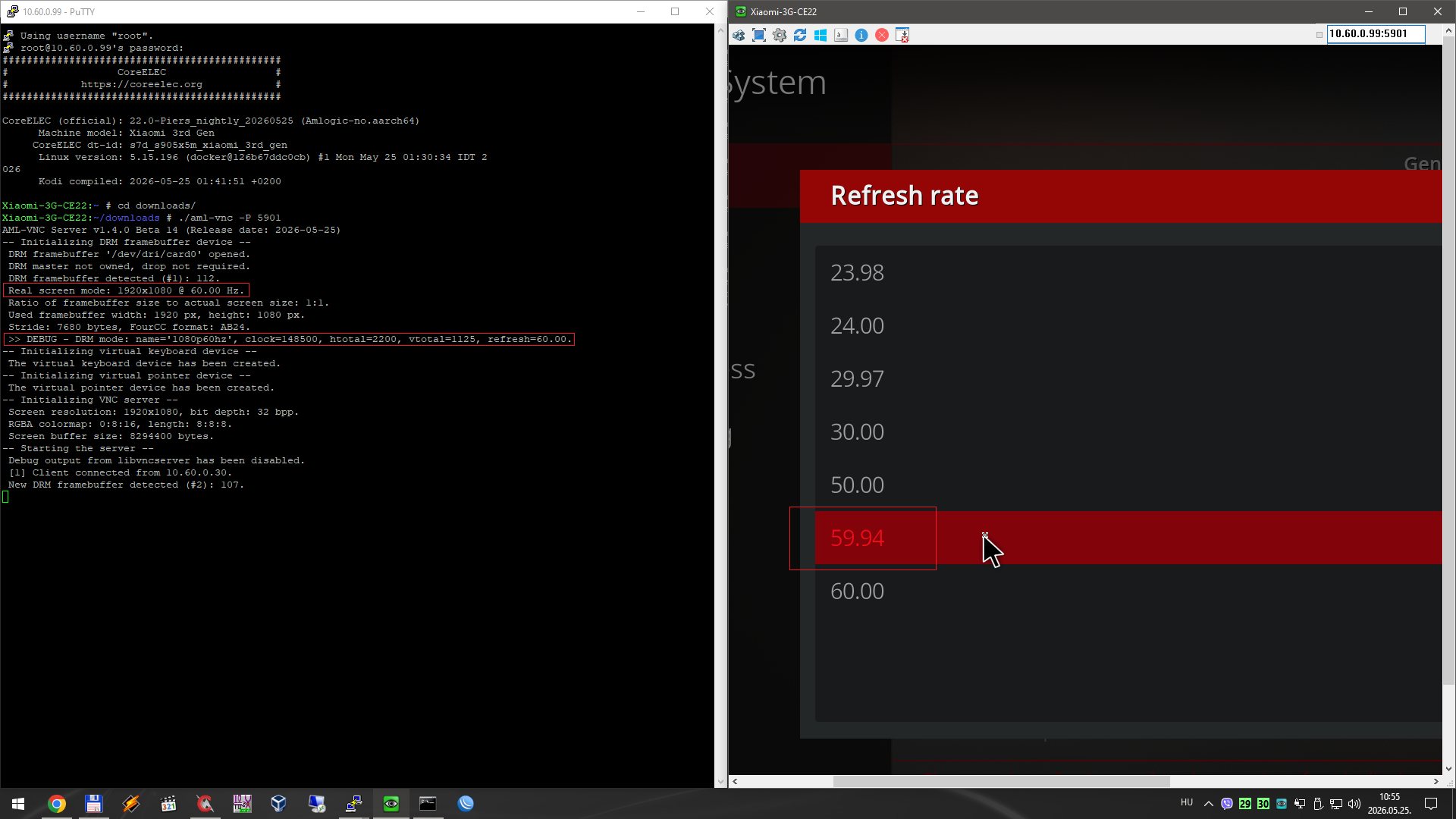
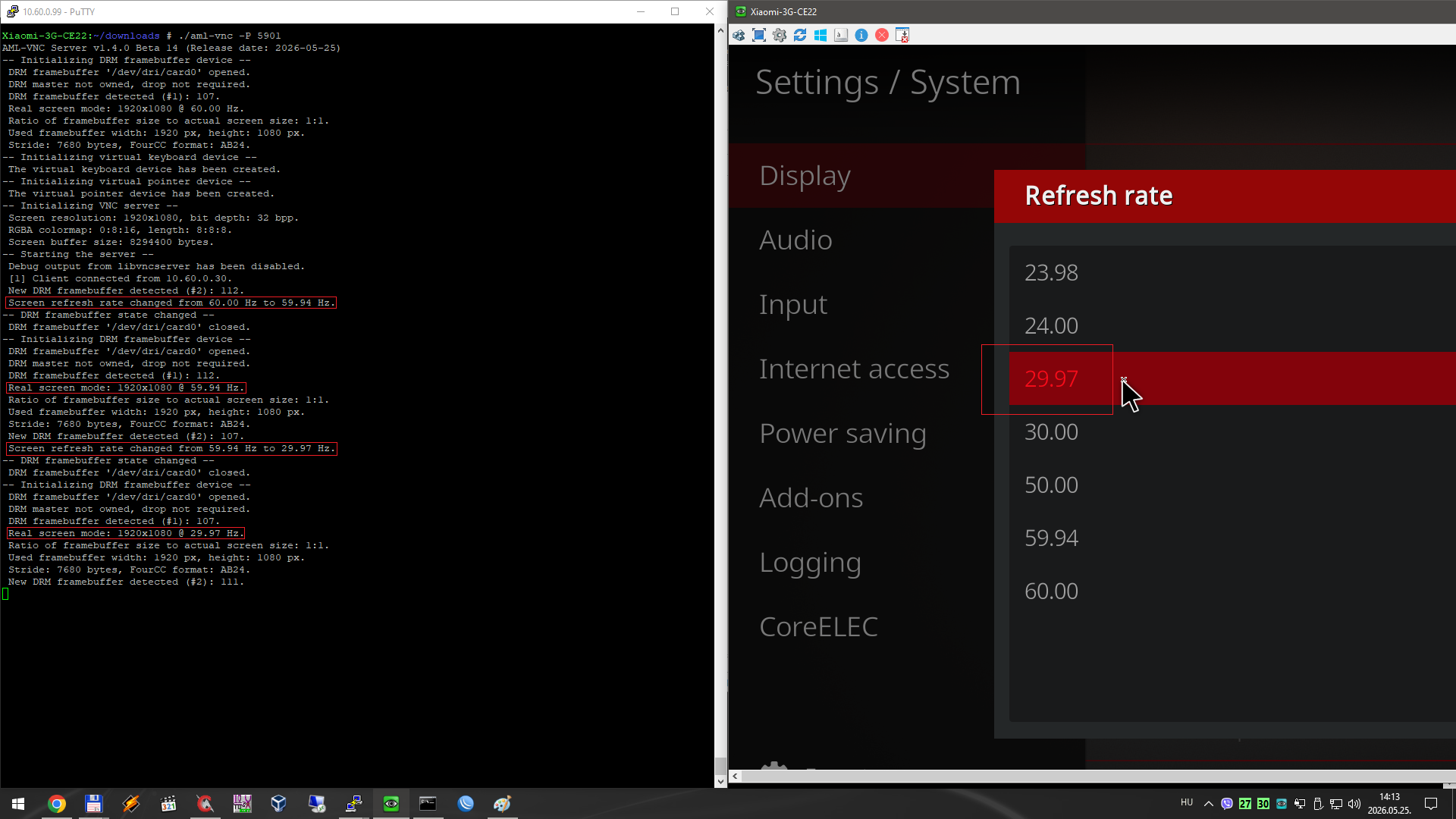
I made a mistake earlier because I stored the refresh rate as an integer. This has been fixed now, and after that I noticed that DRM reports incorrect mode values.

For the VNC server, mode changes are important markers for buffer reinitialization. So I think this is a bug in the kernel/DRM stack that should be fixed.

It’s handled different. Kernel reports only integers, but also fractional rate.

So by the FRAC_RATE_POLICY property of the DRM connector you know if the integer needs to be divided by 1.001f or not.

I think there is no DRM fractional handling by default. There is also some PR about Wayland and fractional handling in XBMC I think.

2 Likes

Okay, with this extra check, it’s completely manageable.

2 Likes