I have Piers installed, running and fully configured on a SanDisk Ultra. It’s a reasonably fast card in terms of read and write, but I would like to try it on a SanDisk Extreme Pro because its read/write speeds are twice as fast. Can I simply copy the contents of the Ultra to the Extreme Pro using my PC or do I have to do a complete reinstall using Rufus?
Alternatively, if doing a new install with Rufus, can I copy/paste the folder contents from one to the other afterwards?
Don’t reinstall, just clone your first card to the second card.
With Rufus, you can create a vhdx image of your first card then write the saved image to the second card.
Alternatively, if you have two USB to SD card adapters you can use Balena Etcher to clone.
Balena supports direct cloning between two USB drives.
I find the backup procedure a little hard to follow in terms of creating a cloned SD card. It looks as though it is really designed to backup everything to an HDD for reimport if ever required. Perhaps I haven’t really understood the procedure?
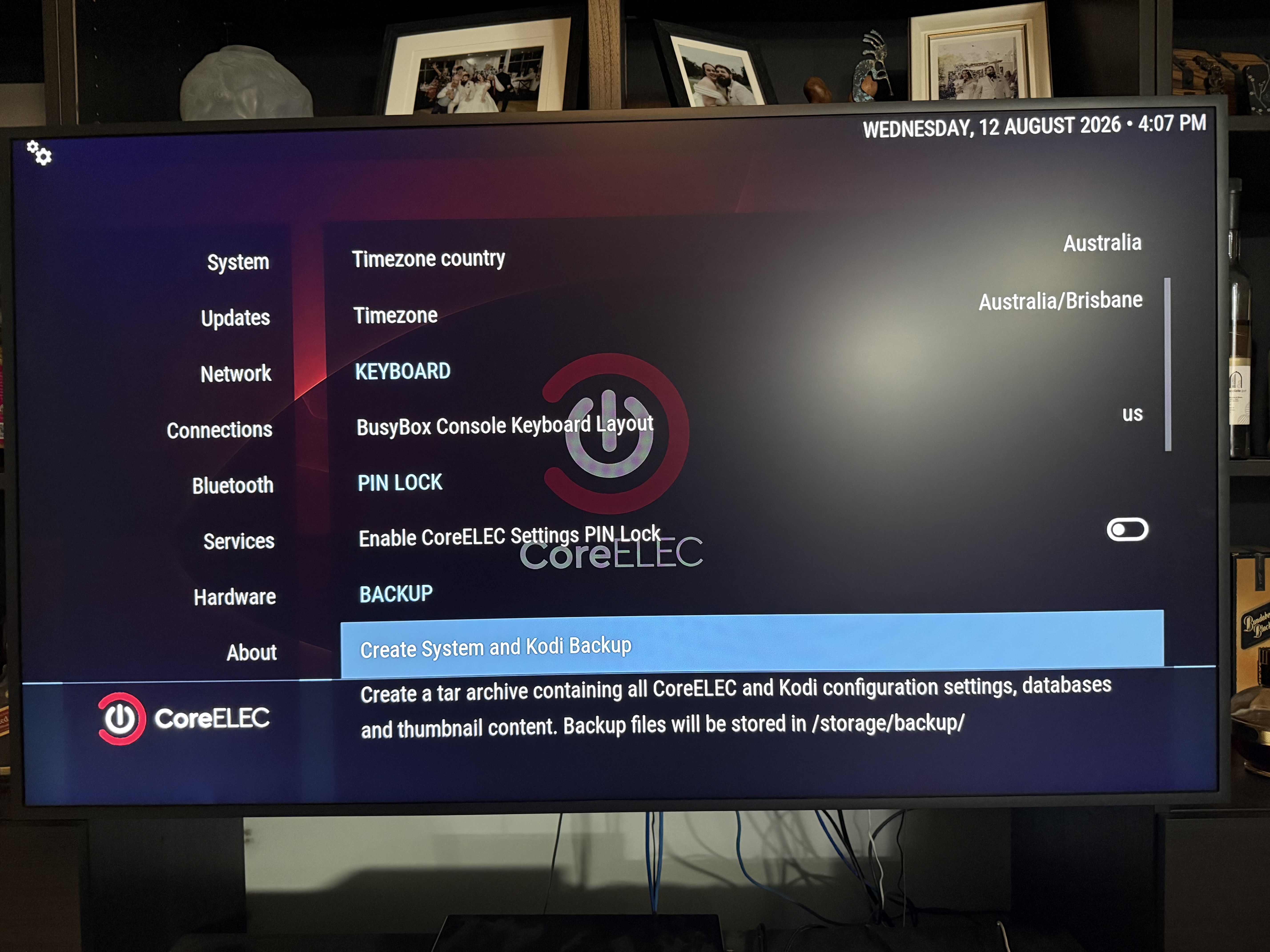
This sentence in particular bothered me, because it seems to indicate the backup is on an external drive, not an SD card:
“HINT: before removing the USB Flash Drive, reboot CoreELEC from the power menu, allowing the backup file to synchronize to the drive.”
I may be wrong, but I got the impression that most of the data downloaded whilst scanning and adding content is stored in the TV box rather than on the SD card. If that is correct, then surely a clone of the current SD card to the new one should work?
I do have the adapters required to perform yabai’s suggestion of cloning with Balena Etcher. Are you saying that would not work?
Good to read you are up n running on your Ugoos Boxes !!
Both methods will work, The Wiki uses a USB Drive, probably because there are not 2 micro SD card ports on any Box that I know of. Then insert the Thumb Drive in your PC..etc
Booting from SD card or USB Drive, is Booting CoreELEC from external. Unless you have used the CoreELEC Tool ceemmc-x and moved to internal?
Maybe just remove the Current SD card ,use the 2 adapter and clone it.
Hi Freddy, yes both boxes are running ok and CoreELEC Piers hasn’t given me any problems yet. I have Piers on SD cards for both with Kodi on eMMC. I have been scanning content for 2 weeks now. It’s horrendously slow although that’s probably my fault for getting a maximum of data for my music collection.
I figured if I change to a card that can read and write much faster, it can’t do any harm, so I will go with the cloning option as that appears to be the simplest method. First I have to wait until all the content scanning has been completed though.
Ok,when scanning is done and you are happy. Then definitely make a backup of your existing.
Save to /storage/backup on your existing CoreELEC. Also do you have File Share with CoreELEC and your PC?.You can Create a Folder on Desktop and copy your Addons Folder, for example . Or Data etc…
And just for safe keeping should also save a backup to a USB DRIVE. Always best to have backup stored in more than one place
Do you mean on the SD card itself, or to that folder in Android?
I think I do have file share with my PC. I can see it in the drive tree. I have a folder for the Ugoos box so I can try adding the backup there, and on the flash drive I leave permanently connected to the box.
Incidentally, from the Kodi repository I added the backup addon. I’m surprised that hasn’t been mentioned so far. Is it any good, or do you think it would be better to use CE’s built-in backup option?
I’m a bit stuck here guys. I followed the Wiki and created a backup to the home/storage directory, but I wanted an external backup so I created a second one on the SD card I wanted to clone to. As you know, this gives a .tar archive. Should I use CE’s restore option to write it to the same card (it’s a 2TB card so space is not a problem), or should I insert the SD card into my laptop and use WinRAR’s “Extract Here” option?
By the way, I tore my hair out looking for the backup option in Settings/System/CoreELEC. It is not there. I eventually found it in Addons/My Addons/Program Addons/CoreELEC configuration and you have to click on Run in order for all CoreELEC settings to appear.
Ok,you have a backup on existing, and that is fine.
Reformat the 2 Terra byte SD card that you created the second backup on.
Now remove current SD card and Clone CoreELEC to the New 2 Terra byte SD card with your PC.
Once you Clone success .Insert 2 Terra byte Card in Ugoos. That’s it..Everything that was on the old Card will now be on the 2 Terra byte,including the backup tar file.
If you have any problems, just go back to the old Card
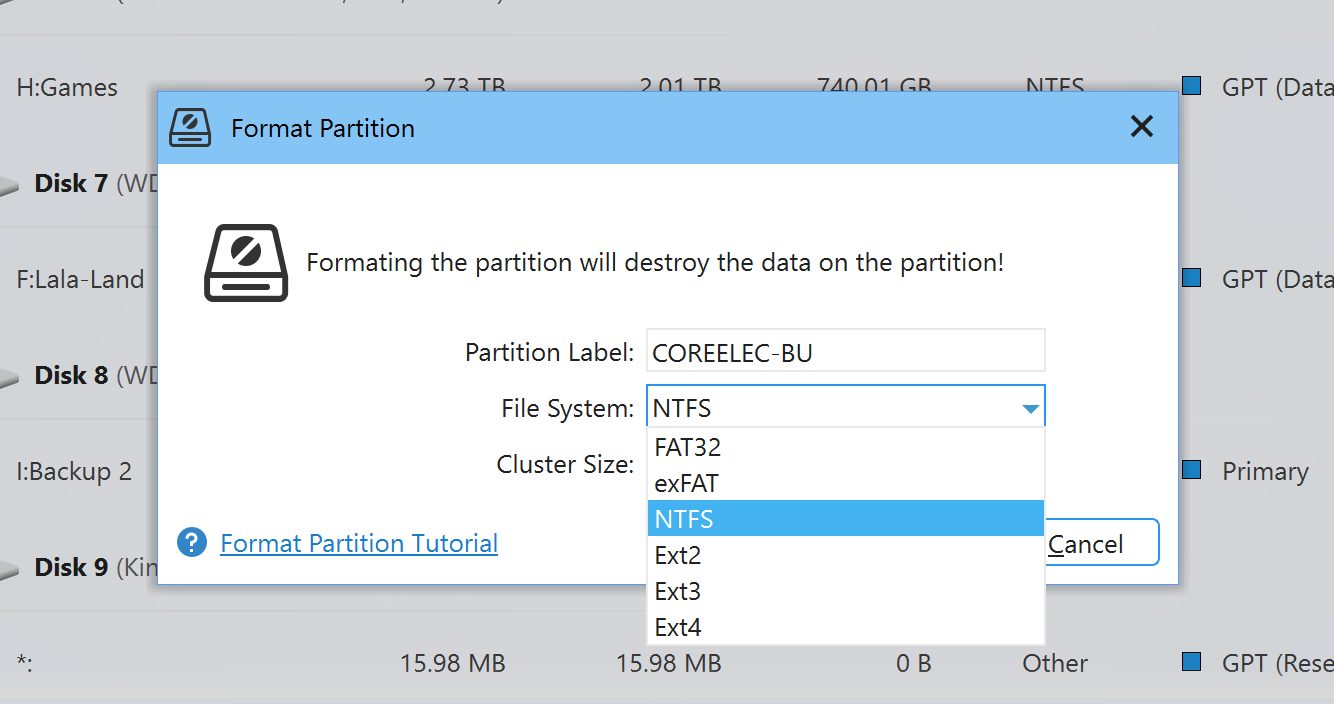
It appears I have a problem. WinRAR says the backup is corrupt, so I will have to do it again. When formatting the SD card which format should I choose? Before doing the backup, I formatted the card using FAT32, but all the other options were available.
I bought a 2TB card so that plenty of storage space would be available. Will cloning create a partition and leave the rest of the space available, or will it shut off any other use of the card?
Another thing, which is quite important, is that the Wiki said to restart after backing up for the purpose of synchronisation. Great, except that it would not restart. In fact, the box crashed forcing me to pull the power plug. This was probably the cause of the corruption. When starting the box afterwards, it refused to start, simply displaying the CoreELEC logo for several minutes before restarting again and it looped this action. Finally, I wondered whether it may be attempting to boot from the backup SD card, which it wasn’t, so I pulled the power and removed it. Still it would not boot, so I pulled CE and booted into eMMC so my wife could watch her series. When she had finished, I shut down the box and put CE back in, then attempted to boot. This time it did and appeared to function normally. Is there a tool available to verify the integrity of the original installation?
I did, but I saved it to the SD card I want to clone to. Therefore, I needed to move the backup to another drive. Before doing so, I wanted to open it with WinRAR to see what exactly was contained and that’s when WinRAR reported the file was corrupt. I did another backup to home/storage, although I need to redo that as I inadvertently excluded thumbnails.
Now I know the backup is approximately 2.7Gb, I can use a smaller flash drive to back it up to. If you’re wondering why I want to store a backup off the device, put it down to paranoia. I have a habit of backing up all my data at least twice.
I still need to know what to format the card in? It’s currently FAT32. If necessary, I can reformat it to NTFS, exFAT, Ext2, Ext3, or Ext4.
Because I cannot work out how that can be achieved. If I create a backup to internal storage, for example, I would need to remove the current SD card in order to write that backup to the replacement SD card, but if I have understood correctly, I need to shut down the box before removing the current card and if I do that there will be no way to relaunch into CE to do that restore.
Obviously there must be because you say you have done it often, in which case, where have I gone wrong please Tim?
Edit: I think I have worked it out. I need to put the card to be cloned to into a USB SD card adapter and use the Restore option to write to that. I will try it. The worst that can happen is I have to reformat the clone if it doesn’t work.
 . Or Data etc…