CoreELEC:~ # CoreELEC:~ # ls -al /
total 17
drwxrwxr-x   13 root     root           245 May  6 19:53 .
drwxrwxr-x   13 root     root           245 May  6 19:53 ..
drwxrwxr-x    6 root     root            65 May  6 19:53 android
lrwxrwxrwx    1 root     root             8 May  6 19:53 bin -> /usr/bin
drwxr-xr-x   17 root     root          6680 May  7 15:35 dev
drwxrwxr-x   23 root     root          1073 May  6 19:53 etc
drwxr-xr-x    5 root     root         16384 Jan  1  1970 flash
lrwxrwxrwx    1 root     root             8 May  6 19:53 lib -> /usr/lib
lrwxrwxrwx    1 root     root            10 May  6 19:53 media -> /var/media
lrwxrwxrwx    1 root     root            13 May  6 19:51 opt -> /storage/.opt
dr-xr-xr-x  250 root     root             0 Jan  1  1970 proc
drwxr-xr-x   22 root     root           700 May  7 15:35 run
lrwxrwxrwx    1 root     root             9 May  6 19:53 sbin -> /usr/sbin
drwxrwxrwx   20 1023     1023          1024 May  7 15:31 storage
dr-xr-xr-x   13 root     root             0 May  7 15:35 sys
lrwxrwxrwx    1 root     root            22 May  6 19:53 system -> /android/system/system
drwxrwxrwt    9 root     root           180 May  7 15:36 tmp
drwxrwxr-x   10 root     root           153 May  3 16:47 usr
drwxr-xr-x   10 root     root           240 May  7 15:35 var
lrwxrwxrwx    1 root     root            15 May  6 19:53 vendor -> /android/vendor
CoreELEC:~ #

CoreELEC:~ # ls -al /storage
total 33
drwxrwxrwx   20 1023     1023          1024 May  7 15:31 .
drwxrwxr-x   13 root     root           245 May  6 19:53 ..
-rw-------    1 1023     1023           295 May  6 19:13 .bash_history
drwxr-xr-x   16 1023     1023          1024 May  5 18:54 .cache
drwxr-xr-x   18 root     root          1024 May  7 15:35 .config
drwxr-xr-x   10 1023     1023          1024 May  5 18:54 .kodi
drwxr-xr-x    2 1023     1023          1024 May  5 18:54 .restore
drwx------    2 root     root          1024 May  5 18:50 .ssh
drwxr-xr-x    2 root     root          1024 May  7 15:31 .update
drwxr-xr-x    2 root     root          1024 May  5 18:50 backup
drwxr-xr-x    2 root     root          1024 May  5 18:50 downloads
drwxr-xr-x    2 root     root          1024 May  5 18:50 emulators
-rw-r--r--    1 1023     1023          1792 May  7 15:31 init-previous.log
drwxr-xr-x    2 root     root          1024 May  5 18:50 logfiles
drwx------    2 1023     1023         12288 May  5 06:17 lost+found
drwxr-xr-x    2 root     root          1024 May  5 18:50 music
drwxr-xr-x    4 1023     1023          1024 May  5 18:50 picons
drwxr-xr-x    2 root     root          1024 May  5 18:50 pictures
drwxr-xr-x    2 root     root          1024 May  5 18:50 recordings
drwxr-xr-x    2 root     root          1024 May  5 18:50 screenshots
drwxr-xr-x    2 root     root          1024 May  5 18:50 tvshows
drwxr-xr-x    2 root     root          1024 May  5 18:50 videos
CoreELEC:~ #

CoreELEC:~ # journalctl -l | paste
https://paste.coreelec.org/Gg0ee7
CoreELEC:~ # journalctl -l | paste
https://paste.coreelec.org/ez6pGr
CoreELEC:~ #
Okay vpeter, there are the results you wanted. I ran the last one twice to ensure it was correct but seems that sends the info to your website. The test build made no difference to the problem which you are probably aware that it would not.
One other problem i seem to get when I have this reboot with no auto pairing is that first reboot does not work it leaves me in the A1/S905X4 logo but a power down and reboot then it does boot into CE? This usually goes away if I reburn the SD card strangely enough but comes back probably after I have come back from an Andrioid boot up. Maybe that is another problem not relevant but then again maybe it is.
Problem is the same or very similar. When I installed this new update the BT remote still would not auto pair when set into pairing mode and I had to go to the BT config page and then pair from there and then it all worked with rebooting into CE with it auto pairing, so far so good. However as soon as I booted in Android and returned to CE then the same problem as before. Had to go to the BT config to pair but now after rebooting into CE each time I had to manually re pair again as before.
Only way to stop this is to run the ssh command line that you first sent me to solve this Android permissions bug "find /storage -maxdepth 1 -type d ! -user root -exec chown -R root:root {} ; " . And then all is fine as long as I do not boot into Android when I have to run the ssh command again to keep the pairing on each CE bootup
I also still have the problem with it rebooting whenever I try to play a catchup program from the PVR EPG screen.
So for now I have gone back to the stable release of CE 21 and then updated it to your PVR Seek fix you sent so it could skip forwards and backwards.
Let me know what if anything I can do to help as this seems a big PITA to fix it seems.
But it still is the same problem when coming back from Android into CE. Sure not bothered about only then pairing through the BT config screen but without going back into Android it would be nice if it then on each boot up into CE came back with the BT remote working without having to manually re pair it every time unless I run your ssh command.
Also the problem with the PVR EPG catchup causing a crash and reboot which does not happen with CE 21 stable release with just your pvr fix.
I appreciate the frustration for you my friend but I am just trying to help with testing for a fix. It may be easier to explain if we could speak over a free voice connection like messenger and you could ask any relevant questions to clarify teh symptoms better. I could explain it all much easier then. Only problem is I am 7 hours ahead of GMT. Maybe not a good idea to commit it yet if it is still causing problems.
I am going to test todays latest nightly to see if the PVR catchup crashing problem is still present if not then that is fixed.
To make it easier to help I will set up a separate SD card to run these tests so my daily usage SD card remains working (other than the Android permissions BT problem). Anyway I am here to run any tests you may still need,
Just to let you know that I downloaded the latest nightly and burned it to a new SD card and restored my latest backup. Here are the two main problems I have with it to clarify the current situation. The first problem is IMHO by far the most serious as will affect any user of PVR Simple Client. So certainly the latest nightly is it seems not yet a candidate for the next stable release 21.1
Problem 1. It is not possible to stream either live or catchup TV programs from the IPTV Simple Client EPG. All attempts cause a freeze and a reboot of CE. This is not a problem with the last CE 21 full stable release with vpeter’s test fix update CoreELEC-Amlogic-ne.aarch64-21.0-Omega_devel_vpeter_pvr_seek.tar I know this was incorporated into an earlier nightly and worked but cannot remember which before this new problem arose.
Problem 2. The old problem of the BT remote not pairing properly after coming back from an Android boot session as discussed in depth above. To sum it up once you run an Android session and return to CE than you have to manually pair your BT remote on each and every CE bootup or to return to normality run the ssh command “find /storage -maxdepth 1 -type d ! -user root -exec chown -R root:root {} ;”
Both are I feel serious problems that need fixing, although I appreciate that the BT issue is a long standing one. Easily worked around by never booting into Android which is IMHO a crap OS anyway but sometimes needed for apps not available in KODI like the Berlin Philharmonic Digital Concerthall app. I now have a separate Android box for use with that app but should not be necessary without this usual crap Android permissions problem.
As I said I am here to help where possible with testing on my main uGoos X4Q Extra device.
Why not help to fix the service which I added? Writing same ssh instruction again and again is not really a solution. And because I can’t really replicate the issue also the fix can’t be done easily. This ssh command just blindly set root owner on whole storage partition which I’m not really a fan of it (if can be done better).
Yes vpeter I truly want to help you and the CE team to fix this for everyone too but I really am confused as to what you want me to now do. Yes I know continually having to write the ssh instruction again and again is far from a workable solution but I get around it for now by running this once and then not booting into Android even though sometimes I really need to.
So yes I did ask how to recreate a file and put that service in the /.config/system.d folder. I know how to put any file in any of the storage folders using file manager so please tell me where I can get the file from for this service as I did ask you that some days ago. I could create a raw text file of your code but then what do I name the file??
I am just a relative rookie at this vpeter but I’m on the same site as you and willing to learn more and help but need your help in doing so. So please I need instructions how to put this service into a file that I can copy to the …/system.d folder and check it out for you.
Yes but how and what do I copy the …/system.d folder. So I need you to help me so I can test this for you as I do not know exactly what is needed here??
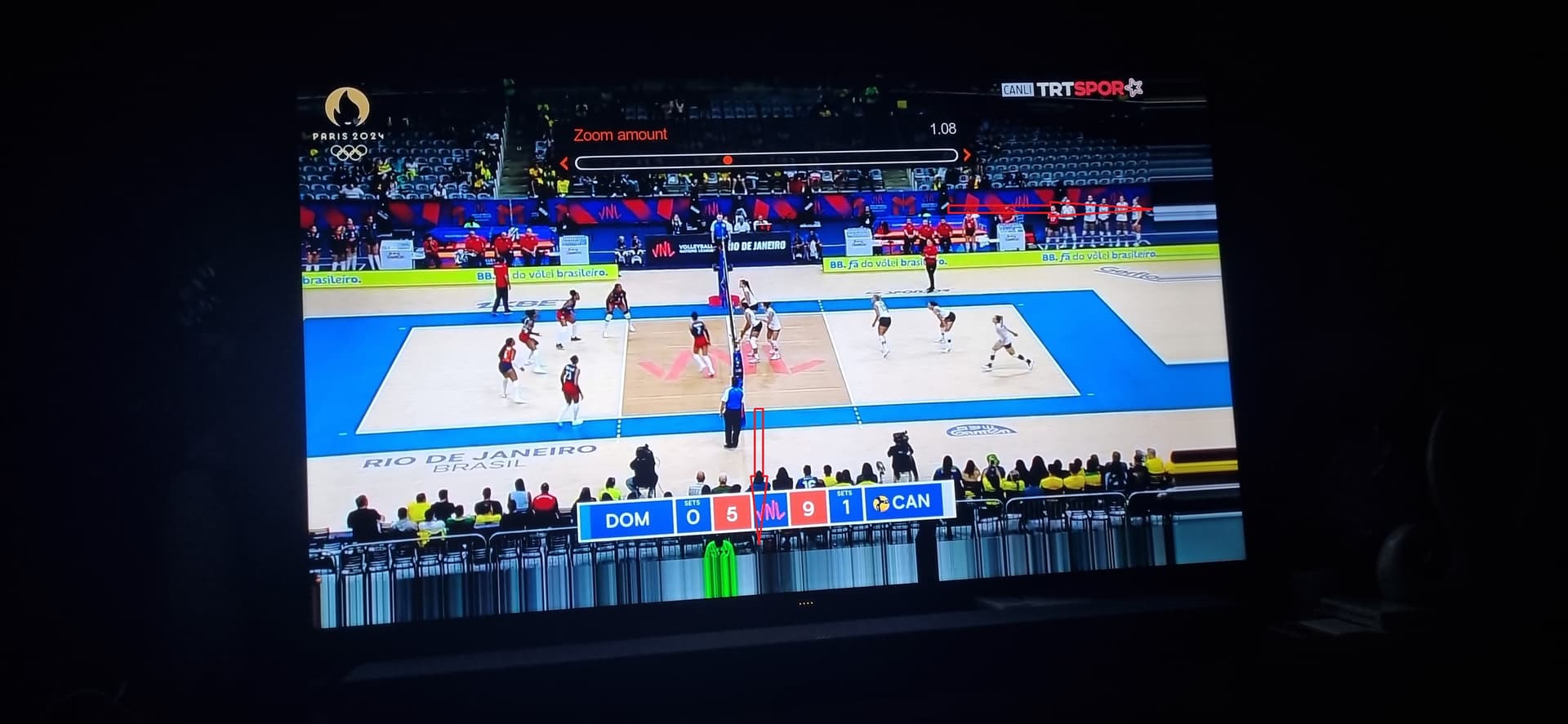
Noticed this evening when watching some content from broadcast TV that is 50hz interlaced that a number of pixels at the bottom of the screen are blurry.
Seem to recall this was a problem in the past, but also feel like this had been fixed moons ago.
Thank you as I truly want to help here but did not know what to do. In fact I still am unsure as yes I can easily create a file using this script in Notepad++ but what do I call the file or is naming it unimportant when I add this file to the …/system.d folder ?? That is all I have been asking for some time so I can test this and report back.
Why is this so complicated for you? I said DL, not C&P.
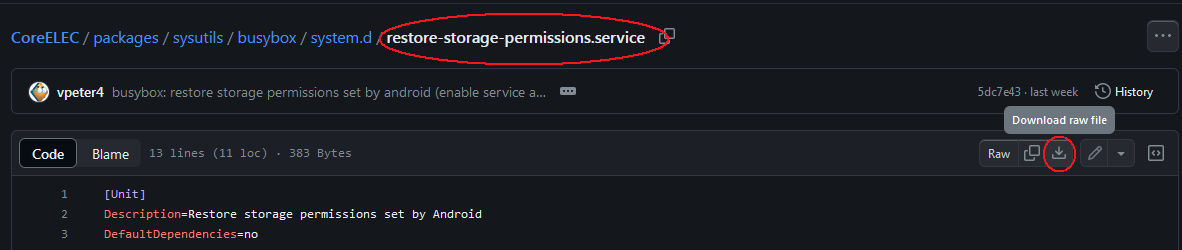
The file is already named restore-storage-permissions.service
You DL it, optionally modify the command with Notepad++, and move it to /storage/.config/system.d/
If that is all beyond your horizon, then better don’t touch anything.
Sorry mate but please be patient as I am a 78 year old retired qualified senior electronics and comms engineer who likes to keep my hands on this stuff as an enthusiast and love tinkering with CoreELEC and a bit of Python learning. So not a novice at PCs but not a programmer. I simply misunderstood that it was the file name too. I am a silly old git but now I see my stupidity. Sorry.
I have same kind of a problem. Every h.264 file with non mod16 resolution have blurry area bottom or right side of the video when using hardware decoding. Using software decoding solves problem.
There is a blurry about 1 cm wide at the bottom edge of the TV screen.
This detail does not appear when you takecreenshots or record video.
You can make this noticeable by zooming in the video settings.
When you enlarge the screen a little bit, it’s more obvious.
Okay I DL’d this file and placed in in my …/storage/.config/system.d folder and rebooted but this made no difference as still when I comes back from Android and re pair the remote it will not keep the pairing on each straight reboot into CE 9iei not form an Android session) But running the ssh command line as before then it does keep the remote pairing at each reboot into CE, not from Android.
I really have no idea what I need to edit in that script only possibly that user 1023 which vpeter mentioned. As I said I will simply run the ssh commend line and just not boot into Android on this box for now until a fix is found.
So with or without this file in my system.d folder is there anything I can now test to help??
You are writing text again and again but you didn’t bother to list the /storage to see what permissions are set on files and folder when you get from Android.
I did manualy set 1023 both file and folders and after reboot all were root. So in my eyes this works as expected. The only reason for failing is that BT service starts earlier than this service for fixing permission.