Hello everyone,
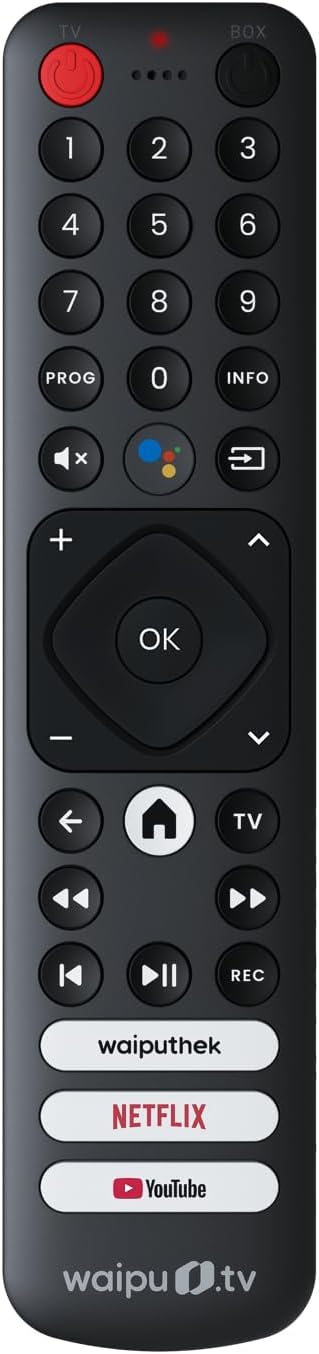
I had this remote left over from a freebie and I really like it’s layout with the number pad as well as regular “android” controls. So I decided to get it working with my coreelec setup.
The /etc/udev/hwdb.d/99-waiputv.hwdb I have come up for the remote is:
# waipu.tv B18F Bluetooth remote
# digits -> number keys, ok -> KP Enter, info -> i, prog -> y
# mediathek -> x, movies -> w, shows -> g
# rewind/skipBack swap fixed
evdev:input:b0005v2D01pC006*
 KEYBOARD_KEY_c0037=1
 KEYBOARD_KEY_c0038=2
 KEYBOARD_KEY_c0039=3
 KEYBOARD_KEY_c003a=4
 KEYBOARD_KEY_c003b=5
 KEYBOARD_KEY_c003c=6
 KEYBOARD_KEY_c003d=7
 KEYBOARD_KEY_c003e=8
 KEYBOARD_KEY_c003f=9
 KEYBOARD_KEY_c000f=0
 KEYBOARD_KEY_c0007=y
 KEYBOARD_KEY_c0040=i
 KEYBOARD_KEY_c0221=search
 KEYBOARD_KEY_c00e9=volumeup
 KEYBOARD_KEY_c00ea=volumedown
 KEYBOARD_KEY_c00e2=mute
 KEYBOARD_KEY_c009c=channelup
 KEYBOARD_KEY_c009d=channeldown
 KEYBOARD_KEY_c0041=kpenter
 KEYBOARD_KEY_c0224=back
 KEYBOARD_KEY_c0223=homepage
 KEYBOARD_KEY_c008d=program
 KEYBOARD_KEY_c00b5=rewind
 KEYBOARD_KEY_c00b3=fastforward
 KEYBOARD_KEY_c00b4=previoussong
 KEYBOARD_KEY_c00cd=playpause
 KEYBOARD_KEY_c00b2=record
 KEYBOARD_KEY_c00d2=x
 KEYBOARD_KEY_c00d1=w
 KEYBOARD_KEY_c00d3=g
To apply this hwdb you need to run
systemd-hwdb update
udevadm trigger --sysname-match="event*"
and here is the /storage/.kodi/userdata/keymaps/waiputv.xml:
<keymap>
  <global>
    <keyboard>
      <!-- prog button: TV guide (EPG) -->
      <y>ActivateWindow(tvguide)</y>

      <!-- mediathek / movies / shows buttons -->
      <x>ActivateWindow(Videos,plugin://plugin.video.jellyfin/,return)</x>
      <w>ActivateWindow(Videos,MovieTitles,return)</w>
      <g>ActivateWindow(Videos,TvShowTitles,return)</g>

      <!-- info button: long-press for context menu (short press = Info is built-in) -->
      <i mod="longpress">ContextMenu</i>
    </keyboard>
  </global>

  <fullscreenvideo>
    <keyboard>
      <!-- info button: player process info during playback -->
      <i>PlayerProcessInfo</i>

      <!-- number keys for direct input during playback -->
      <zero>Number0</zero>
      <one>Number1</one>
      <two>Number2</two>
      <three>Number3</three>
      <four>Number4</four>
      <five>Number5</five>
      <six>Number6</six>
      <seven>Number7</seven>
      <eight>Number8</eight>
      <nine>Number9</nine>
    </keyboard>
  </fullscreenvideo>

  <fullscreenlivetv>
    <keyboard>
      <!-- prog button: guide OSD for current channel -->
      <y>ActivateWindow(pvrosdguide)</y>
    </keyboard>
  </fullscreenlivetv>
</keymap>
for which you need to restart kodi to apply:
systemctl restart kodi
As is the following keys map to these functions:
| Button | Action |
|---|---|
| 1–9, 0 | Number input (jumps in lists, chapter/seek input in fullscreen) |
| prog | TV guide (EPG); guide OSD when watching live TV |
| info | Info / codec info during playback / long-press = context menu |
| Search | |
| + / - / mute | Volume |
| progUp / progDown | Channel up/down (PVR) |
| ok | Select (works in dialogs and on-screen keyboards) |
| back | Back |
| home | Home screen |
| tv | Guide (Kodi default for KEY_PROGRAM) |
| rewind / fastforward / skipBack | Rewind / fast-forward / previous item |
| PlayPause | Play/pause |
| rec | Record (PVR) |
| waiputhek | Jellyfin library listing |
| netflix | Movie library |
| youtube | TV show library |
The remote is also available on Amazon if you search “waipu-tv-Fernbedienung-Schnellwahltasten-Stick-Ersatzteil-Schwarz” for around 15€