Is there any dtb.img that works with Mecool kt1 s905x4?
If not, are there any projects in progress?
Started with “sc2_s905x4_2g.dtb”.
Not work bluetooth.
Not work dvb tuner.
Work wifi.
Thanks!
I’ll wait for the dvb tuner version.
As Mecool doe not support CE you will wait forever.
There was one developer on the team who could help for DVB (afl1)
unfortunately he was cut off a while ago from 2019, and we don’t know anything about him
@afl1 where are you? 
I’m not @afl1 but I did make it  The internal DVB on MeCool KT1 works with latest version of CE-22 + AVL6862 addon from nightly builds. So You need to update to latest CE-22 nightly, use new device tree sc2_s905x4_mecool_kt1 and install latest AVL6862 addon to make it work.
Also, for those who want to install CE on KT1 I will describe here the full procedure based on this topic. Unfortunetly there is a typo in bootloader which prevents installation of CE using normal sd/usb update procedure. The problem is that update script in the bootloader uses autoscr command which is not available there, it is replaced by the source command and CE-22 is already assuming that the bootloader have this new command.
- First of all You need to open the device and solder wires to uart socket. The socket is described on the bottom side of the PCB. Connect only RX, TX and GND. VCC should not be connected
- Connect serial terminal to the box using baudrate 921600 and power on the box
- To enter the bootloader press any key before android starts booting
- Now actual fix,
recovery_from_fat_devenv variable must by changed like that:
# setenv recovery_from_fat_dev ‘setenv loadaddr ${loadaddr_kernel};if fatload ${fatload_dev} 0 ${loadaddr} aml_autoscript; then source ${loadaddr}; fi;if fatload ${fatload_dev} 0 ${loadaddr} recovery.img; then if fatload ${fatload_dev} 0 ${dtb_mem_addr} dtb.img; then echo ${fatload_dev} dtb.img loaded; fi;bootm ${loadaddr};fi;’
# saveenv - Now the box is fixed and You can install CE-22 the normal way
There is also possibility to install CE to emmc, BUT this will prevent Android to boot.
- Before You start backup reserved partition to be able to revert things back
dd if=/dev/reserved of=reserved.img- copy reserved.img to some safe place
- Install to emmc the normal way BUT DO NOT reboot yet
- ceemmc changes content of
reservedpartiotion which will no longer be passing AVB verification in the bootloader so we need to disable this verification which in turn will prevent Android to boot … to do that:
fw_setenv avb2 0 - now You can shutdown, take out usb/sdcard and boot into CE
To revert changes back to be able to boot android:
dd if=reserved.img of=/dev/reserved(reserved.img is the file dumped before installation to emmc)fw_setenv avb2 1- reboot
- now android should boot
When CE is installed to emmc You can still flash the stock firmware and bring android back but You will loose all data obviously
Very interesting to me. I have a MECOOL M8S (with s905x2) that has an internal DVB-T2 tuner based on the MXL608 and AVL6762 chips. Is your build available somewhere? I’d be happy to test it. Maybe after adjusting the dtb.img it will work on my box. 
Yes and no. As I wrote support for builtin DVB is available for latest nightly builds, and they are available here: https://relkai.coreelec.org/
But the changes I made are for sc2 soc and newer, x905x2 is older one and driver for older socs were already there. Have You tried Amlogic-ng ?
@Secam7 I found Your post.
I took original dtb You uploaded and converted it to CE version. You could try to add this to Your dts:
/{
	/delete-node/ demux;
	dvb {
		compatible = "amlogic,dvb";
		dev_name = "avl6762";
		ts1 = "parallel";
		ts1_control = <0x0>;
		ts1_invert = <0x0>;
		dtv_demod0_i2c_adap_id = <3>;
		fec_reset_gpio-gpios = <&gpio_ao GPIOAO_10 GPIO_ACTIVE_HIGH>;
		/*ant_power_gpio-gpios = <&gpio_ao GPIOE_2 GPIO_ACTIVE_LOW>;*/ //not used by the driver
		/*tuner_power_gpio-gpios = <&gpio GPIOH_8 GPIO_ACTIVE_LOW>;*/ //not used by the driver
		pinctrl-names = "p_ts1";
		pinctrl-0 = <&dvb_p_ts1_pins>;
		clocks = <&clkc CLKID_DEMUX
		&clkc CLKID_ASYNC_FIFO
		&clkc CLKID_AHB_ARB0
		&clkc CLKID_HIU_IFACE>;
		clock-names = "demux", "asyncfifo", "ahbarb0", "uparsertop";

		interrupts = <GIC_SPI 23 IRQ_TYPE_EDGE_RISING>,
			     <GIC_SPI  5 IRQ_TYPE_EDGE_RISING>,
			     <GIC_SPI 19 IRQ_TYPE_EDGE_RISING>,
			     <GIC_SPI 25 IRQ_TYPE_EDGE_RISING>;
		interrupt-names = "demux0", "demux1", "asyncfifo0", "asyncfifo1";
	};
};

&pinctrl_periphs {
	dvb_p_ts1_pins: dvb_p_ts1_pins {
		tsin_b {
			groups = "tsin_b_sop_z",
			"tsin_b_valid_z",
			"tsin_b_clk_z",
			"tsin_b_din0_z",
			"tsin_b_din1",
			"tsin_b_din2",
			"tsin_b_din3",
			"tsin_b_din4",
			"tsin_b_din5",
			"tsin_b_din6",
			"tsin_b_din7";
			function = "tsin_b";
		};
	};
};

&i2c3 {
	status = "okay";
	clock-frequency = <400000>;
};
There are still two gpio that are in original dtb and are not covered by the CE driver (those commented ones). ant_power is only to enable 5V on the antenna output for the antenna amplifier, if You have external power source for the antenna then You can forget it. The other one tuner_power may be required, but lets try without it first.
Of course try with Amlogic-ng kernel and install dvb-latest drivers from the CE addon repo.
@Secam7 have You succeded ?
Me and @Mike worked hard on getting his s905x3 device work with internal tuner and we succeeded. I think the issue here is that the old driver does not handle properly demod on TS1 input so You propably have the same issue. Are You willing to test my CE-NO build to see if it works for You ?
I have a problem as described here: Amlogic-NO discussion - #2479 by Secam7
As @Portisch wrote: no logs, no problem.
I need to connect via UART, which is currently impossible.
However, I’d like to try your version.
How do I do this?
Do you have ready-made compilations, or do I have to compile them myself?
If I have to compile them myself, could you give me some instructions on how to do it?
You can try but 99% sure it will also not boot:
img
If it boots up, send me your dts file and I will update it with dvb stuff.
I managed to get my MECOOL M8S box working.
I’ve attached the DTS file that it works with.
g12a_s905x2_2g_mecool_m8s.dts (706 Bytes)
Thanks for your help and interest!
g12a_s905x2_2g_mecool_m8s_dvb.dts (1.6 KB)
report back with dmesg output if not working
Thanks a lot! Looks good, now I need to connect it to the antenna.
CoreELEC:~ # dmesg | grep -i -E "dvb|avl68|mxl603|demux|frontend"
[    3.508062] dvb power gpio invalid
[    3.514898] aml_dvb_extern_init: OK, version: V1.28
[   40.102804] kernel-overlays-setup: processing conf /storage/.cache/kernel-overlays/50-AVL6862.conf
[   40.122657] kernel-overlays-setup: added modules from /storage/.kodi/addons/AVL6862//kernel-overlay/lib/modules/5.15.170
[   46.056687] probe amlogic dvb driver [V2.02]
[   46.056942] aml_dvb_get_adapter need register adapter first.
[   46.056947] DVB: registering new adapter (amlogic-dvb)
[   46.057547] get irq num demux0_irq:41
[   46.065564] get irq num demux1_irq:42
[   46.076109] get irq num demux2_irq:29
[   46.099346] DVB: Set DMX0 TS_RECORDER_ENABLE to 0
[   46.099352] DVB: Set DMX1 TS_RECORDER_ENABLE to 0
[   46.099356] DVB: Set DMX2 TS_RECORDER_ENABLE to 0
[   46.099358] DVB: reset ASYNC FIFOs
[   46.099559] DVB: Set DMX0 TS_RECORDER_ENABLE to 0
[   46.099562] DVB: Set DMX1 TS_RECORDER_ENABLE to 0
[   46.099565] DVB: Set DMX2 TS_RECORDER_ENABLE to 0
[   46.099568] DVB: reset ASYNC FIFOs
[   46.099573] DVB:dmx_reset_dmx_hw_ex_unlock into
[   46.099623] DVB: demux0 smallsec buf disable
[   46.099626] DVB: demux0 timeout disable
[   46.099629] DVB: demux0 timeout enable:timeout(9000),ch(0xfffffff8),match(1)
[   46.099682] DVB: demux0 smallsec buf disable
[   46.099684] DVB: demux0 timeout disable
[   46.099686] DVB: demux0 timeout enable:timeout(9000),ch(0xfffffff8),match(1)
[   46.339550] i2c i2c-3: dvb_meson: found AVL6862 family_id=0x68624955
[   46.339571] i2c i2c-3: Load avl6862 firmware patch for DVB-T/T2 size=70044
[   48.804692] i2c i2c-3: avl6862 patch ver 2.0 build 24098
[   48.897624] i2c i2c-3: MxL603 detected id(02)
[   48.897838] i2c i2c-3: Attaching MxL603
[   48.897851] Demod: adapter null, call aml_dvb_get_adapter
[   48.897860] amlogic-dvb-demux dvb-demux: DVB: registering adapter 0 frontend 0 (Availink AVL6762)...
[   48.898101] aml_dvb_extern_attach_work demod 0 attach done
[   59.216000] Modules linked in: ir_rc6_decoder ir_nec_decoder meson_ir rc_core 8021q mali_kbase(O) amvdec_avs2_fb(O) amvdec_av1_fb(O) amvdec_h265_fb(O) amvdec_vp9_fb(O) amvdec_vp9(O) amvdec_av1(O) amvdec_vc1(O) amvdec_mmpeg4(O) amvdec_mmpeg12(O) amvdec_mmjpeg(O) amvdec_h266(O) amvdec_h265(O) amvdec_mh264(O) amvdec_h264mvc(O) amvdec_mavs(O) amvdec_avs3(O) amvdec_avs2(O) 8189fs(O) bluetooth aic8800_bsp(O) dvb_meson(O) aml_hardware_dmx(O) stream_input(O) pts_server(O) decoder_common(O) firmware(O) media_clock(O) nfsd nfs_acl nfnetlink autofs4
CoreELEC:~ # ls -la /dev/dvb/
total 0
drwxr-xr-x    3 root     root            60 Oct 13 17:01 .
drwxr-xr-x   19 root     root          6160 Oct 27 13:04 ..
drwxr-xr-x    2 root     root           280 Oct 13 17:02 adapter0
CoreELEC:~ #
yeah. looks good.
If it will not tune to channels that it should tune to then You need to check what is the actual crystal mounted near MXL608 tuner. Current config assumes 16MHz
Seems there is some crash?
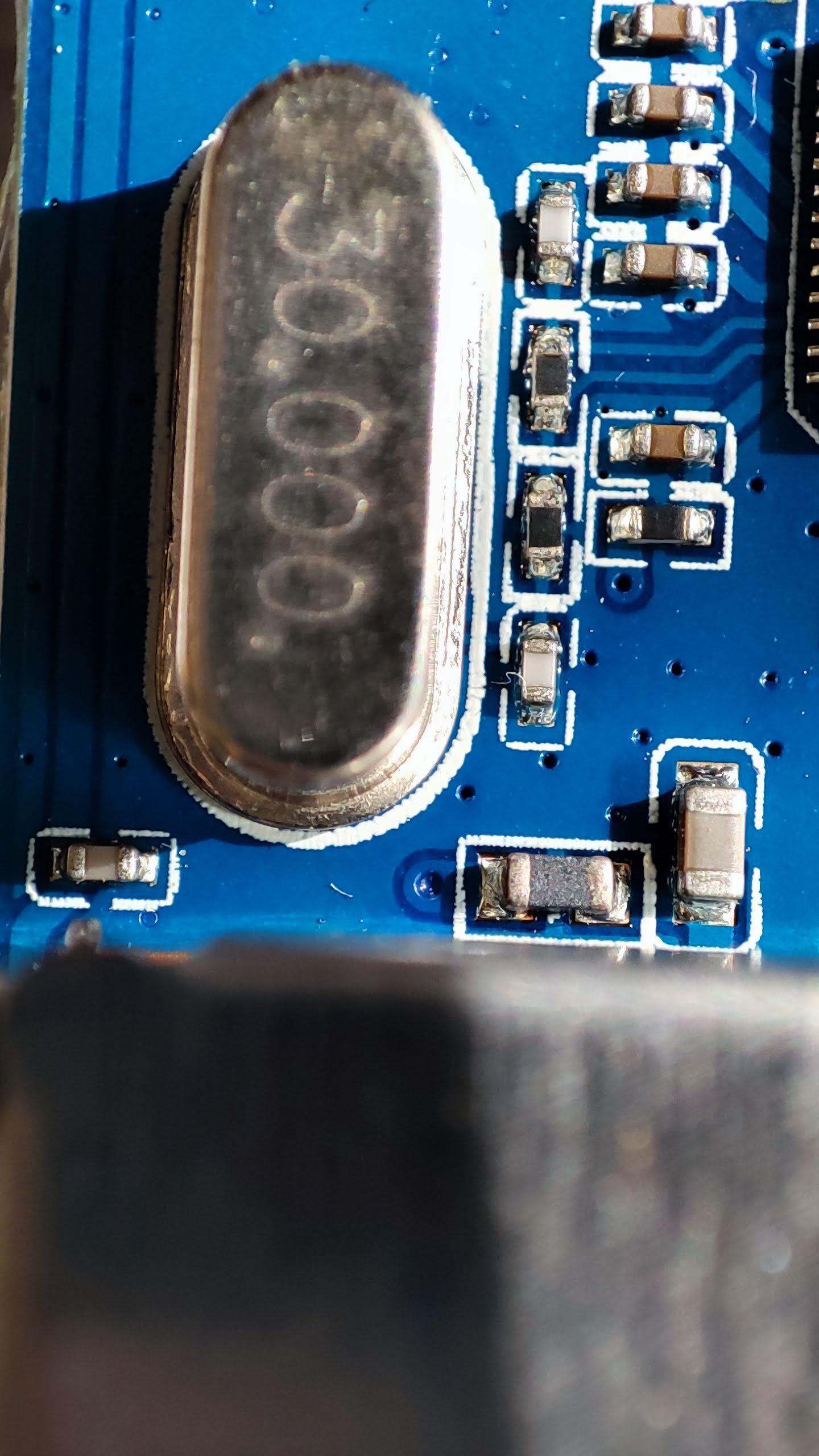
this is 30MHz, this is more like demodulator crystal. tuner can be only 16 or 24 MHz. Tuner is hidden in metal casing toghether with antenna connector. You need to take of the metal cap, CAREFULLY