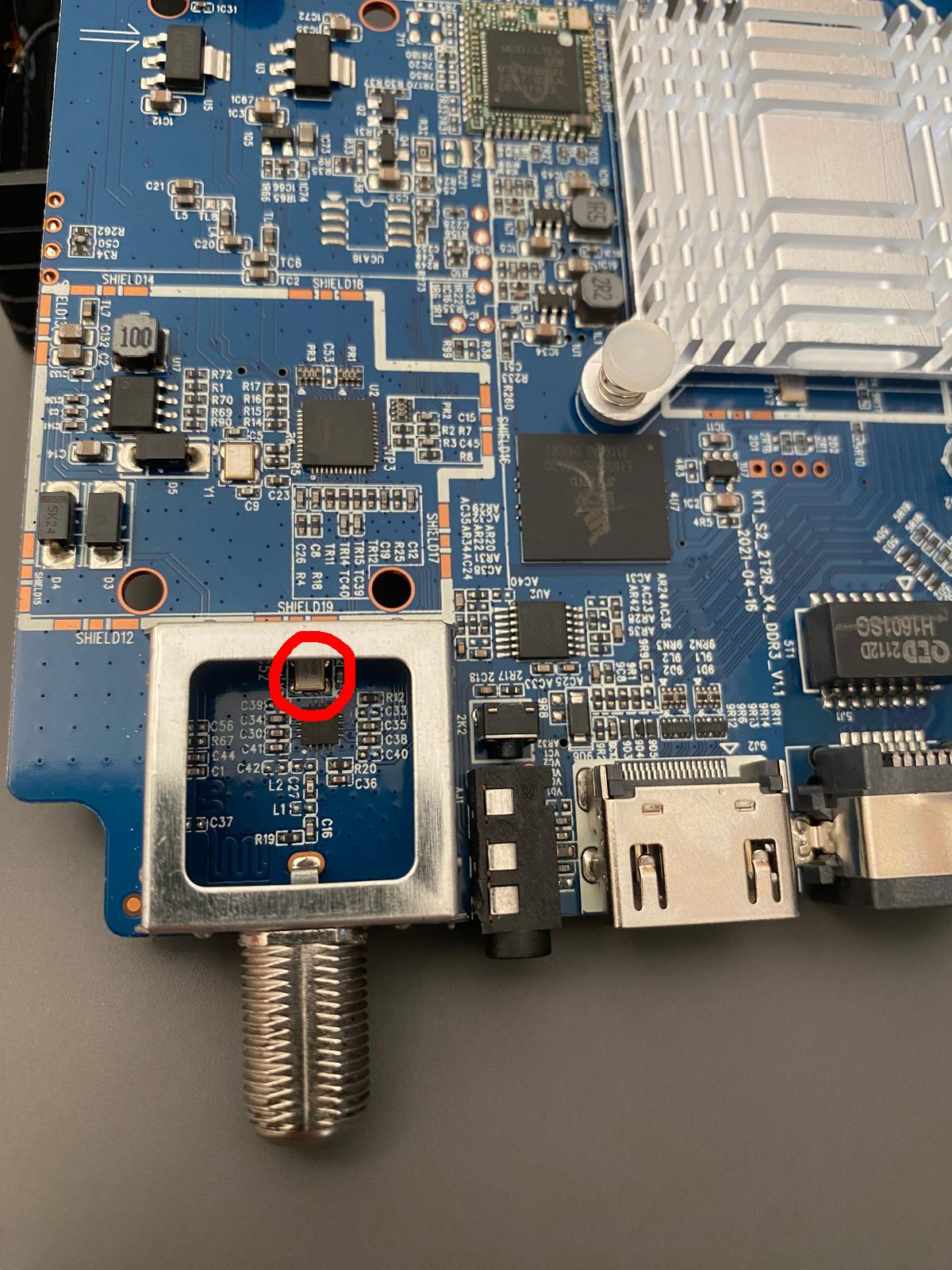
Thank your for your prompt reply!
dmesg:
\[    1.611911\] Tuner: client mxl603 0x60 adapter 00000000d64ab393 Meson I2C adapter
\[    1.611986\] Demod: client avl6762 0x14 adapter 00000000d64ab393 Meson I2C adapter
\[    1.611997\] dvb power gpio invalid
\[    1.612092\] aml_dvb_extern_init: OK, version: V1.30

\[   21.795821\] aml dvb init
\[   21.796530\] aml_dvb_get_adapter need register adapter first.
\[   21.796549\] DVB: registering new adapter (amlogic-dvb)
\[   21.796822\] fend:no tsinb setting
\[   21.796836\] tee_compat:1
\[   21.893567\] btmtk_sdio_download_rom_patch patch size is 213054 bytes
\[   21.893645\] btmtk_sdio_send_wohci retrun  0x0
\[   21.900394\] \[btmtk\] =============== Patch Info ==============
\[   21.900410\] \[btmtk\] Built Time = 20210420095605f
\[   21.900410\]
\[   21.900414\] \[btmtk\] Hw Ver = 0x3138
\[   21.900417\] \[btmtk\] Sw Ver = 0x3032
\[   21.900419\] \[btmtk\] Patch Ver = 0x009a
\[   21.900422\] \[btmtk\] Platform = mp2\_
\[   21.900425\] \[btmtk\] Patch start addr = 8a21
\[   21.900427\] \[btmtk\] =========================================
\[   21.903242\] btmtk_sdio_download_rom_patch read chipid =  f07668
\[   21.903257\] btmtk_sdio_download_rom_patch loading ILM rom patch…
\[   21.903260\] Downloading FW image (196608 bytes)
\[   21.910457\] chip:sc2-a not support ts clone
\[   22.319539\] tuner_attach_register_cb: register type 22, current num 1, modnum 1
\[   22.319580\] tuner_attach_register_cb: register type 21, current num 1, modnum 1
\[   22.319584\] tuner_attach_register_cb: register type 31, current num 1, modnum 1
\[   22.319589\] \[demod_attach_register_cb\]:register type 11, current num 0, modnum 1
\[   22.319593\] \[demod_attach_register_cb\]:register type 15, current num 1, modnum 1
\[   22.319596\] \[demod_attach_register_cb\]:register type 18, current num 1, modnum 1
\[   22.320772\] aml_attach_detach_dtvdemod: cb id 15
\[   22.326435\] i2c i2c-3: dvb_meson: attach failed family id mismatch
\[   22.326459\] Demod: attach demod0 \[id 15\] fail
\[   22.326465\] Demod: demod0 \[id 15\] had not attached
Photos:
drive(dot)google(dot)com/file/d/1dy0_qVGHzHubk5B0xP8h4eKzJNL7Ce3L
drive(dot)google(dot)com/file/d/1Dj9s3zwFGYAYUXB_qhfhweYVWE6NgiTV
drive(dot)google(dot)com/file/d/1xlXgSwxQNxL9CgVBd3JiRqa-Cj_wChqx
drive(dot)google(dot)com/file/d/1o35BqZTvHXhK30JtUuE2mxGf-0oWW1ze
drive(dot)google(dot)com/file/d/1SsnFdY4lQgxaHCmkqp59zudSo7qP3Cnq
Full dmesg:
so the problem 1. is due to that this is not AVL6862 but AVL6261 which creates problem 3 for You which is that the current AVL6862 addon does not have driver for that. There were some attempts to include this driver but with no success and I do not have any device with this demod so I will not help with that.
although @taki reports that something “worked” in this message:
Chewitt aml_ dvb drivers and worked with your wrapper version
chewitt_an_your_wrapper_version.zip (516.0 KB)
dts
fe_num = <1>;
fe0_demod = "avl6221c";
fe0_i2c_adap_id = <&i2c2>;
fe0_demod_i2c_addr = <0x14>;
fe0_demod_xtal = <3>;
fe0_ts_out_mode = <1>;
fe0_ts_clk_pol = <1>;
fe0_ts_clk = <1>;
fe0_ts_data_pin = <0>;
fe0_ts = <1>;
fe0_tuner0 = <0>;
tuner_num = <1>;
tuner0_name = "av2018";
tuner0_i2c_adap = <&i2c2>;
tuner0_i2c_addr = <0x62>;
tuner0_xtal = <27000>;
…
when I find time I look into that.
I need clear photo of marked crystal resonator. I need to know the number printend on it.
Mike
22 May 2026 09:41
309
hi again rozpruwacz i still appreciate your help with my stb
so do you have any branch for gtmedia combo coreelec21?
no and I do not plan to make it. on CE 22 everything is working fine so I see no point.
Hello brother
I have a device Gt combo and I used your source code and the distribution works fine.
But Bluetooth and wifi is working after loading them manually
They never autoload by default
How to solve that
Also after loading Bluetooth manually using autostart.sh the Bluetooth remote never showed up in Bluetooth devices even when using the buttons for pairng
I’m not using bt or wifi so I was not aware of that, i’ll look into that.
I checked my gtcombo and it loads wifi/bt driver automatically.
check if You have the same output of those commands:
gtcombo:~ # cat /proc/device-tree/sdio\@ffe03000/wifi\@1/compatible
sprd,unisoc-wifi
gtcombo:~ # cat /usr/lib/udev/rules.d/80-unisoc_sdio.rules
### UniSOC UWE5631 and UWE5621 kernel modules
ACTION=="add", ENV{SUBSYSTEM}=="sdio", ENV{SDIO_ID}=="0000:0000", \
  ENV{OF_NAME}=="wifi", ENV{OF_COMPATIBLE_0}=="sprd,unisoc-wifi", \
  RUN{builtin}+="kmod load sprdwl_ng sprdbt_tty hci_uart", \
  TAG+="systemd", ENV{SYSTEMD_WANTS}+="sprd_sdio-firmware-aml.service"
gtcombo:~ # cat /usr/lib/udev/rules.d/80-ea6x21qx.rules
### EA6X21QX
### this driver is split in two individual kernel modules
ENV{MODALIAS}=="?*", ENV{SUBSYSTEM}=="sdio", ENV{OF_NAME}=="wifi", ENV{OF_COMPATIBLE_0}!="sprd,unisoc-wifi", \
  ENV{SDIO_ID}=="0000:0000", GOTO="load_module"
GOTO="end"

LABEL="load_module"
ENV{MODALIAS}=="?*", ENV{SUBSYSTEM}=="sdio", RUN{builtin}+="kmod load skw_sdio", RUN{builtin}+="kmod load skw"

LABEL="end"
I don’t have it These are the results of the same commands you entered.
CoreELEC:~ # cat /proc/device-tree/sdio\@ffe03000 /wifi\@1 /compatible
CoreELEC:~ # cat /usr/lib/udev/rules.d/80-unisoc_sdio.rules
### UniSOC UWE5631 and UWE5621 kernel modules
ACTION==“add”, ENV{SUBSYSTEM}==“sdio”, ENV{SDIO_ID}==“0000:0000”, \
ENV{OF_NAME}==“wifi”, ENV{OF_COMPATIBLE_0}==“sprd,unisoc-wifi”, \
RUN{builtin}+=“kmod load sprdwl_ng sprdbt_tty hci_uart”, \
TAG+=“systemd”, ENV{SYSTEMD_WANTS}+=“sprd_sdio-firmware-aml.service”
CoreELEC:~ # cat /usr/lib/udev/rules.d/80-ea6x21qx.rules
### EA6X21QX
### this driver is split in two individual kernel modules
ENV{MODALIAS}==“?*”, ENV{SUBSYSTEM}==“sdio”, ENV{OF_NAME}==“wifi”, ENV{OF_COMPATIBLE_0}!=“sprd,unisoc-wifi”, \
ENV{SDIO_ID}==“0000:0000”, GOTO=“load_module”
GOTO=“end”
LABEL=“load_module”
ENV{MODALIAS}==“?*”, ENV{SUBSYSTEM}==“sdio”, RUN{builtin}+=“kmod load skw_sdio”, RUN{builtin}+=“kmod load skw”
LABEL=“end”
This Ismod
https://paste.coreelec.org/PunctureGender
You have wrong dtb, use sm1_s905x3_gtcombo.dtb from my branch which adds this node:
&sd_emmc_a {
	brcmf: wifi@1 {
		compatible = "sprd,unisoc-wifi";
	};
};
I already used dtb for gtcombo compiled in build
If the CE 22 on Gtcombo is working well, can you push the project to the main branch?
To be honest, I have no experience in building images for that device
I was a user DTB The allocated file, but I told you I wanted a file to test it as well, to confirm.
Here it is:
Thank you for your effort!
try this addon:AVL6862-22.0.10.4.zip (467.8 KB)sc2_s905x4_mecool_kt1_s2.dtb (76.1 KB)
report back with dmesg output