I will take a look at this and see if I can propose a solution.
It’s already available, but not “live”. You need to stop/start the media again.
But this doesn’t matter when already enabled.
Edit: just tested and the CE options itself looks broken again.
Jamal, the current ppi version made all switching perfect with TV Led mode.
Please don’t change that part.
Thx.
ps. I don’t tested in the last nightly.
Thanks for the feedback. If it’s working perfectly for you in TV-led mode, that’s useful to know and I agree we shouldn’t touch that path unless there’s a clear reason.
The main issue seems to be around VS10 switching and forced mode changes in some cases, so any future changes should be limited to that area and tested carefully. If you get a chance to try the latest nightly too, please report whether TV-led still behaves the same there.
A new TinyPPI update is now available for download from the repository.
TinyPPI 2.8.1 – Changelog
Everything that landed since 2.6.9 (versions 2.7.0 – 2.8.1).
 Web Dashboard
- Redesigned layout for the dashboard and the metadata page — reworked cards, side rail, theming and icons.
- Reworked event handling and streaming updates, so the page does far less work per update and no longer rebuilds DOM it does not have to.
- Stable status and badge state — status text and badges no longer flicker between updates.
- Responsive fixes across all cards and the topbar: no more content overflowing on narrow screens, badges wrap, the logo is capped, and version/name are hidden while the action menu is open.
- Touch behaviour — hover-only highlights no longer stick on touch devices; hover styling is limited to real pointer devices, and toggling a disclosure card gives a short accent flash instead.
- Action menu click handling fixed, plus a 3 s idle timer that resets on actual activity (pointer, keyboard, focus) instead of closing mid-interaction.
- Localized labels — the Average label in the live chart legend, the live-panel legend names and the icon-only transport buttons are now read from the translations instead of stale text (ar, de, en_gb, hu, zh_cn).
- Subtitle cards show language/name + codec, and keep the special Off state.
- Track-change logging stabilized: index and label are now read together in one snapshot, so a quick switch can no longer be logged against the wrong pair.
 Playback Controls
- Chapter Previous / Next buttons added to the transport row. They are automatically disabled when a title has fewer than two chapters.
- Volume slider replaced by step buttons (−, mute, +). Steps are sent via
Input.ExecuteAction, so a CEC-controlled amplifier actually receives them. That is also why no absolute level is displayed any more — with CEC there is no reliable level to show. The old absolutevolumecommand is still accepted for backward compatibility.
 Dolby Vision / HDR
- HDR10+ presence is now tracked and published as
TinyPPI.Hdr10PlusPresentfor streams that carry HDR10+ alongside Dolby Vision. - DV + HDR10+ hybrids are recognized as such: no VS10 modes are offered for them, and applying a mode anyway logs a warning.
- HDR badge shortened to DV so it can no longer overflow the badge row.
 Audio
Audio
- Codec-specific logos instead of the generic AAC icon:
- AAC-LC
- AAC LATM
- AAC LTP
- AAC SSR
- HE-AAC
- HE-AAC v2
- OGG
and - Vorbis
 Fixes
Fixes
- Kodi would not shut down or restart while a browser was connected to the dashboard, and ran into a timeout. Kodi waits for every thread of the interpreter before it tears a service script down, with only ~5 s to do it, and each reconnect of the page handed it another thread to wait on. The server now refuses connections as soon as it is stopping, closes the listening socket under a
finally, joins its accept loop, producer and request threads inside that window, times out quiet keep-alive connections and writes into streams nobody reads, tells the page to stay away for 20 s instead of 5, and no longer lets a settings callback restart the server behind the shutdown. Also fixed a producer thread that could never be joined at all. - Several-second delay in front of every YouTube (add-on) title removed. The media-source row used to
statthe played file for its size — harmless for a local or network file, but an add-on-resolved item is a signed CDN link that has every reason to leave aHEADhanging, and that stall landed on the thread the overlay is drawn from. The size is now only asked for where it can be answered. Local paths, SMB/NFS shares, plain HTTP(S) files from Plex/Jellyfin and add-ons that resolve to a real share path all still report their size. (Thanks for the report in this thread!) - Metadata latch across title changes (issue #71): cached static fields such as HDR metadata are cleared when the title changes instead of being carried over. A Dolby Vision + HDR10+ hybrid followed by a plain Dolby Vision title no longer reports hybrid metadata.
 Project / Licensing
- Relicensed to AGPL-3.0-or-later (from MIT), because TinyPPI serves a web dashboard over the network. Added
LICENSE,LICENSE-ASSETSandNOTICE, plus SPDX headers across all Python, XML, CSS, HTML and JS sources. - Branding protection documented for the TinyPPI name, logo and artwork — the code is free, the branding is not.
- Artwork switched from JPEG to PNG (
icon.png,fanart.png) with all references and MIME types updated. - README updated for the new controls, the CEC volume behaviour, the DV + HDR10+ hybrid case and the new codec formats.
Jamal, your work is fascinating.Thank you always
A new TinyPPI update is now available for download from the repository, together with a new version of the TinyPPI Mobile app.
TinyPPI 2.9.2 – Changelog
Everything that landed since 2.8.1 (versions 2.8.2 – 2.9.2).
New: start a film from the dashboard
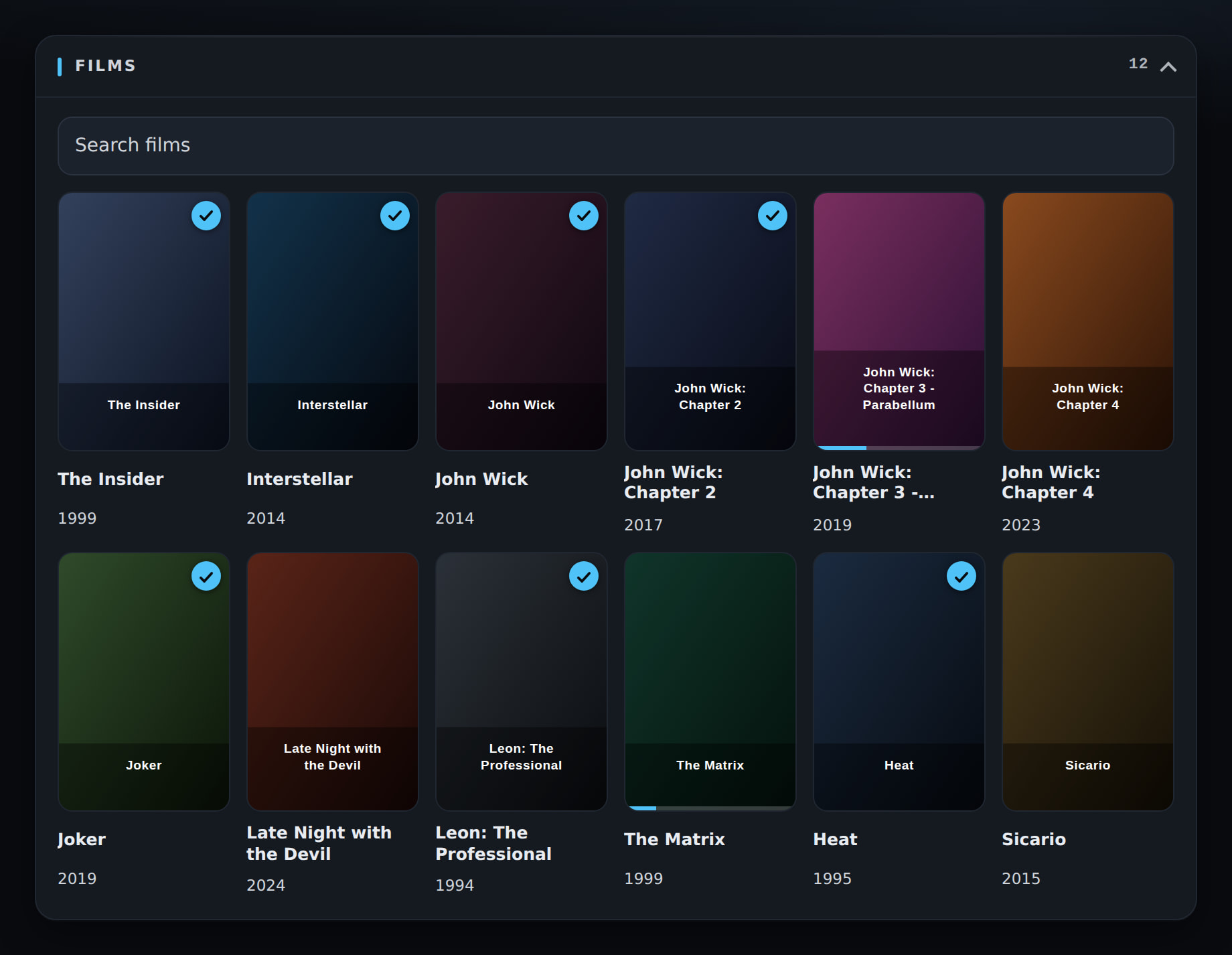
- When nothing is playing, the dashboard now shows your films — all the films from Kodi’s video library as posters. Tap one and it starts on the TV.
- Films you did not finish show a small progress bar and continue where you stopped. Films you have already seen get a tick in the corner.
- Search box — from about a dozen films upwards you can search the list instead of scrolling.
- The card can be folded away, and the number of films stays next to the title.
- New films show up by themselves after a library scan, without restarting anything.
- Posters load only when you scroll to them, so even a big library stays fast.
- Can be switched off under Settings → Dashboard → Show the film library. Starting a film also needs the dashboard controls to be enabled.
Web Dashboard
- “Ends at” under the progress bar — you can now see at what time the film will be over, instead of working it out yourself. It sits in the middle, between the elapsed time and the total length.
- The time comes from Kodi, so it matches the TV exactly and stays correct after a pause. It is shown in your own format (24-hour or AM/PM).
- Nothing is shown when there is no end — live TV, recordings, or a title Kodi has not measured yet.
- Translated (ar, de, en_gb, hu, zh_cn).
Codec logos on screen
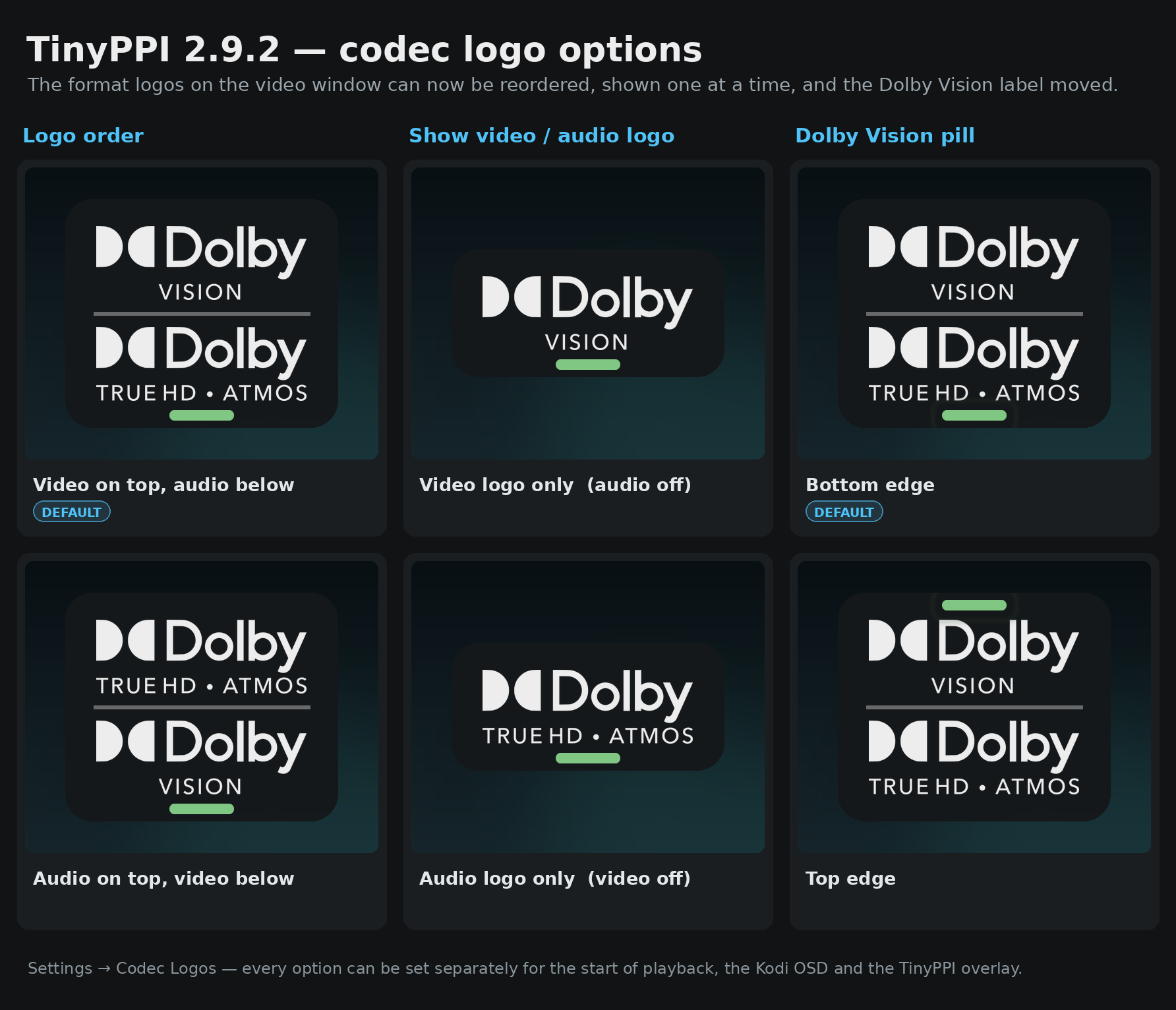
- You can now choose the order — video logo on top and audio below (as before), or the other way round.
- You can hide one of the two logos and show only the video or only the audio logo.
- The Dolby Vision label (FEL / MEL / DV) can sit at the bottom (as before) or at the top of the logo panel.
- All of this can be set separately for each situation: at the start of playback, in the Kodi OSD and in the TinyPPI overlay.
TinyPPI Mobile 1.4.2 – Changelog
Everything that landed since 1.3.1 (versions 1.3.2 – 1.4.2).
 New: start a film from your phone
- When nothing is playing, the app shows your films as posters — tap one and it starts on the TV.
- Films you did not finish show a progress bar and continue where you stopped; films you have seen get a tick.
- Search box from about a dozen films upwards, so you do not have to scroll through everything.
- The poster wall fits the screen — more columns on a tablet, fewer on a phone.
- Posters load while you scroll, so even a large library does not slow the app down.
- If the box offers no film list (switched off in the add-on, controls off, or an empty library), the app simply keeps showing that nothing is playing.
Live screen
- “Ends at” on the progress bar — the time the film will be over, shown in the middle of the bar between elapsed time and total length.
- The time comes from the box, in its own format (for example
21:47or9:47 PM), so the phone and the TV always agree. - Hidden when there is no end — live TV, recordings, or a title whose length is not known yet.
- Translated (de, hu, en).
Other
- Works together with TinyPPI 2.9.2, which provides the film list and the finish time.
 Screenhots
@jamal2367 Amazing work. Thank you 
@jamal2367 Can’t seem to find the “Dashboard” option in the add-on settings? I need to put the link code in…
Aha, found it - had to scroll 
Simply incredible

I think there is still no display mode reset performed on DV-ST? It shows 10bit, RGB from SDR to DV.
The CE setting works as mode switch is forced.
No, this is currently only used in DV-LL. I excluded DV-Std because it was buggy.
It’s awesome feature again. 
Maybe possible,
to add the TV Shows too?
You will need a forced mode switch on any DV format to non DV and vice versa so the hardware setup goes correct. Not only DV-LL.
My TV acts weird when I do that, so I’ve ruled out DV-Std. That’s on purpose. Even if it’s wrong, it works perfectly for me just the way it is right now.
As I’ve mentioned a few times before, the sysfs/drm implementation in TinyPPI isn’t a reliable solution.
My suggestion was to have something similar to the other custom CE21 builds or from SamuriHL his custom CE22 build, where you can switch modes via Actions. That way, the code stays in CE, and TinyPPI can run it in its raw form. This would save a few hundred lines of code in TinyPPI and prevent issues.
For example:
<onclick>Action(vs10.original)</onclick>
<onclick>Action(vs10.sdr)</onclick>
<onclick>Action(vs10.hdr10)</onclick>
<onclick>Action(vs10.dv)</onclick>
I’ve already said that I won’t be making any more changes to the VS10 modes in TinyPPI.
It’s just too sensitive.
It’s wrong, yes. There are more then 5k users out there confirmed a forced mode switch is required when DV mode get enabled/disabled. Same with HDR10(+).
There is no extra action required. It just works how it is.
For now, I don’t plan to do anything about it, even if it’s wrong. So far, no one has made a serious complaint. For me, it’s a waste of time. The project is publicly available. If anyone can do it better, they’re welcome to submit a pull request.
You only need to remove the block if not DV LED:
Then the display reset is done in DV-Std and DV-LL mode.