TinyPPI for CoreELEC 22
TinyPPI is a CoreELEC addon that displays detailed playback information in a custom overlay during video playback.
It provides real-time information about video, audio, HDR, Dolby Vision, system resources and output processing without requiring modifications to 1080p skins.
TinyPPI is designed for CoreELEC 22 with special support for Amlogic hardware.
Compatibility
TinyPPI 2.6.9 and up requires CoreELEC 22 Nightly 20260822 or newer.
Older CoreELEC 22 Nightly builds are not compatible with this release.
Source:
Features
- Detailed real-time video, audio and system information
- HDR10, HDR10+, HLG and Dolby Vision detection
- Extensive Dolby Vision RPU metadata
- Live L1 luminance, L5 active area, L6 mastering information and additional DV metadata
- Dolby Vision CM v2.9 / CM v4.0 information
- FEL / MEL layer information
- Live video and audio bitrate
- Video resolution, display mode, pixel format, decoder and codec information
- Audio codec, channels, sample rate and bit depth
- VS10 output mode switching
- Video/HDR and audio Codec Logos
- Graphical speaker/channel layouts
- Configurable colors, transparency and positioning
- Highlighting when live metadata values change
- Dedicated Dolby Vision Metadata View
- Built-in Web Dashboard
- Browser-based playback remote and VS10 control
- No skin modification required
Screenshots
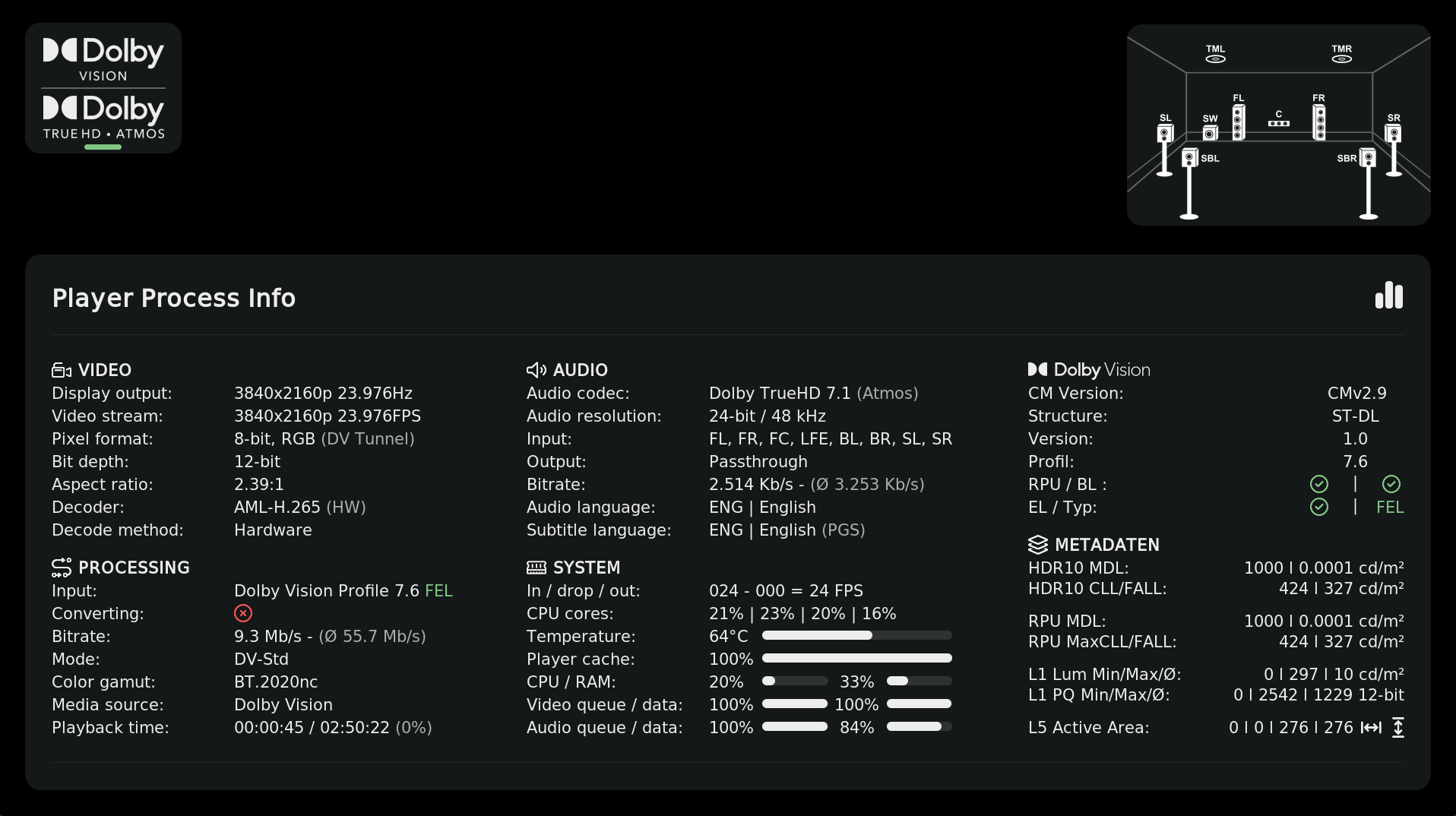
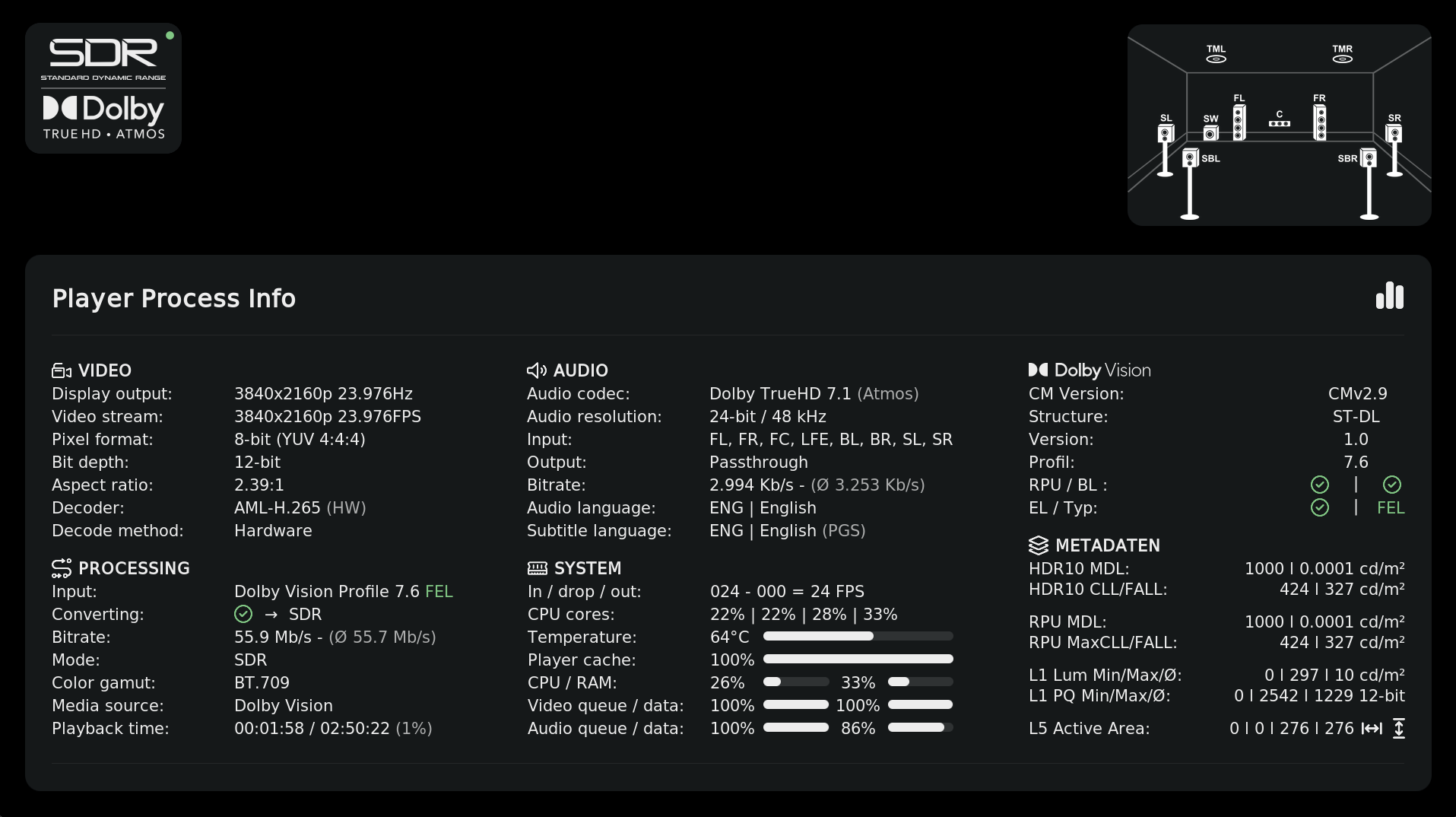
Installation
Via Repository
- Open Settings → File Manager → Add Source.
- Enter the following repository URL:
https://ce-repo.github.io/repository.jamal2362/
- Go to Add-ons → Install from ZIP file and select the source.
- Install the repository ZIP.
- Go to Install from repository.
- Open the repository and install TinyPPI.
Usage
Assign a remote shortcut with Keymap Editor
The easiest way is using the Keymap Editor addon:
- Open Keymap Editor.
- Select Edit → Global → Add-ons.
- Select Launch TinyPPI.
- Press the key/button you want to assign.
- Save the keymap.
The assigned button will now open or close TinyPPI during video playback.
Manual keymap
Add the following to:
Userdata/keymaps/gen.xml
Replace xxxxx with your desired key:
<keymap>
  <global>
    <keyboard>
      <xxxxx>RunAddon(script.tinyppi)</xxxxx>
    </keyboard>
  </global>
</keymap>
Launch from another addon
import xbmc
xbmc.executebuiltin('RunScript(script.tinyppi)')
TinyPPI can also be launched using:
plugin://script.tinyppi/
Codec Logos
TinyPPI can display the current video/HDR and audio format as stacked logos directly on the video window.
The logos can independently be enabled:
- On playback start
- While the Video OSD is open
- While the TinyPPI overlay is open
Position, size, colors and opacity can be configured separately.
Supported Video / HDR Formats
| Logo | Format |
|---|---|
| SDR | Standard Dynamic Range |
| HDR10 | HDR10 |
| HDR10+ | HDR10+ |
| HLG | Hybrid Log-Gamma |
| Dolby Vision | Dolby Vision |
Supported Audio Formats
| Logo | Format |
|---|---|
| AAC | AAC / HE-AAC |
| Dolby Digital | AC-3 |
| Dolby Digital Plus | E-AC-3 |
| Dolby Digital Plus Atmos | E-AC-3 + Atmos |
| Dolby TrueHD | TrueHD |
| Dolby TrueHD Atmos | TrueHD + Atmos |
| DTS | DTS |
| DTS 96/24 | DTS 96/24 |
| DTS-ES | DTS-ES |
| DTS-Express | DTS Express |
| DTS-HD HRA | DTS-HD High Resolution Audio |
| DTS-HD MA | DTS-HD Master Audio |
| DTS:X | DTS:X |
| IMAX | DTS:X IMAX Enhanced |
| FLAC | FLAC |
| PCM | PCM / LPCM |
| MP3 | MP3 |
| OPUS | Opus |
Channel Layout
TinyPPI can display a graphical speaker layout showing the channels used by the current audio stream.
It can be enabled independently for:
- SDR
- HDR10 / HDR10+ / HLG
- Dolby Vision
Supported layouts include:
- 1.0
- 2.0
- 2.1
- 3.1
- 4.1
- 5.1
- 5.1.2
- 6.1
- 7.1
- 7.1.2
Height-channel layouts such as 5.1.2 and 7.1.2 are automatically used for compatible Dolby Atmos and DTS:X streams.
Dolby Vision Metadata View
TinyPPI includes a dedicated Dolby Vision Metadata View for inspecting the metadata carried by the currently playing stream.
Enable it under:
Settings → Debug → Dolby Vision metadata view
While TinyPPI is open during Dolby Vision playback, press OK to switch between the normal overlay and metadata view.
The metadata is refreshed live and changed values can be highlighted.
Available information includes:
- Dolby Vision configuration record (
dvcC/dvvC) - Dolby Vision profile and level
- RPU header information
- Composer mapping / reshaping curves
- NLQ information
- L1 frame luminance
- Source mastering information
- Colorimetry and conversion matrices
- L2 trims
- L3 offsets
- L4 temporal metadata
- L5 active-area offsets
- L6 mastering display / MaxCLL / MaxFALL
- L8 trims and saturation/hue data
- L9 source primaries
- L10 target displays
- L11 content information
- L254 / L255
- Static HDR10 metadata
- HDR10+ metadata when present
Dolby Vision and HDR metadata is read directly from the stream’s side data using script.module.sidedata and can follow the picture frame by frame.
Web Dashboard
TinyPPI includes a built-in web interface that allows playback information to be monitored from a phone, tablet or computer without covering the picture on the TV.
Enable it under:
Settings → Dashboard
The default address is:
http://<box-ip>:8099/
The dashboard includes:
- Now Playing information
- Poster, title, year and genre
- Playback progress
- Video/HDR and audio logos
- Frame rate and dropped frames
- Output-switch statistics
- Live Dolby Vision L1 luminance graph
- Dolby Vision L5 active-area visualization
- Playback and output events
- Video information
- Processing information
- Audio information
- HDR metadata
- Dolby Vision metadata
- System information
- Highlighting of changed values
- Copy report function
- Dedicated Dolby Vision metadata window
Everything is served locally by TinyPPI. No external internet connection is required.
Dashboard Themes
Three dark themes are available:
- Dark
- Dark (adaptive)
- Midnight
Dark (adaptive) automatically derives an accent color from the currently playing movie’s poster.
The selected theme is remembered independently by each browser.
Browser Remote
The dashboard can also act as a remote control for the currently playing video.
Available controls include:
- Play / Pause
- Stop
- Seek ±10 seconds
- Seek ±1 minute
- Seek through the progress bar
- Volume
- Mute
- Audio track selection
- Subtitle selection
The controls communicate with Kodi through its JSON-RPC interface.
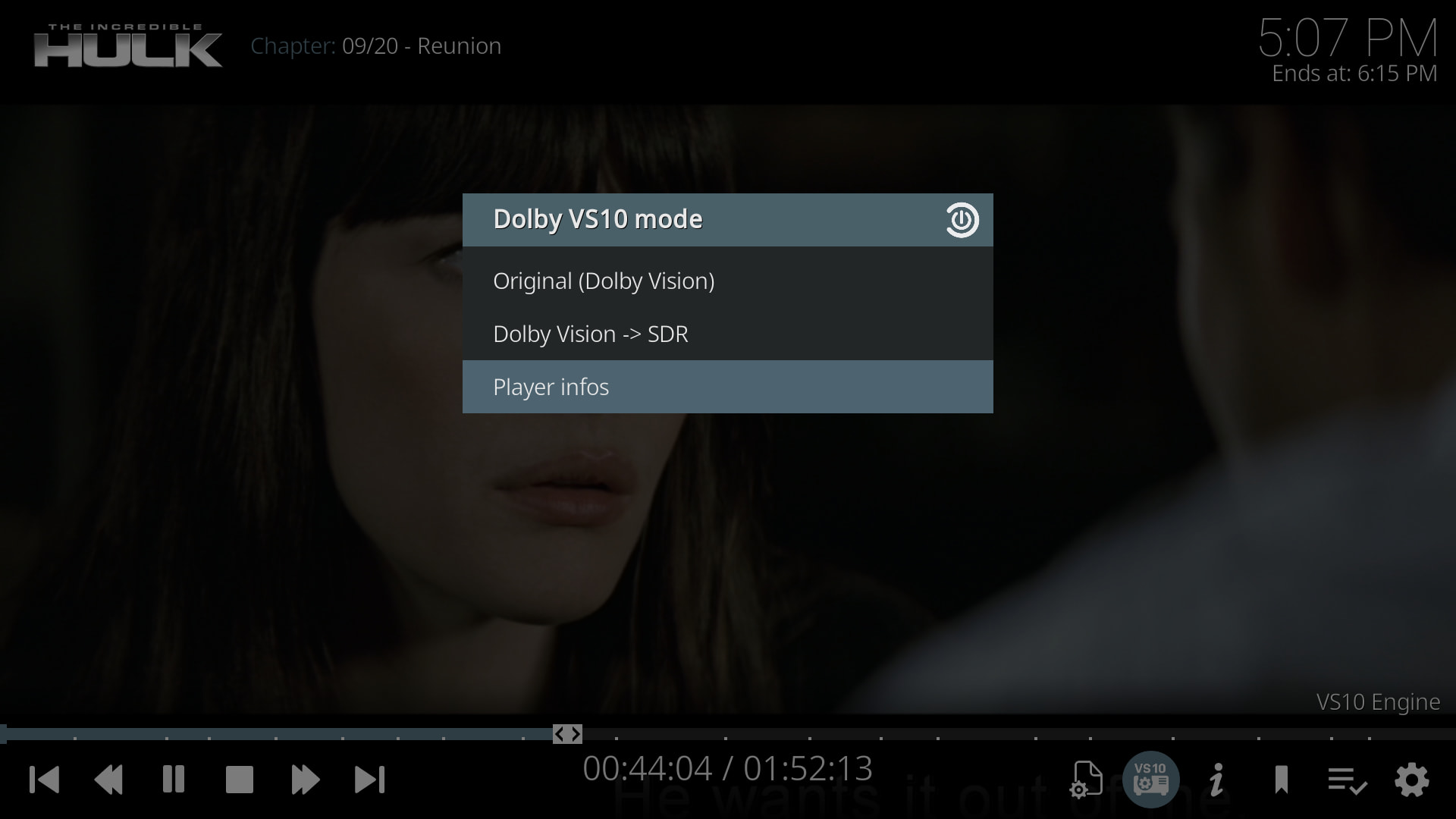
VS10 Switching
TinyPPI includes an integrated VS10 mode selection dialog.
Open it directly with:
RunScript(script.tinyppi,dialog)
The available modes depend on the currently playing source.
HDR10+ and HLG do not expose VS10 conversion modes.
Direct VS10 Mode Switching
Modes can also be applied directly:
RunScript(script.tinyppi,run_mode,sdr8)
RunScript(script.tinyppi,run_mode,sdr10)
RunScript(script.tinyppi,run_mode,hdr10)
RunScript(script.tinyppi,run_mode,dv)
RunScript(script.tinyppi,run_mode,original_sdr)
RunScript(script.tinyppi,run_mode,original_hdr)
RunScript(script.tinyppi,run_mode,original_dv)
| Mode | Description |
|---|---|
original_sdr |
Pass through SDR unchanged |
original_hdr |
Pass through HDR10 unchanged |
original_dv |
Pass through Dolby Vision unchanged |
hdr10 |
Convert to HDR10 output |
dv |
Convert to Dolby Vision output |
sdr8 |
Convert to SDR 8-bit output |
sdr10 |
Convert to SDR 10-bit output |
This makes it possible to assign individual output modes directly to remote buttons or trigger them from other addons.
Dashboard Security
The Web Dashboard is designed for use on your local home network only.
- The dashboard is disabled by default.
- VS10 switching and remote actions require an access token.
- Reading can optionally also require the token.
- A new access token can be generated at any time.
- TinyPPI does not expose arbitrary filesystem paths.
- Do not forward port 8099 to the internet.
Credits
Many thanks to everyone involved in the CoreELEC and Kodi projects and especially to the developers whose work makes TinyPPI possible.
script.module.sidedata
script.module.sidedata by @matthane
TinyPPI uses script.module.sidedata to access the raw Dolby Vision and HDR metadata published by CoreELEC 22 through Player.Process(video.sidedata).
A big thank you to @matthane for the SideData implementation.

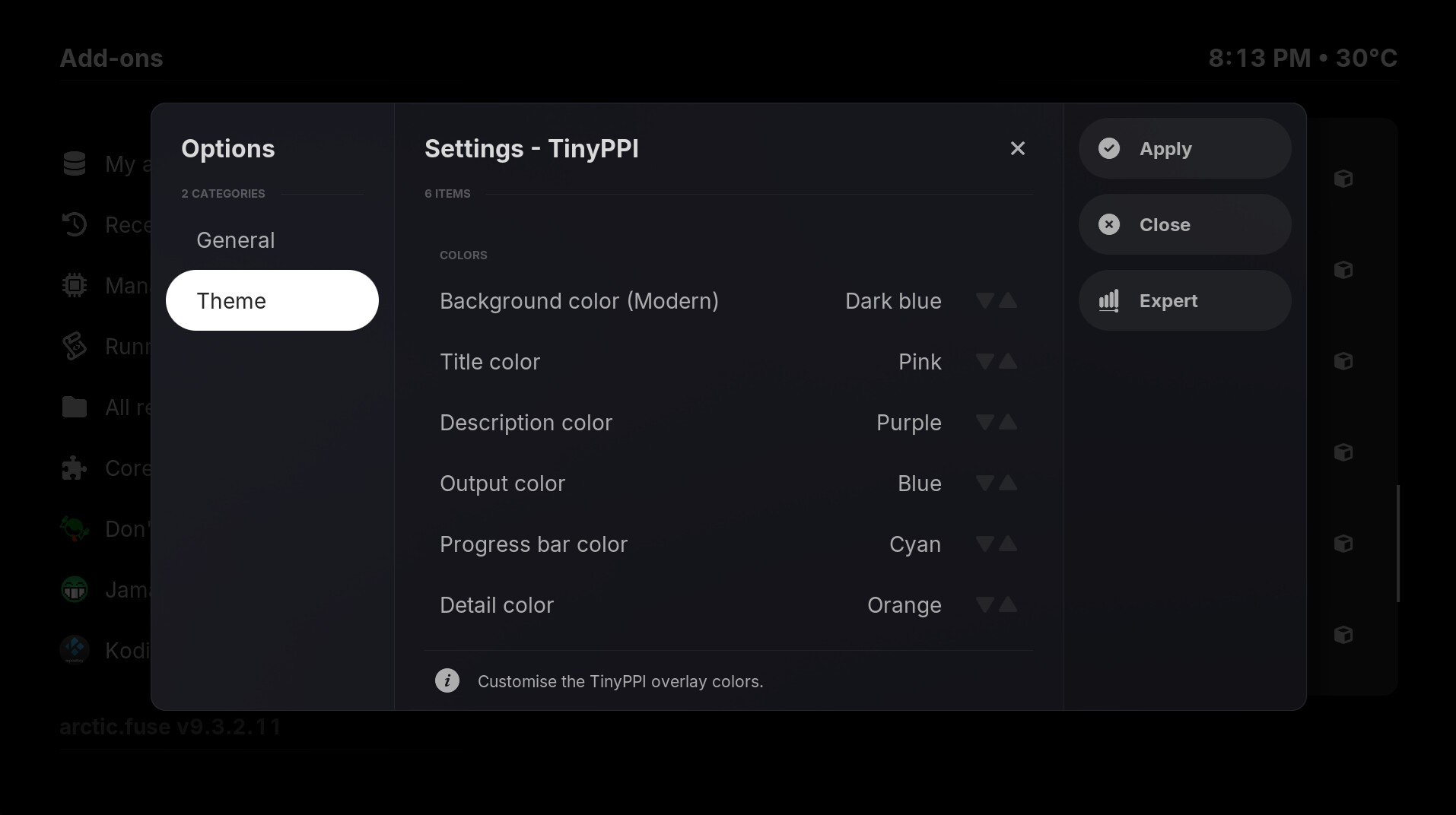
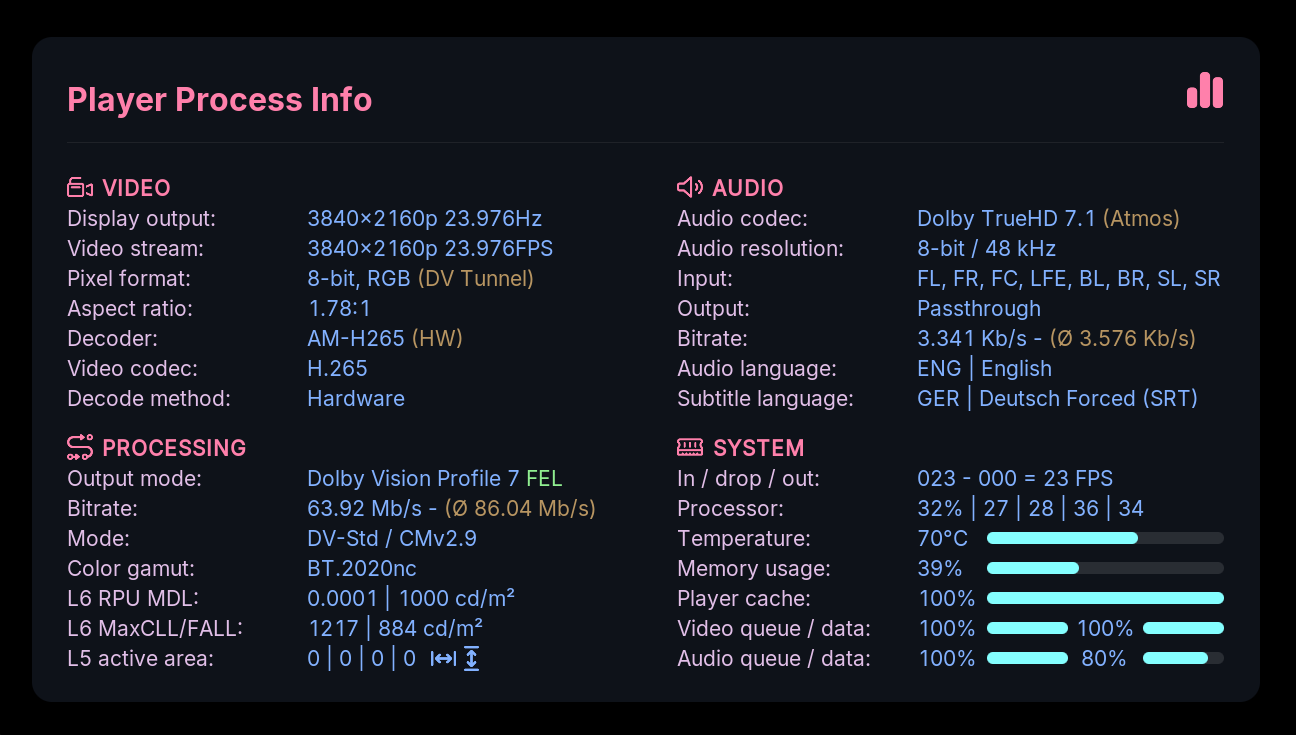
 Added Theme Engine:
 Foreground colors:
 Background colors:
 Other changes:
 Expanded color customization:
 Improved settings: