Exactly, maybe the word used for the search is not correct, and I wasn’t able to find an answer and like some ping on it, I jump for it too 
But I understand no worry
Exactly, maybe the word used for the search is not correct, and I wasn’t able to find an answer and like some ping on it, I jump for it too
But I understand no worry
Thats not true
I never set GUI to 4k, never use whiteelist and all my videos are playing in the native video resolution.
BTW:
I´m KODI user since 2012
Why you, or anyone, would not use “Refresh rate changer” ? It’s one of the most useful features in Kodi. Set it to “Start - Stop” and forget about all sorts of different refresh rates…
+1 but Kodi user from 2014 when XBMC (used it from 2006 became Kodi.
Thanks for confirmation 
I’m using Kodi lately from windows then FireTV (Android) and did a few testing with CoreELEC but no more hardware, but I will have AMB6+ soon.
I explain why just few posts above but not in full detail
I always use refresh rate changer with Windows or Android on 1080p Projector Sony (so here no 4K LOL).
Then I switched recently to 4k Projector and I notice that when video match the display, and when using motion compensation from the display (here the projector) I have noticed artifact, that I wasn’t able to see on my Sony neither on TV (4k btw).
So I didn’t notice that playing 24p on 59.94Hz with motion compensation to low, make lower artifact on display, and not much frame drop.
But, some other type of artifact happens with the pull down.
What I want to say it’s, here, we don’t want to switch refresh rate to match the fps of the video, it’s a nonsense, I know, but it’s the one solution to avoid those artifacts.
The other solution, is this time to match refresh rate so enable the options like it should be and disable motion compensation. This way, no more artifact but 24P without motion compensation can be sometime hard to watch, for ex, on “RED” movie intro with Bruce Willis.
So user maybe needed to disable this option, to “fix” the issue from bad motion compensation from projector, and I have tried many 4k and quite all the same, at first I was thinking it was related to DLP (even if Rainbow effect is not quite good too but not related), it happens also on 3LCD.
On Windows when trying some rendered (Dimitri) or Avisynth script or SVP, we can transform the 24p video to 60 in real-time, this way most of the artifact are not present, but soap opera effect is not easy to watch too.
Still in SVP, we can rule out that, and did less interpolation so it’s a compromise between motion compensation OFF and LOW, and it’s quite good, but, it’s on Windows, not on Linux so neither in CE and not in Kodi event if in 2020 someone try to add some code on OpenGL to do to, but commit was reverted somehow.
Still now I understand the even without Refresh Rate Changer, GUI at 1080 shouldn’t have impact on 4k movie, it will be played in 4K output.
I didn’t find the answer in the wiki and when doing another search for it, we have again different answer and not one clear (but I surely didn’t find the correct post with the answer).
I did try XBMC at that time too, but was working with MediaPortal team
And all this has nothing to do with this device specifically 
True, sorry for off-topic
What may be kind of on topic is setting GUI to 1080p is less demanding on the box vs. 4K.
Even with Kodi on Android TV, that works just fine, choose 1080 and nothing in whitelist
I’ll try to map the Xiaomi remote but it looks kinda complicated, maybe it’s out of my league for now. I don’t have much time and I’m not familiar with this at all, but I’ll try to learn.
Btw, anything about this ?
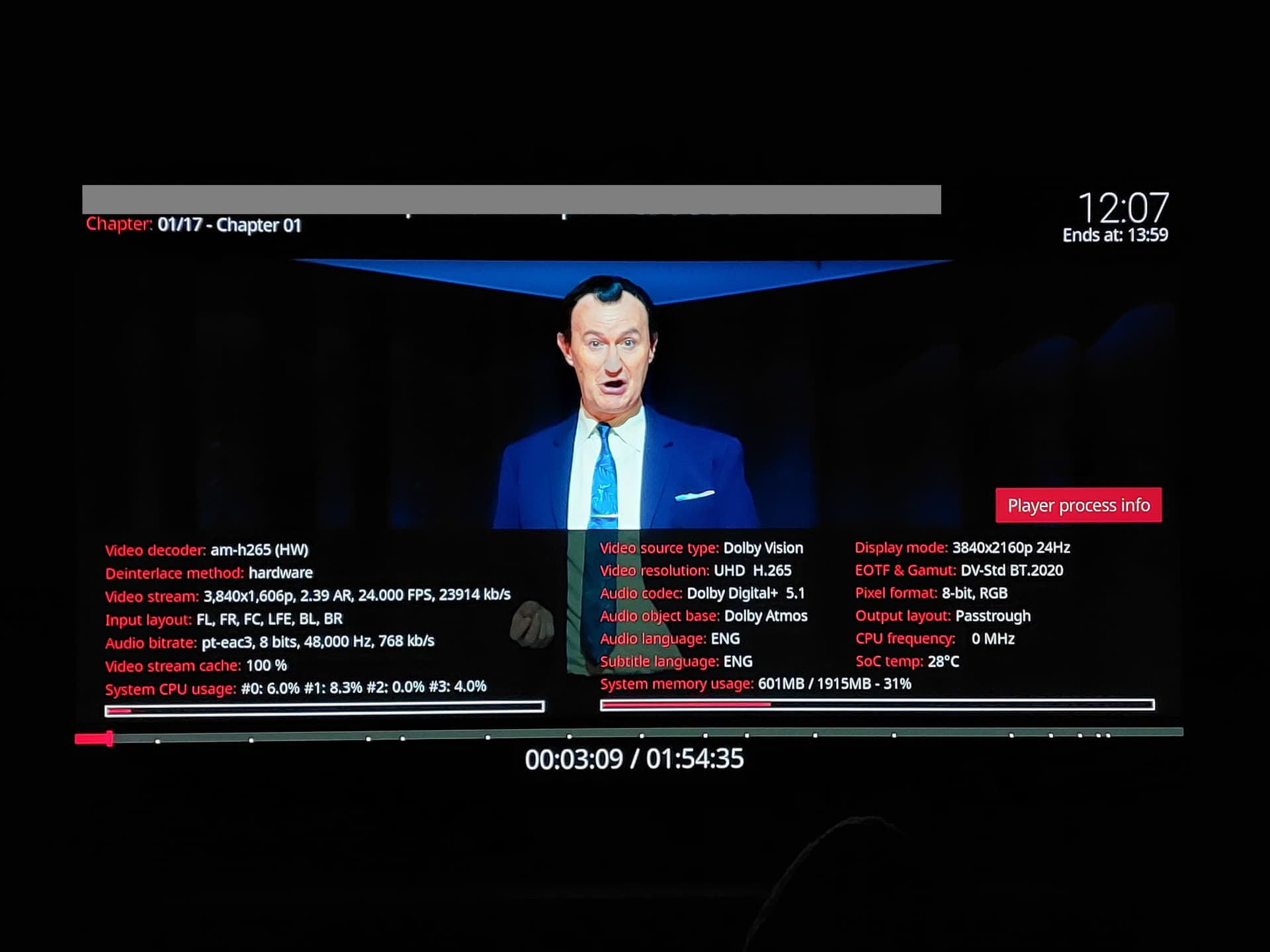
Maybe a dumb question but in player info, can see all the information except CPU frequency which stays at 0. Is there a reason for this ? I don’t really care honestly but I’m just curious.
Also noticed I got 2 consecutive crashes after opening player info (not right after opening it, but some time after closing it and continuing playback). No crash when not opening it. Will try to reproduce and post logs.
Thanks you all.
EDIT: here is log (date and hour is wrong, do not mind), I think this is what happened right before crash :
Only complete debug logs are usefull.
If you mean what happened after, there is nothing, CE crashed, box rebooted and back to CE. I guess the logging stopped when it crashed.
Otherwise if it is not what you need, I’ll check to post more complete logs.
This was never a problem under CoreELEC, but now I checked this Xiaomi box with a capture device and even under Android, TV-Led mode is no longer fake.
So they might have fixed it ? I was wondering the same because in player info I get this:
It looks consistent with what “true” TV-led is supposed to be: EOTF & Gamut info are right (DV-Std and BT.2020 and you can also see Pixel format is 8-bit RGB which is DV tunneling (this is a DV P5 file).
I’m really no expert in this domain though, but this seems right to me. Ofc I don’t have HDMI capture like you so coudln’t verifiy it. If you are right about this, this is very interesting.
Unfortunately, my TV is getting old, it’s a LG C8 and, as far as I know, it only supports CMv2.9, I think CMv4.0 came around 2019, 2020 si I don’t get “full” enhancements from DV but still, “true TV-led would be nice even though some argue the difference in image quality is negligible (you would have to pause and do a side by side comparison in most cases from what I heard).
This is not visible in the player info. An HDMI capture device is not necessarily required for verification; a display that does not support DV and an EDID with TV-Led mode enabled are sufficient.
Ok for player info, but do you agree that the information seen (DV-Std, BT.2020 and 8-bit RGB) is correct or rather, it is what should be seen when playing DV ?
Can you elaborate on this please ? I’m not familiar with this.
Also when you said:
What do you mean by that ? I thought the “fake” and “true” DV-led thing was due to Amlogic, Realtek and maybe others processing the info of the RPU and no sending it to the TV, which would be a mistake on their side and really misleading because users see the options “TV-led” or “Player-led” but in fact it’s not real “TV-led” at all.
Again, I’m really no expert, just trying to understand, but how could CE fix this if it is an Amlogic (in this case) problem ?
That’s great… out of curiosity, what kind of capture device? Wonder if there is or could be a video like the woman at 80s to similarly check for TV-led?
Yes, they are correct, the colorspace is irrelevant anyway.
A device must be placed between the display and the player that allows you to send a different EDID (which also includes DV capability) to the player instead of the display’s own. There are several devices available for this purpose, such as hdfury, but there are also cheaper options.
This is a software issue and has long been fixed in CoreELEC.
When playing videos, you should use Video priority instead of Graphics priority. It seems that this has already been fixed in newer versions of Android.
About | FAQ | Terms of Service | Privacy Policy | Legal Notice