Aside from the Changelog we can see on the nighty builds page which is very technical for non developers or people with limited knowledge of the coding field, is there a more general Changelog? I know there is for big updates, but is there any for “smaller” updates?
Reason I’m asking this is regarding @djnice answer about the “fake” TV-led, “true” TV-led subject. Many people thought (and still think) that Amlogic and others are doing “fake” TV-led altough you guys are saying this was fixed some time ago by CE team. I’ve read the whole Learning about Dolby Vision and CoreELEC development and apparently it was fixed somewhere around march 24? But even reading all that stuff, I didn’t see (maybe I didn’t search enough) an official statement from CE team saying this was fixed or something.
A lot of people and even well informed ones like @ht2tweak thought it was still doing “fake TV-led.
Just a technical question here as I’m not well enough versed in that matter:
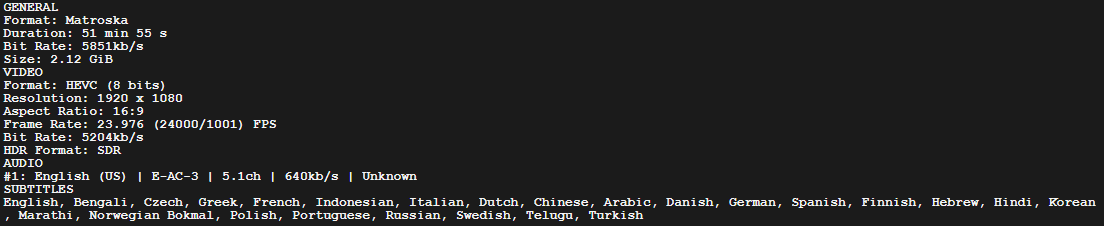
Here is the info of a file I have which is H265 SDR 1080p:
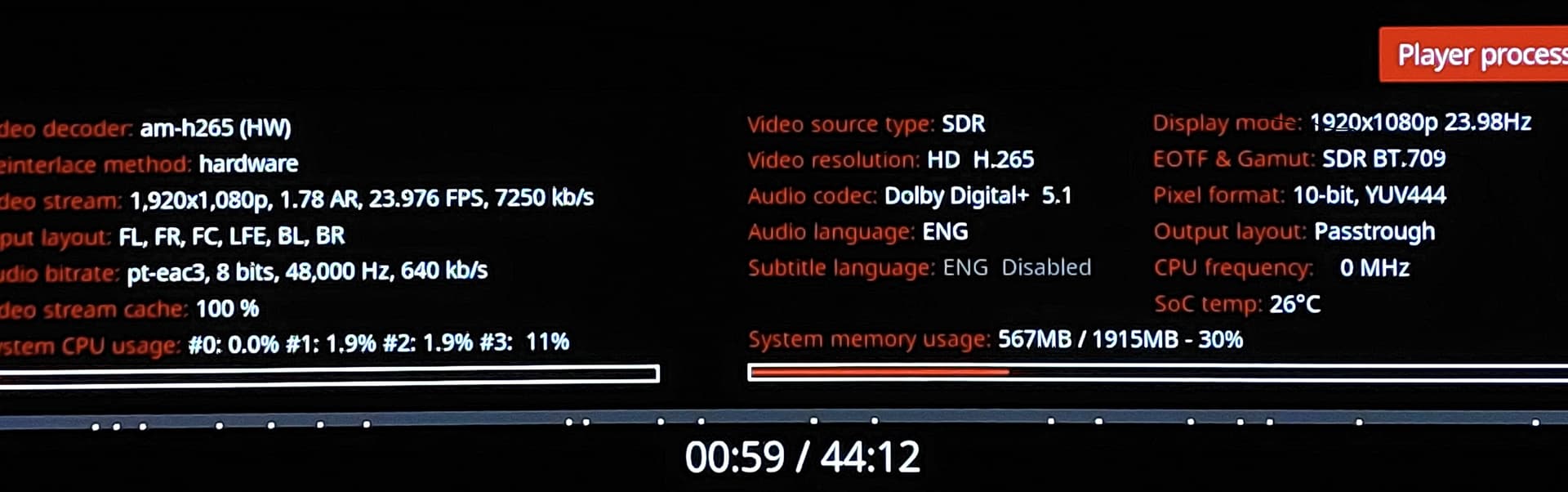
In first picture we see it’s HEVC 8 bits and in CE info we see 10-bit, YUV444.
Can someone explain this to me, why was the file encoded in 8 bit but outputing in 10 bit and in YUV 444 (why not 420 for example). I don’t know enough about this subject to understand and I’m curious.
I already asked this question before but how is it that CPU frequency doesn’t work, it always shows 0 MHz?
And finally, I said I would try and I’m not lazy but has anyone successfully mapped the Xiaomi remote for CE yet? As said before it is recognized and works for the most part but the center button (enter/validate) does something else entirely.
Fake TV-led is probably not the best way to describe it; it’s just how this has been referred to for a while. Google “fake tv led dolby vision” and you’ll get plenty of results.
Maybe, yes, but that’s just semantics. When I’m talking about “fake TV-led”, I’m obviously talking about it in the context of Dolby Vision.
Apparently this was fixed but not a lot of information about that hence my first question.
@djnice
I never said I don’t believe you, I asked if that had been properly documented somewhere, like CE team making an official statement or a Changelog saying something like: hey guys, we squashed that “fake” TV-led thing, now it works as intended and the player is no longer processing the RPU instead of the TV (like player-LED, LLDV etc.).
@Portisch
It has been discussed extensively in the thread I just posted above, thread in which you replied many times back in 2024 (for example Dolby Vision Implementation Discussion - #21 by djnice). Now again, I’m no pro and you’re gonna lose me sooner or later if you get technical about this, but I just thought my question was clear.
Also if anyone one has an answer to the other questions, would be greatly appreciated.
Here’s an explanation (need to use CC for English subs). I’m far from an expert on this. Dolby Vision, as good as it can be, is a convoluted mess of a proprietary HDR format. Maybe by design… and of course, now they’re giving us DV 2.
Let’s close this “fake” TV-Led topic. This has been fixed in CoreELEC since March 2024 (this was also necessary for CMv4.0 to work). There is also no problem with this box under Android. I checked it with HDFury Integral 2 + Decklink 4K Mini Recorder.
And again, I believe you, but it doesn’t answer my initial question (nor the others, for that matter).
EDIT:
Btw, never mind my question about the remote, I got my old Shield 2017 remote to work perfectly within CE. It’s actually even better than the Xiaomi one, the feel on the buttons is way better and there aren’t so many useless buttons like Netflix etc. All is good.
I’m new to Kodi/CoreELEC world, i got also this 3rd gen box.
These couple of days i tested multiple latest nightlies NO builds in a USB drive, but i got problems like several bootloops/kernel panics and mostly no BL/WIFi
these logs are with nightly_20251025-Generic build.
no BL/WiFi and sometimes multiple bootloops before successful boot
I managed to boot successfully with working WiFi/Bluetooth and without bootloops/kernel panics, only after i disabled the sdio@fe088000 in the DTB, i think there is a problem loading sdio and usb interface causing the kernel panic or no BL/WiFi, now only the usb interface is loading, i don’t know if this happened just to me because i didn’t see any user reported this problem, please correct me if i’m wrong, and suggest what i should do next, i only did some small test to this installation like testing wifi and some video/audio playbacks
Thank you
This is the new logs after disabling the sdio@fe088000
My device has the same behavior, several bootloops before successful boot. Could you share the dtb you are currently using, without kernel panic or no BL/WiFi?
I don’t mean to be rude, but could someone finally answer my first 3 questions if possible, please?
Asked again and again, never got an answer (and still for first question, I don’t doubt it’s been fixed but doesn’t answer it). If you guys don’t want to answer, then at least tell me and I’ll give up.