YoutubeTV addon

Hello

I made Chrome Launcher mod for youtube in TV mode.
I’ve tested in windows and Ubuntu. I can’t install coreelec to my V88 box I guess this box not supporting.
I need your help. Please anybody test it with coreelec and write comments/suggestions.
Here is the addon link

https://mega.nz/file/77B1jaIB#XK1fx4i-yK6hphp_cW6YVElL7eC7GXOnVgpjp_Uu7aE

Screenshot at Here https://ibb.co/jr7sDyX

PS: If I’m wrong section dear modorators please move to right place.

1 Like

You must installed Google Chrome Browser to work.
I guess there is no Google Chorome browser support (yet) in Coreelec like LibreElec.
Thank you for your reply.

Probably never will be supported in coreELEC

I would like to know if there has been any progress in investigating the bug reported in the aml-vnc topic?

Since the bug affects the CoreELEC DRM stack and not the VNC server, any feedback from the developers would be appreciated. Thanks in advance.

No dev does use the YouTube add-on anymore.
But it’s for sure the add-on so maybe contact the author? CE does a frame rate switch when it get need (reported).

Please read the entire post, the additions in the next post, and the attached log as well, because it clearly states that the problem is not in the YouTube add-on, but in the CE’s DRM handling.

If, after reading and interpreting the posts, you think that this bug is not in CE, then forget it. Unfortunately, investigating this bug took up more of my free time than I have these days, so I don’t want to waste any more time and energy on it.

I see the same issue with the youtube plugin, about 5s in the video changes framerate and (for me) a grayish image is seen and audio keeps playing but as soon as press pause on my remote the normal image is seen again. This may happen multiple times during playback.

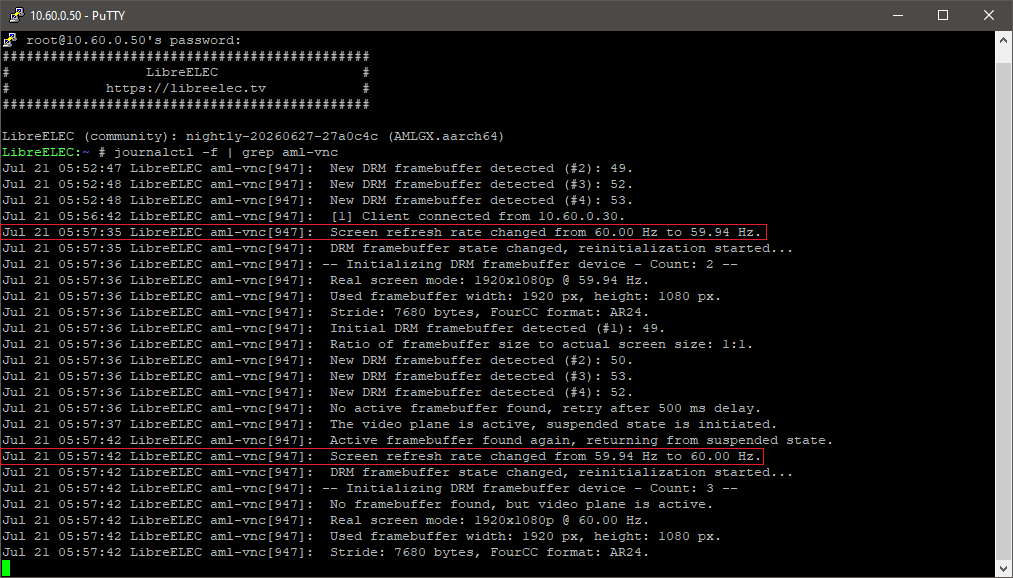
I think the bug is in the FRAC_RATE_POLICY handling, and I suspect there is a point where Kodi is not notified of an actual frequency change. I handle this case separately in AML-VNC (this is also visible in my vnc server log), but it is possible that at some point Kodi is not notified of this change, because there is actually a case here when it changes from integer to fractional, or vice versa, during video playback. In the case of CE, only the FRAC_RATE_POLICY property value changes, while the frequency value remains unchanged.

However, since the bug was attributed to the addon, no one is actually investigating it at the moment.

Edit: Unfortunately, moving this bugreport to the other topic proves that no one wants to deal with this bug. The bug is in the DRM implementation, not in the addon. This bug does not occur under LE13 when using the AMLGX image. However, there is no FRAC_RATE_POLICY under the mainline kernel. So now, what should be the next step?

Then try yourself if this is big issue?

As written 1000000000 times: this is hoby project and whoever do it decide what to do and what not.

Okay, that’s a very comfortable position on your part, I could have said the same when you contacted me about the VNC server with the DRM capture backend.

I had quite a lot of work with that, despite the fact that you were constantly changing the DRM stack under your system on the fly. What was fine one day, didn’t work the next day. But I solved it and didn’t whine.

Now, I only reported one thing, supported by screenshots and a log, and in the first round you didn’t even respond, in the second round you blamed the bug on the addon, and in the third round I got this reaction from you. Thank you, but I don’t need that either.

Are you sure it was me? I would say I was not.

And I’m not really full VNC user - just use it occasionally and could live without it. Like with everything else which is not under my control (because I just can’t do anything about it).

Me neither. But thank you anyway for the addon.
And regarding DRM changes (even if not my job): work in progress. Just look Kodi itself :smiley:

I meant “you” as the CE Team, not you personally as @vpeter. The person who contacted me was actually @Portisch here: DRM Grabber · Issue #1 · dtechsrv/aml-vnc-server · GitHub .

I accept that CE Team cannot debug due to lack of (human) resources, but the silence and then the “surely the addon is buggy” without technical arguments are not supported by anything, they just sound like a simple excuse.

Based on the responses, I don’t feel even the slightest effort in the fact that my post was read at all, which although doesn’t fill me with very good feelings, I’m not dying from it. However, the “solve it yourself” type of reaction is almost a bit stingy.

If I had enough free time right now, which unfortunately I don’t have much, I would find the root cause of the problem and send a PR, but unfortunately this can’t happen these days.

You’re welcome. :+1:

Yes, I did contact you about implement DRM grabber. This was same issue like here. CE was not able to solve by itself, the author of the addon was asked to.

There is no response as it’s clear it must be the addon. When it does report wrong FPS and after 5 seconds again Kodi just do it’s job told by the addon. This is called frame rate adjustment.

The difference here is that CE use a media perfect playback match, including fractional rate what other platforms just do not and you will watch anything like in 60hz or whatever the display mode was.

It’s maybe same like PVR, the addon report 0 fps, Kodi use GUI resolution. After 5 seconds by measuring the frames it does fix the display mode. Like when GUI is 60hz and YouTube is in real 59.94hz.

This is a common issue and Kodi Wiki says to adjust GUI refresh rate same as most of media is used. Any improvement on this side was declined by Team Kodi.

Anyway, nobody did analyse kodi.log so all is just guessing and useless discussing.

The addon is just not used by any dev as it’s way to complicated to setup. All new TVs have just a one button hit and it works OTB.

So is it worth to invest hours of reading debug logs just to prove it’s a fault of the add-on, what I am sure it is?

CE is a open source platform, PRs to fix such “issue” are welcome.

This is completely legitimate and understandable, I accept this because it is a simple fact.

However, I do not fully accept this. Unfortunately, from the complete lack of responses to my multiple bug descriptions, I can basically only conclude that they are being ignored, and your current theory is unfortunately also based on a partially incorrect assumption.

This is unfortunately a false statement, and I can confirm this with the frequency calculation in AML-VNC. LE13 provides correct values ​​via DRM, and there is no FRAC_RATE_POLICY property there, like in the Amlogic BSP kernel.

The formula for calculating the frequency is just this:
refreshRate = (double)(crtc->mode.clock * 1000 * scanFactor) / (crtc->mode.htotal * crtc->mode.vtotal * drm_getFracRate());

The value of scanFactor is 2 for interlaced scan, and 1 for progressive scan. drm_getFracRate() is interpreted for CE, which returns 1.001 if FRAC_RATE_POLICY is true, otherwise 1. (It returns 1 even if the property is missing, e.g. in the case of LE.)

In the case of LE13, this always returns the correct frequency value even without the FRAC_RATE_POLICY property, and after the second (fractional) change there is no bug, and the video is displayed immediately without any issue.

Therefore, the basis of the problem is that FRAC_RATE_POLICY is not a basic DRM property, so its handling is added to Kodi by CE afterwards. Thus, if this is not included in the frequency calculation at a critical point, it actually returns a false frequency. For example, according to DRM, the frequency change from 60 Hz → 59.94 Hz remains 60 Hz throughout, only the value of FRAC_RATE_POLICY changes. So, if a trigger monitors the actual frequency change, it will not indicate it here, and that is quite a problem.

Of course, I still don’t mean to say that you absolutely have to solve this, I just wanted to point out that if the bug is in the addon, why don’t I experience this error on other platforms at all? So your previous theory unfortunately seems incorrect.

You are correct and LE/DRM does not support frac rate. Kodi does and shows correct values but the display does not.

AML have the extra DRM property, what is vendor code base, not mainstream. Because of this the CE is able to handle all frame rates correctly.

When now frac rate does change Kodi does correct adjust it in hardware and to get it active a new mode switch is need. Even when resolution stay same.

To solve this item:

  1. Use exactly same refresh rate in GUI as video, like recommended for PVR
  2. Get the addon to report correct frame rate on video start so the auto video frame rate detection do not start. When you check Kodi log I am sure you will see 0 FPS. And after 5s it adjust correct need display mode.

I see same on PVR when GUI is 60hz but DVB is 50hz. After 5s the display mode is adjusted correctly to measured FPS 50hz because it reports 0 FPS on stream start.

Did someone already look now in Kodi log?
I guess not. So all, like written before, discuss is just useless. It becomes the same discussion like if you like real green gras or not.

^ There was a log before, but it has expired. I even found that turning on debug keeps the OSD open all the time, so it’s simply impossible to cause the bug in debug mode.

I can’t test the PVR right now, but it’s not the same situation because the base frequency is different, it’s not just switching between fractional and non-fractional framerate.

The problem is that we both have a certain theory, but of the two of us, you have a deeper understanding of Kodi’s code, while I only have a superficial understanding. So it’s a bit harder for me…

This might help, debug log without OSD.
advancedsettings file xml
loglevel 1

Without a Kodi log with video component enabled nothing can be done. Sure always on last nightly and only reproduce the add-on issue.

I will try to present a debug log tonight, but I think it wouldn’t hurt to include windowing either, because UI/OSD handling would also be good if it was visible in the log.