This post mainly targeted at @Portisch and @Joe_90 to add my own tests and findings on multich PCM audio.
My DuneHD BoxR 4K was updated to CE-NO 20260105 and I didn’t notice then that the forum was already in readonly mode so I couldn’t report my satisfaction. I always perform tests with my very own testsuite to validate that everything works after any update (2 USB sticks in a A/B system). I was pleasantly surprised to notice that finally, my 4ch audio files played correctly ! Until then, only the front channels would play, the back channels would remain silent.
NOTE: I’ve updated today to release 20260224 and everything still works as described.
I created a full set of audio files to test multich audio. There are a bunch of files with varying channels layouts and each channel is clearly identified beyond a shadow of a doubt! No confusion possible. These are :
- AudioLayout-5.0.flac
- AudioLayout-5.0-side.flac
- AudioLayout-5.1.flac
- AudioLayout-5.1-side.flac
- AudioLayout-7.0.flac
- AudioLayout-7.1.flac
- AudioLayout-quad.flac
- AudioLayout-quad-side.flac
The `-side` files are the actual correct layout used in the industry! It involves the SR (SideRight) and SL (SideLeft) channels. The RR (RearRight) and RL (RearLeft) exist as a valid audio layout but they are never used anywhere by anyone in the industry. I included them only for the sake of completeness for the tests. ALL receivers out there will correctly adjust non-side layouts to side layouts transparently on 5.0/5.1 setups.
4ch layouts only exist as quad-side layout in the industry. The 4.0 layout (with Rear L/R) exists but never was used anywhere by any studio.
5.1 and 7.1 are common, respectively with DolbyDigital/DTS and DolbyTrueHD/DTS-MA but NOT with DolbyAtmos nor DTS-X which both are object-based layouts. Both can be converted back to 7.1 PCM files with FFMPEG but position information will be lost and all height channels will be mixed into Side/Rear channels depending on their initial position.
5.0 is mainly found in classical music SACDs where a LFE channel makes no sense most of the time (piano and violin concertos).
Quad (4ch) is mainly found in recent multichannel releases of very old blues/rock recordings from the 70’s (ie: Pink Floyd, ZZ Top, The Doobie Brothers, etc.)
All the above files are also duplicated as AC3 files to be decoded by the receiver and confirm the correct layout.
I own a Denon receiver which features a very nice “Info” panel with named icons showing exactly the input layout and the output layout so you can exactly see what happens even with object-based audio formats as you can see. Sorry for the poor visual quality 
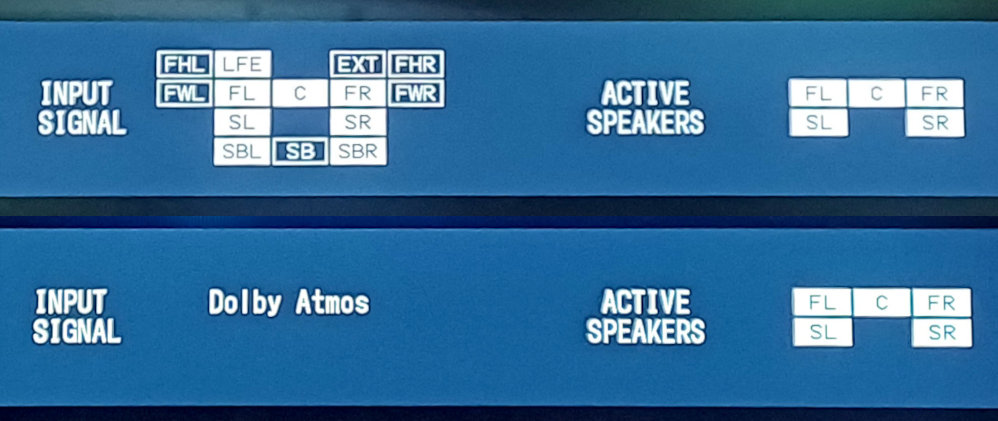
NOTE: The 7z archive is not big ~51 MB but too big for the upload feature of the forum. I don’t have an account at any upload service and I’d rather not open one for this one time operation. If someone have a long term account somewhere and would be willing to host the 7z archive for the benefit of all people in the forum, please contact me privately.
Ok so now here are my findings after the tests :
- 5.1 and 7.1 layouts work perfectly
- ALL x.0 layouts are promoted by Kodi/Kernel/Alsa (don’t know which) to their x.1 nearest equivalent
-
- 5.0 →5.1
- 7.0 →7.1
- Quad → 5.1
In all cases, the channel mapping is correct. You can hear the correct sound on the correct speaker.
Final note: From what I’ve seen in the previous posts, especially Amlogic-NO discussion - #2947 by Portisch there’s currently support for 2.0, 2.1, 3.1, 5.1 and 7.1 channels. The 3.1 is simply non existent in the industry and there’s clearly no point in supporting it. I mean from the Kodi/Kernel/Alsa point of view as an input channels layout. I dare anyone to find an official audio file with a 3.1 layout in the wild!
Please @Portisch remove the 3.1 layout and replace it with quad-side : FL+FR+SL+SR which is the actual 4ch used in the real world.
Any user with a physical 3.1 speakers layout connected to a receiver will have no problem as the receiver will always correctly adapt any input channels layout to the physical output speakers layout 
As always, thank you very much @Portisch for your hard work and dedication to make CE a really splendid and marvellous distro and @Joe_90 for your patience and test of various images! We all here should feel blessed and grateful that people of this quality work solely for our pleasure.
 for all of your work. I can’t believe you have been working on this project for about 2 years already.