stock Android firmware Tanix TX5 Plus — Яндекс Диск
dmesg from stock Android
https://paste.coreelec.org/CustomerRoxbury
ls -la /sys/bus/sdio/devices/
total 0/vendor
0x8888
0x8888
0x07
Does anyone work on uwe5631-aml driver for CE-NO ?
It never worked great and nobody did need it yet …
I managed to adapt uwe5631-aml for CE-NO and after simple tests it seems it works.
But there is some clash with EA6X21QX driver.
ENV{MODALIAS}=="?*", ENV{SUBSYSTEM}=="sdio", ENV{SDIO_ID}=="0000:0000", GOTO="load_module"
GOTO="end"

LABEL="load_module"
ENV{MODALIAS}=="?*", ENV{SUBSYSTEM}=="sdio", RUN{builtin}+="kmod load skw_sdio", RUN{builtin}+="kmod load skw"

LABEL="end"
which also triggers for the uwe5621ds wifi module … how can I distinguish those two devices in udev rules ?
This was the old udev rule:
### UniSOC UWE5631 and UWE5621 kernel modules
ACTION=="add", ENV{SUBSYSTEM}=="sdio", ENV{OF_NAME}=="wifi", ENV{OF_COMPATIBLE_0}=="sprd,unisoc-wifi", \
  ATTRS{vendor}=="0x0000", ATTRS{device}=="0x0000", \
  RUN{builtin}+="kmod load sprdwl_ng sprdbt_tty hci_uart", \
  TAG+="systemd", ENV{SYSTEMD_WANTS}+="sprd_sdio-firmware-aml.service"
And you will need a special node in your DTS to enable the driver:
What device is it for?
This will not solve the problem of unwanted skw module loading
Sure, this must be adjusted as well like:
diff --git a/projects/Amlogic-ce/packages/linux-drivers/amlogic/EA6X21QX/udev.d/80-ea6x21qx.rules b/projects/Amlogic-ce/packages/linux-drivers/amlogic/EA6X21QX/udev.d/80-ea6x21qx.rules
index c63ee42749..6fb2446b8e 100644
--- a/projects/Amlogic-ce/packages/linux-drivers/amlogic/EA6X21QX/udev.d/80-ea6x21qx.rules
+++ b/projects/Amlogic-ce/packages/linux-drivers/amlogic/EA6X21QX/udev.d/80-ea6x21qx.rules
@@ -1,6 +1,7 @@
 ### EA6X21QX
 ### this driver is split in two individual kernel modules
-ENV{MODALIAS}=="?*", ENV{SUBSYSTEM}=="sdio", ENV{SDIO_ID}=="0000:0000", GOTO="load_module"
+ENV{MODALIAS}=="?*", ENV{SUBSYSTEM}=="sdio", ENV{OF_NAME}=="wifi", ENV{OF_COMPATIBLE_0}!="sprd,unisoc-wifi", \
+  ENV{SDIO_ID}=="0000:0000", GOTO="load_module"
 GOTO="end"

 LABEL="load_module"
But without even know what device you work on it’s hard to say how to solve this issue.
Please share your last changes to the driver as I just was able to find a device with such chip.
Ok, i will clean it up and make a pr, maybe even today
I use gtmedia gtcombo device
bazzle
27 November 2025 01:24
364
S905x4
In NO I cannot get over 90 mb download using Speedtest app with wireless
In NG I can see up to 200+ mb using Speedtest app with wireless
I dont know if this helps. 2 clean installs
NO https://paste.coreelec.org/SaddledHometown
NG https://paste.coreelec/RoomieYvette
Baz
Thx, driver works. Wifi + BT is working on BuzzTV HD5. So the driver will be inlcuded with tomorrow nigthly.
You will still need to set the wifi node in your DT:
&sd_emmc_a {
	brcmf: wifi@1 {
		compatible = "sprd,unisoc-wifi";
	};
};
1 Like
hav
27 November 2025 12:55
367
NE 21 work wifi & BT
dmesg | paste
https://paste.coreelec.org/PlummerGarage
udevadm info /sys/bus/sdio/devices/* | paste
https://paste.coreelec.org/ToxicLongest
lsusb | paste
https://paste.coreelec.org/ApproachSlaves
NO 22.0-Piers_nightly_20251127 not work wifi, not work BT
dmesg | paste
https://paste.coreelec.org/DougieGrubbing
udevadm info /sys/bus/sdio/devices/* | paste
https://paste.coreelec.org/EmptyPaste
lsusb | paste
https://paste.coreelec.org/StrokesMisses
Try with this image:
And make a dmesg | paste log please.
hav
27 November 2025 14:55
369
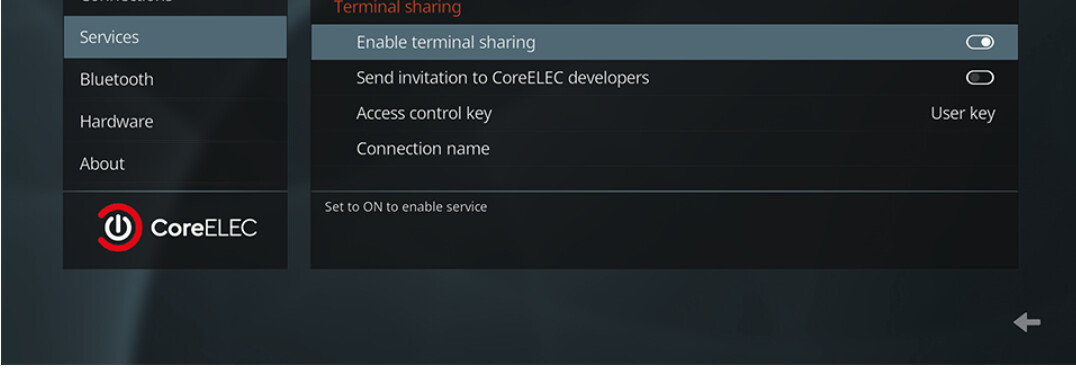
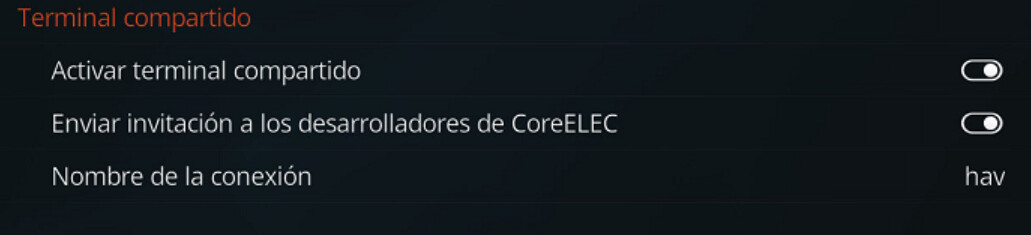
Nothing. Best is to emable tmate and we can more easy solve the issue:
hav
27 November 2025 16:32
379
I left it just as it appears on the wiki, but I just activated the second line.
vpeter
27 November 2025 16:42
380
Yes, now it is available. Leave it on and Portisch will look tomorrow.