I found the error.
It was due to the wrong dovi file. It has now been replaced and it works. I will now work my way through the settings and look for the best viewing experience for me.
1 Like
Yes, i know what you mean but I’m not sure. If i use the VRR overlay on 1080p content it says 1080p24 , not 2160p. I’m on Display-LED setting on an LG OLED.
I know for a fact most TVs support different resolutions and are able to switch to them depending on content.
Of course it does, because that is exactly the resolution your TV is receiving from the box.
How can’t you understand that if it says 2160, then that would mean the box is doing the upscaling (NOT your TV) and sending this resolution to TV?
If your TV does not upscale 1080p resolution the picture on your TV would look like this in yellow top left corner:
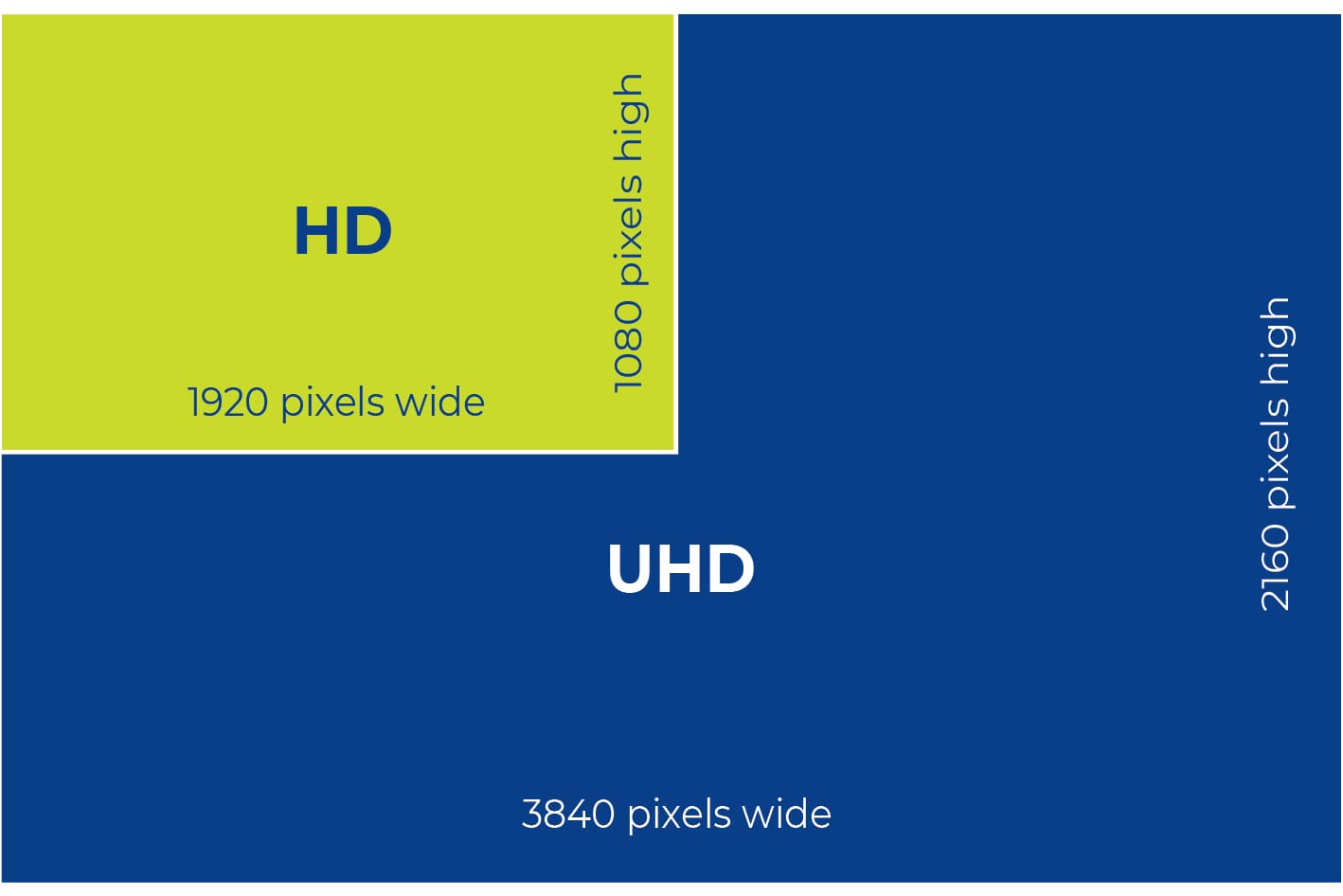
3 Likes
100% agree. You want your tv to display 1080p because that means it is receiving the source signal untouched. If the image is filling the screen it is being upscaled as your tv can only display images at its native resolution.
1 Like
Ok, fair enough, makes sense, thank you both! Appreciated
This is the CoreELEC CPM version made in Taiwan
Maybe you can try it, but the boot screen is in Chinese, you can change it to English.
I have only used the RockTek G2 version and it is very smooth to use.
CoreELEC NG 21.1.1 + Dovi + 2024/11/23 VS10CPM A11 Download URL
Not sure I see the point. I can create my own installation.
Anyone know what’s special/different about the Arctic Zephyr A11 skin mod for CPM A11?
The videostats (playerprocessinfo) are way more detailed. See screenshots.
1 Like
All the mainstream public service broadcasters in Europe use 1080/50i internally. Those that broadcast on DVB-T2 (or have online IPTV streams) in 1080/50p are almost always deinterlacing from 1080/50i sources, those that broadcast in 720/50p are cross-converting from 1080/50i (nobody produces in 720/50p natively in Europe AFAIK)
1080/50p production is still pretty rare - 2160/50p is probably more widespread. (Some broadcasters like the BBC are doing OTT streams of special events like the Euros in 1080p50 HDR using 1080p50 host feeds - but these, like the 2160p50 HDR broadcasts - are specials)
Lots of infrastructure is 3G-SDI (1080/50p capable) but running in 1080/50i still…
1 Like
A12
1 Like
It seems he went his own way with av sync stuff.
but just to be clear, this build includes the sync fixes (+ new latency adjustment) from mainline CE and just adds an experimental mode on top. Though I’m not fully sure I understand what it’s supposed to do just by the description, will have to study the code.
3 Likes
We have no idea how a latency should be automatic calculated from a display when you have no feedback…

It’s just a useless calculation because it is already done by Kodi by sync audio and video to maximum 50ms difference. But display latency can’t be auto calibrated/calculated because of the missing feedback.
These builds become more and more personalized for single person, so please be careful by using such private mod builds!
Thanks for the feedback, and clarification portisch.
I set now that in the advancedsettings, off (false).
Will try to play with that experimental setting , maybe later.
All other part of his build working excellent.
Of course the CE-NG nightly as base, working good too, without those extra stuffs.
Thanks for that.
I haven’t noticed anything negative so far.
It’s not better or worse now.
But I’ve also never had any problems with the A/V sync.
It has always been correct for me.
So I don’t really care about the whole issue. 
same-ish here. I experienced small de-syncs on some DV titles, but mostly it was ok (and better now with the fixes). Earlier on occasion I had severe AV sync issues and thought it had the same root cause, but it was mostly due to stupid HW combo issues: If I paused a movie for a long time ~15min or so (interrupted by a call or smth), then resumed the delay was around 750ms (was painful to watch), but debug info showed no change. Sometimes restarting videos a couple of times worked, but sometimes not. Then I restarted the box and it still had the sync issue, only full power cycle of TV and soundbar fixed it. I blame Samsung soundbar, while they sound very nice, they suck in terms of firmware quality: this bug, messing with EDIDs, etc.
1 Like
I would say that AV sync with passthrough audio seems generally better with A12 after (admittedly minimal) testing. I’ve done a bunch of tests pausing/unpausing and stopping/resuming playback and so far everything looks good. I would notice things dropping out of sync fairly often before this build.
Will update this post if I do notice any issues arising after I get more time with it.
3 Likes
Do we need to manually edit a file to enable? I’m not seeing menu options yet.
It mirrors the nightly, there is no menu option there either since it was a code patch.
If still needed there is option to further customize the audio offset by editing the advancedsettings.xml file similar to nightly. You will need to reference that thread to see how to customize that file, the Kodi Audio OOS thread.