DVB-S2 Tuner AVL6211 support on S905/S905H/S905D

Android DVB-S2.pdf (1.8 MB)

S905D.dts.txt (47.9 KB)

coreelecdvb.dts.txt (59.6 KB)

coreelecdvb_ser.dts.txt (59.6 KB)

After installing CoreELEC 21.3 with gxl_p231_2g_dvb.dtb as dtb.img everything seems working except for some freezes/crashes and dvb tuner which is not detected by default, after trying many things like different dtbs gxl_p231_2g_dvb_ser.dtb, different CoreELEC builds 9.2.8, 20.5, the only builds that get dvb tuner detected by default are builds 9.x.x but they only include driver for AVL6862.
Back to CoreELEC 21.3 :

CoreELEC:~ # dmesg | grep -i dvb
[    0.000000@0]d CoreELEC dt-id: gxl_p231_2g_dvb
CoreELEC:~ # ls /dev/dvb/
ls: /dev/dvb/: No such file or directory

So installed CoreELEC Module Drivers then DVB drivers from the latest kernel, rebooted this time :

CoreELEC:~ # dmesg | grep -i dvb
[    0.000000@0]d CoreELEC dt-id: gxl_p231_2g_dvb
[    7.002147@3]- kernel-overlays-setup: processing conf /storage/.cache/kernel-overlays/50-driver.dvb.dvb-latest.conf
[    7.045959@0]- kernel-overlays-setup: added modules from /storage/.kodi/addons/driver.dvb.dvb-latest//kernel-overlay/lib/modules/4.9.269
[   14.701412@3]- dvb_meson: no symbol version for amports_switch_gate
[   14.711019@3]- dvb_meson dvb: Found i2c-1 adapter: Meson I2C adapter
[   14.711027@3]- dvb_meson dvb: ts0: parallel
[   14.711314@3]- dvb_meson dvb: ts0_control: 0x0
[   14.711430@3]- dvb_meson dvb: dev_name=dvb
[   15.950570@2]- dvb_meson dvb: DVB demod detection for i2c-1 (Meson I2C adapter)…
[   17.164616@1]- dvb_meson dvb: Checking for Availink AVL6862 DVB-S2/T2/C demod …
[   17.164734@0]- i2c i2c-1: dvb_meson: i2c wr failed=-6 len=3
[   17.164807@0]- i2c i2c-1: dvb_meson: i2c rd failed=-6 len=4
[   17.164874@0]- i2c i2c-1: dvb_meson: i2c wr failed=-6 len=3
[   17.164935@0]- i2c i2c-1: dvb_meson: i2c rd failed=-6 len=4
[   17.164941@0]- i2c i2c-1: dvb_meson: attach failed reading id
[   17.164950@0]- dvb_meson dvb: Failed to find AVL6862 demod!
[   18.380579@1]- dvb_meson dvb: Checking for AVL6211 DVB-S/S2 demod …
[   18.380996@0]- i2c i2c-1: AVL6211+AV2011 DVB-S/S2 successfully attached
[   18.381010@0]- dvb_meson dvb: Total DVB modules found: 1
[   18.394152@0]- dvbdev: DVB: registering new adapter (dvb_meson)
[   18.403883@2]- dvb_meson dvb: DVB: registering adapter 0 frontend 0 (Availink AVL6211+AV2011 DVB-S/S2)…
[   18.404369@2]- Meson DVB frontend(s) registered successfully.
CoreELEC:~ # ls /dev/dvb/
adapter0

After installing Tvheadend Server 4.3 DVB tuner is detected but couldn’t get any signal, tried some DVB Tools commands :

CoreELEC:~ # dvb-fe-tool -a 0 --femon (0x00) (0x00) (0x00) ^CERROR FE_SET_VOLTAGE: Operation not permitted

After trying to manually decompile android box dtb.img to a dts which I got from a zip update file and decompiling dtb.img from CoreELEC to try to match them but knowing that different kernel and different mapping used on both so couldn’t find a way to actually achieve this.

In the attached files the box hardware layout, the decompiled files of both CoreELEC gxl_p231_2g_dvb.dts, CoreELEC gxl_p231_2g_dvb_ser.dts and original_android.dts, I’ve tried everything I can think of DTS editing, DTB conversions, comparing Android and CoreELEC trees, testing older CoreELEC builds, and cross-checking board variants (gxl_p212, etc.). But the tuner (AVL6211) still isn’t detected properly.

If someone with deeper knowledge of Amlogic DVBS/DVBS-2 drivers, DTBs, or CoreELEC kernel quirks can step in, your help could solve this once and for all.

Thanks in advance to anyone who can take a look.
1 Like

try this

dvb-fe-tool -a 0 --voltage=13

dvb-fe-tool -a 0 --voltage=18

CoreELEC:~ # dvb-fe-tool -a 0 --set-voltage 13
dvb-fe-tool: unrecognized option ā€˜ā€“set-voltage’
Try dvb-fe-tool --help' or dvb-fe-tool --usage’ for more information.
Usage: dvb-fe-tool [OPTION…]

CoreELEC:~ #  dvb-fe-tool -a 0 --verbose
Found dvb demux device: dvb0.demux0
path: /dev/dvb/adapter0/demux0
sysfs path: /sys/devices/platform/dvb/dvb/dvb0.demux0
bus addr: platform:dvb
Found dvb demux device: dvb0.demux1
path: /dev/dvb/adapter0/demux1
sysfs path: /sys/devices/platform/dvb/dvb/dvb0.demux1
bus addr: platform:dvb
Found dvb demux device: dvb0.demux2
path: /dev/dvb/adapter0/demux2
sysfs path: /sys/devices/platform/dvb/dvb/dvb0.demux2
bus addr: platform:dvb
Found dvb dvr device: dvb0.dvr0
path: /dev/dvb/adapter0/dvr0
sysfs path: /sys/devices/platform/dvb/dvb/dvb0.dvr0
bus addr: platform:dvb
Found dvb dvr device: dvb0.dvr1
path: /dev/dvb/adapter0/dvr1
sysfs path: /sys/devices/platform/dvb/dvb/dvb0.dvr1
bus addr: platform:dvb
Found dvb dvr device: dvb0.dvr2
path: /dev/dvb/adapter0/dvr2
sysfs path: /sys/devices/platform/dvb/dvb/dvb0.dvr2
bus addr: platform:dvb
Found dvb frontend device: dvb0.frontend0
path: /dev/dvb/adapter0/frontend0
sysfs path: /sys/devices/platform/dvb/dvb/dvb0.frontend0
bus addr: platform:dvb
Found dvb net device: dvb0.net0
path: /dev/dvb/adapter0/net0
sysfs path: /sys/devices/platform/dvb/dvb/dvb0.net0
bus addr: platform:dvb
Found dvb net device: dvb0.net1
path: /dev/dvb/adapter0/net1
sysfs path: /sys/devices/platform/dvb/dvb/dvb0.net1
bus addr: platform:dvb
Found dvb net device: dvb0.net2
path: /dev/dvb/adapter0/net2
sysfs path: /sys/devices/platform/dvb/dvb/dvb0.net2
bus addr: platform:dvb
Selected dvb frontend device: dvb0.frontend0
path: /dev/dvb/adapter0/frontend0
sysfs path: /sys/devices/platform/dvb/dvb/dvb0.frontend0
bus addr: platform:dvb
Device Availink AVL6211+AV2011 DVB-S/S2 (/dev/dvb/adapter0/frontend0) capabilities:
CAN_2G_MODULATION
CAN_FEC_1_2
CAN_FEC_2_3
CAN_FEC_3_4
CAN_FEC_4_5
CAN_FEC_5_6
CAN_FEC_6_7
CAN_FEC_7_8
CAN_FEC_8_9
CAN_FEC_AUTO
CAN_INVERSION_AUTO
CAN_QPSK
CAN_RECOVER
DVB API Version 5.11, Current v5 delivery system: DVBS2
Supported delivery systems:
DVBS
[DVBS2]
Frequency range for the current standard:
From:             950 MHz
To:              2.15 GHz
Symbol rate ranges for the current standard:
From:             800 kBauds
To:              50.0 MBauds
SEC: set voltage to OFF
ERROR    FE_SET_VOLTAGE: Operation not permitted

After digging further I think the problem is in tuner’s LNB controller AV2011, there is no hardware path to voltage, because DTB don’t enables the AV2011 chip but am not sure.

It’s most likely not a hardware issue, but a driver wrapper error. But you can measure the LNB output voltage with a meter. If you find 13 or 18 volts, the fault is definitely with the driver. If the frontend works with the old CoreElec 9.2 kernel 3.14, there’s a bug in the new driver.

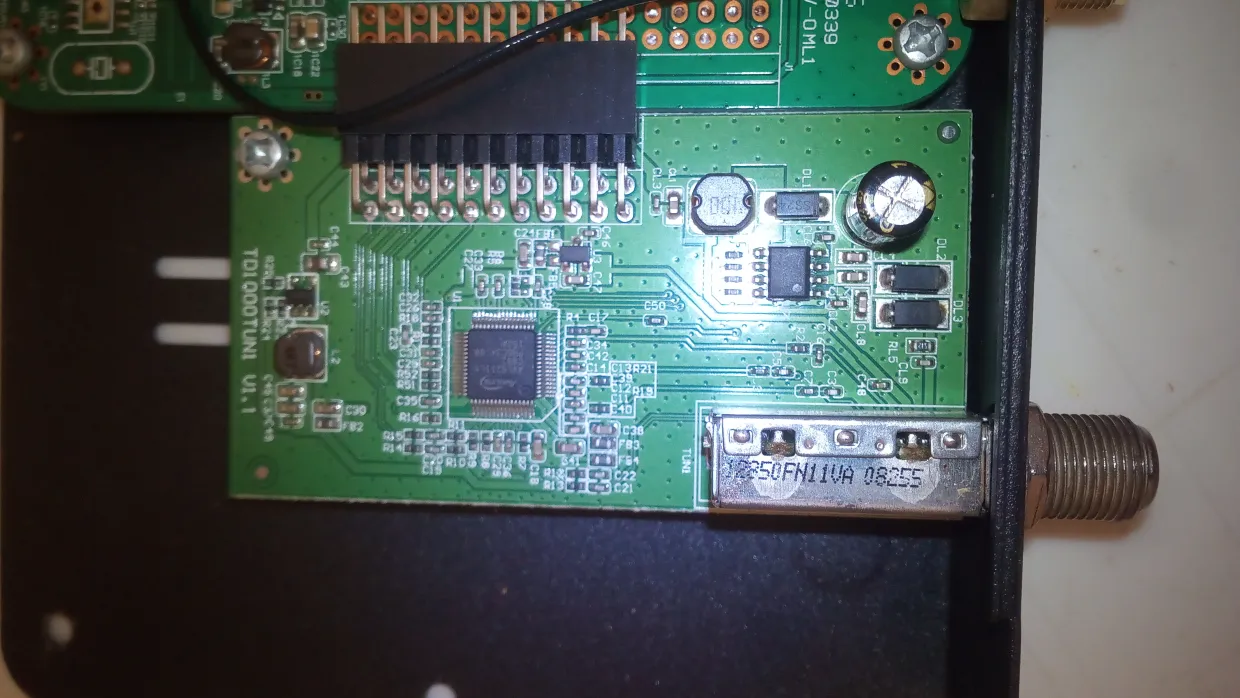
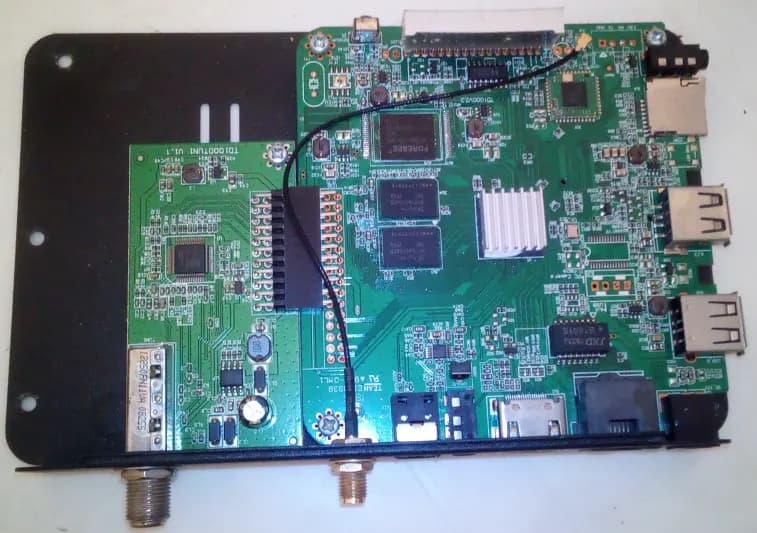
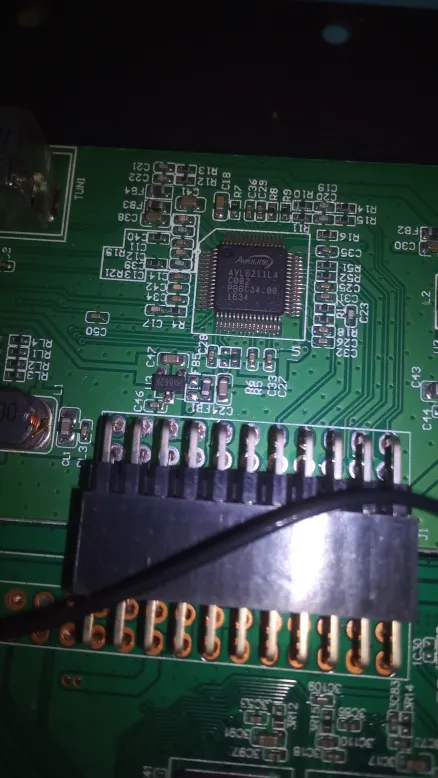
I’m no expert, but your device appears to have a dual tuner on Android DTS. So, there are two AVL6211s. I need a photo of the demod and tuner on the motherboard, along with a full dmesg. Try the following for the correct configuration for 4.9.

add nodes coreelec dts

/ {
    dvb {
        compatible = "amlogic, dvb";
        dev_name = "dvb";
        ts0 = "serial";
        ts0_control = <0x800>;
        ts0_invert = <0x00>;
        ts1 = "serial";
        ts1_control = <0x800>;
        ts1_invert = <0x00>;

        pinctrl-names = "s_ts0", "s_ts1";
        pinctrl-0 = <&tsin_a_pins>;
        pinctrl-1 = <&tsin_b_pins>;

        resets = <&clkc CLKC_RESET_DEMUX>,
                 <&clkc CLKC_RESET_ASYNC_FIFO>,
                 <&clkc CLKC_RESET_AHB_ARB0>,
                 <&clkc CLKC_RESET_PARSER_TOP>;
        reset-names = "demux", "asyncfifo", "ahbarb0", "uparsertop";
    };

    dvbfe {
        compatible = "amlogic, dvbfe";
        dev_name = "dvbfe";

        /* Frontend 0 */
        dtv_demod0 = "Avl6211";
        dtv_demod0_i2c_bus = <&i2c2>;
        dtv_demod0_i2c_addr = <0x0c>;
        dtv_demod0_reset_gpio = <&gpio GPIOX_12 GPIO_ACTIVE_LOW>;

        fe0_dtv_demod = <0>;
        fe0_ts = <0>;
        fe0_dev = <0>;

        /* Frontend 1 */
        dtv_demod1 = "Avl6211";
        dtv_demod1_i2c_bus = <&i2c3>;
        dtv_demod1_i2c_addr = <0x0c>;
        dtv_demod1_reset_gpio = <&gpio GPIOX_3 GPIO_ACTIVE_LOW>;

        fe1_dtv_demod = <1>;
        fe1_ts = <1>;
        fe1_dev = <1>;
    };
};

&i2c2 {
    status = "okay";
    clock-frequency = <100000>;
};

&i2c3 {
    status = "okay";
    clock-frequency = <100000>;
};

&pinctrl {
    tsin_a_pins: tsin_a {
        mux {
            groups = "tsin_a";
            function = "tsin_a";
        };
    };

    tsin_b_pins: tsin_b {
        mux {
            groups = "tsin_b";
            function = "tsin_b";
        };
    };

Getting syntax error when trying to compile the dts file after editing, error on line resets = <&clkc CLKC_RESET_DEMUX>,I think it has to be in the same instructions set that CoreELEC used for kernel 4.9.

Full dmesg attached (using gxl_p231_2g_dvb_ser.dtb and crazy cat drivers).

Full dmesg.txt (111.7 KB)

demotulator ok but tuner ?

if android dts is true. i2c-2 or i2c3

dvb {
compatible = ā€œamlogic, dvbā€;
dev_name = ā€œdvbā€;
ts0 = ā€œserialā€;
ts0_control = <0x800>;
ts0_invert = <0x00>;
ts1 = ā€œserialā€;
ts1_control = <0x800>;
ts1_invert = <0x00>;
pinctrl-names = ā€œs_ts0\0s_ts1ā€;
pinctrl-0 = <0x72>;
pinctrl-1 = <0x73>;
resets = <0x08 0x24 0x08 0x10 0x08 0x3d 0x08 0x39>;
reset-names = ā€œdemux\0asyncfifo\0ahbarb0\0uparsertopā€;
};

dvbfe {
	compatible = "amlogic, dvbfe";
	dev_id = <0x01>;
	dev_name = "dvbfe";
	dtv_demod0 = "Avl6211";
	dtv_demod0_i2c_adap_id = <0x02>;
	dtv_demod0_i2c_addr = <0x0c>;
	dtv_demod0_reset_value = <0x00>;
	dtv_demod0_reset_gpio = <0x18 0x3c 0x00>;
	fe0_dtv_demod = <0x00>;
	fe0_ts = <0x00>;
	fe0_dev = <0x00>;
	dtv_demod1 = "Avl6211";
	dtv_demod1_i2c_adap_id = <0x03>;
	dtv_demod1_i2c_addr = <0x0c>;
	dtv_demod1_reset_value = <0x00>;
	dtv_demod1_reset_gpio = <0x18 0x0c 0x00>;
	fe1_dtv_demod = <0x01>;
	fe1_ts = <0x01>;
	fe1_dev = <0x01>;
};

smartcard {
	compatible = "amlogic,smartcard";
	irq_trigger_type = "GPIO_IRQ_LOW";
	reset_pin-gpios = <0x18 0x46 0x00>;
	detect_pin-gpios = <0x18 0x45 0x00>;
	enable_pin-gpios = <0x18 0x42 0x00>;
	interrupts = <0x00 0x45 0x04>;
	smc0_clock_source = <0x00>;
	smc0_irq = <0x45>;
	smc0_det_invert = <0x00>;
	smc0_5v3v_level = <0x00>;
	smc_need_enable_pin = "yes";
	enable_level = <0x00>;
	smc0_clk_pinmux_reg = <0x30>;
	smc0_clk_pinmux_bit = <0x80>;
	smc0_clk_oen_reg = <0x200f>;
	smc0_clk_out_reg = <0x2010>;
	smc0_clk_bit = <0x2000>;
	smc0_clk_oebit = <0x2000000>;
	smc0_clk_oubit = <0x1000000>;
	pinctrl-names = "default";
	pinctrl-0 = <0x74>;
	resets = <0x08 0x0b>;
	reset-names = "smartcard";
	status = "okay";
};

The tuner works in the orginal android box os but not on CoreELEC, after editing the dtb file like above, the dvb tuner is no longer detected

CoreELEC:~ # ls /dev/dvb/
ls: /dev/dvb/: No such file or directory

Tried to include the dvbfe inside dvb same result, maybe 0x800 in CoreELEC doesn’t map the same as 0x800 in android box os.
Tried another box with S905H but it only works with CoreELEC non ng builds like 9.2.8 kernel 3.14.29, the problem is that box also has DVB-S2 tuner AVL6211 but CoreELEC 9.x.x only include driver for avl6862, for the first box S905D the CoreELEC ng build 9.2.8 kernel 4.9 dvb tuner is detected by default from first boot but also wrong driver.

S905H.dts.txt (41.7 KB)

I decided to boot into the original OS and extract the DTB just to be sure. It turns out that it’s not the same DTB that was included with the update ZIP file.
Really sorry about the confusion.
Here is the exact S905D DTB pulled directly from the OS, also updated the file in the first post and S905H.dts it turns out dtb files from the update images are not the same as the one directly loaded into the os.

S905D.dts.txt (47.9 KB)

dvb_meson: no symbol version for amports_switch_gate
[   14.711019@3]- dvb_meson dvb: Found i2c-1 adapter: Meson I2C adapter
[   14.711027@3]- dvb_meson dvb: ts0: parallel
[   14.711314@3]- dvb_meson dvb: ts0_control: 0x0

I didn’t check properly. According to the log in the first topic, the device isn’t receiving the TS signal because the DTS is configured in parallel. The exact reason is that the DTS pins are in the OUT groups, and the DVB part should work if it’s set to serial. There could be many reasons why it’s not working. 1- According to the image, the device has a single frontend. 2- According to the log, it’s definitely connected serially. Now, what’s needed:

1- Which CoreELEC version did you use with the 6882 addon to capture the log in the first topic?

2- Connect via SSH in that version and try i2cdetect -y 1, i2cdetect -y 2, i2cdetect -y 3, and share the log.

3- Send it along with your version information.

4- Send the version information and DTB.

5-send full dmesg


##############################################
#                  CoreELEC                  #
#            https://coreelec.org            #
##############################################

CoreELEC (official): 21.3-Omega (Amlogic-ng.arm)
      Machine model: Amlogic
     CoreELEC dt-id: gxl_p231_2g_dvb
      Amlogic dt-id: gxl_p231_2g
      Linux version: 4.9.269 (portisch@ubuntu) #1 Tue Nov 4 18:23:37 CET 2025
      Kodi compiled: 2025-11-04 18:37:48 +0100

CoreELEC:~ # i2cdetect -y 1
-sh: i2cdetect: command not found
CoreELEC:~ # i2cdetect -y 2
-sh: i2cdetect: command not found
CoreELEC:~ # i2cdetect -y
-sh: i2cdetect: command not found

https://paste.coreelec.org/HocusSignora

dmesg.txt (229.4 KB)

The frontend demod and tuner are recognized, but then there’s a WR error in I2C. It’s the same problem I’m experiencing. First, install the i2c-tool addon or entware from the coreelec addon section. Then send the i2c-1 and i2c-2 outputs. DTS will be easy based on that. I2c-1 already finds the correct driver address. The only problem is making the DTS serial, which I think is easy. My build is 5.15.170 CE no. 22. I’ll send the serial DTB as soon as possible. If there are no errors in the AV2011 driver, you should get a signal. The CrazyCat driver uses Av2010x.c

Didn’t find any of i2c-tool addon or entware, how to install them ?

The CrazyCat driver uses Av2010x.c so should I swap to latest kernel dvb drivers ?

System-tools addon has i2c tools included.

CoreELEC:~ # i2cdetect -y 1
     0  1  2  3  4  5  6  7  8  9  a  b  c  d  e  f
00:                         -- -- -- -- 0c -- -- --
10: -- -- -- -- -- -- -- -- -- -- -- -- -- -- -- --
20: -- -- -- -- -- -- -- -- -- -- -- -- -- -- -- --
30: -- -- -- -- -- -- -- -- -- -- -- -- -- -- -- --
40: -- -- -- -- -- -- -- -- -- -- -- -- -- -- -- --
50: -- -- -- -- -- -- -- -- -- -- -- -- -- -- -- --
60: -- -- -- -- -- -- -- -- -- -- -- -- -- -- -- --
70: -- -- -- -- -- -- -- --
CoreELEC:~ # i2cdetect -y 2
     0  1  2  3  4  5  6  7  8  9  a  b  c  d  e  f
00:                         -- -- -- -- -- -- -- --
10: -- -- -- -- -- -- -- -- -- -- -- -- -- -- -- --
20: -- -- -- -- -- -- -- -- -- -- -- -- -- -- -- --
30: -- -- -- -- -- -- -- -- -- -- -- -- -- -- -- --
40: -- -- -- -- -- -- -- -- -- -- -- -- -- -- -- --
50: -- -- -- -- -- -- -- -- -- -- -- -- -- -- -- --
60: -- -- -- -- -- -- -- -- -- -- -- -- -- -- -- --
70: -- -- -- -- -- -- -- --
CoreELEC:~ # i2cdetect -y
Error: No i2c-bus specified!
Usage: i2cdetect [-y] [-a] [-q|-r] I2CBUS [FIRST LAST]
       i2cdetect -F I2CBUS
       i2cdetect -l
  I2CBUS is an integer or an I2C bus name
  If provided, FIRST and LAST limit the probing range.

Switched to DVB drivers from latest kernel.

https://paste.coreelec.org/StoopCounters

dmesg.txt (133.6 KB)

try this

copy gxl_p231_2g_dvb.dts build folder linux-amlogic/arch/arm64/boot/dts/amlogic/coreelec-gxl/

#include "gxl_p231_2g.dts"

/{
	coreelec-dt-id = "gxl_p231_2g_dvb";

	dvb {
		compatible = "amlogic,dvb";
		dev_name = "dvb";
        	ts0 = "serial";
        	ts0_control = <0x800>;
        	ts0_invert = <0x00>;
       		dtv_demod0 = "Avl6211";
		dtv_demod0_i2c_adap_id = <1>;
        	dtv_demod0_i2c_bus = <&i2c1>;
        	dtv_demod0_i2c_addr = <0x0c>;
		dtv_demod0_reset_value = <0>;
		fec_reset_gpio-gpios = <&gpio GPIODV_13 GPIO_ACTIVE_HIGH>;
		power_ctrl_gpio-gpios = <&gpio GPIODV_11 GPIO_ACTIVE_LOW>;
		pinctrl-names = "p_ts0", "s_ts0";
		pinctrl-0 = <&dvb_p_ts0_pins>;
		pinctrl-1 = <&dvb_s_ts0_pins>;
		clocks = <&clkc CLKID_DEMUX
		&clkc CLKID_ASYNC_FIFO
		&clkc CLKID_AHB_ARB0
		&clkc CLKID_HIU_IFACE>;
		clock-names = "demux", "asyncfifo", "ahbarb0", "uparsertop";

		interrupts = <GIC_SPI 23 IRQ_TYPE_EDGE_RISING>,
			     <GIC_SPI  5 IRQ_TYPE_EDGE_RISING>,
			     <GIC_SPI 19 IRQ_TYPE_EDGE_RISING>,
			     <GIC_SPI 25 IRQ_TYPE_EDGE_RISING>;
		interrupt-names = "demux0", "demux1", "asyncfifo0", "asyncfifo1";
	};

};

&pinctrl_periphs {
	dvb_p_ts0_pins: dvb_p_ts0_pins {
			tsin_a {
				groups = "tsin_d0_a_dv0",
				"tsin_d1_7_a_dv1_7",
				"tsin_clk_a_dv8",
				"tsin_sop_a_dv9",
				"tsin_d_valid_a_dv10";
				function = "tsin_a";
			};
		};
	dvb_s_ts0_pins: dvb_s_ts0_pins {
		tsin_a {
			groups ="tsin_d0_a_dv0",
				"tsin_clk_a_dv8",
				"tsin_sop_a_dv9",
				"tsin_d_valid_a_dv10";
			function = "tsin_a";
		};
	};
};

&i2c0 {
	status = "okay";
};

&i2c1 {
	status = "okay";
};

&i2c2 {
	status = "okay";
};

&i2c3 {
	status = "okay";
};


gxl_p231_2g_dvb.dts (1.5 KB)

Where is linux-amlogic/arch/arm64/boot/dts/amlogic/coreelec-gxl/ I only compile decomplie dts dtb and test, if need to rebuild kernel that’s too advanced, also the code above gives syntax error when recompile to dtb.

gxl_p231_2g_dvb.dts (1.5 KB)

very simple method PROJECT=Amlogic-ce DEVICES=Amlogic-no ARCH=aarch64 ./scripts/clean linux

PROJECT=Amlogic-ce DEVICES=Amlogic-no ARCH=aarch64 ./scripts/build linux dtb compiled adter ctr+c and copy dtb to usb or sdcard /flash