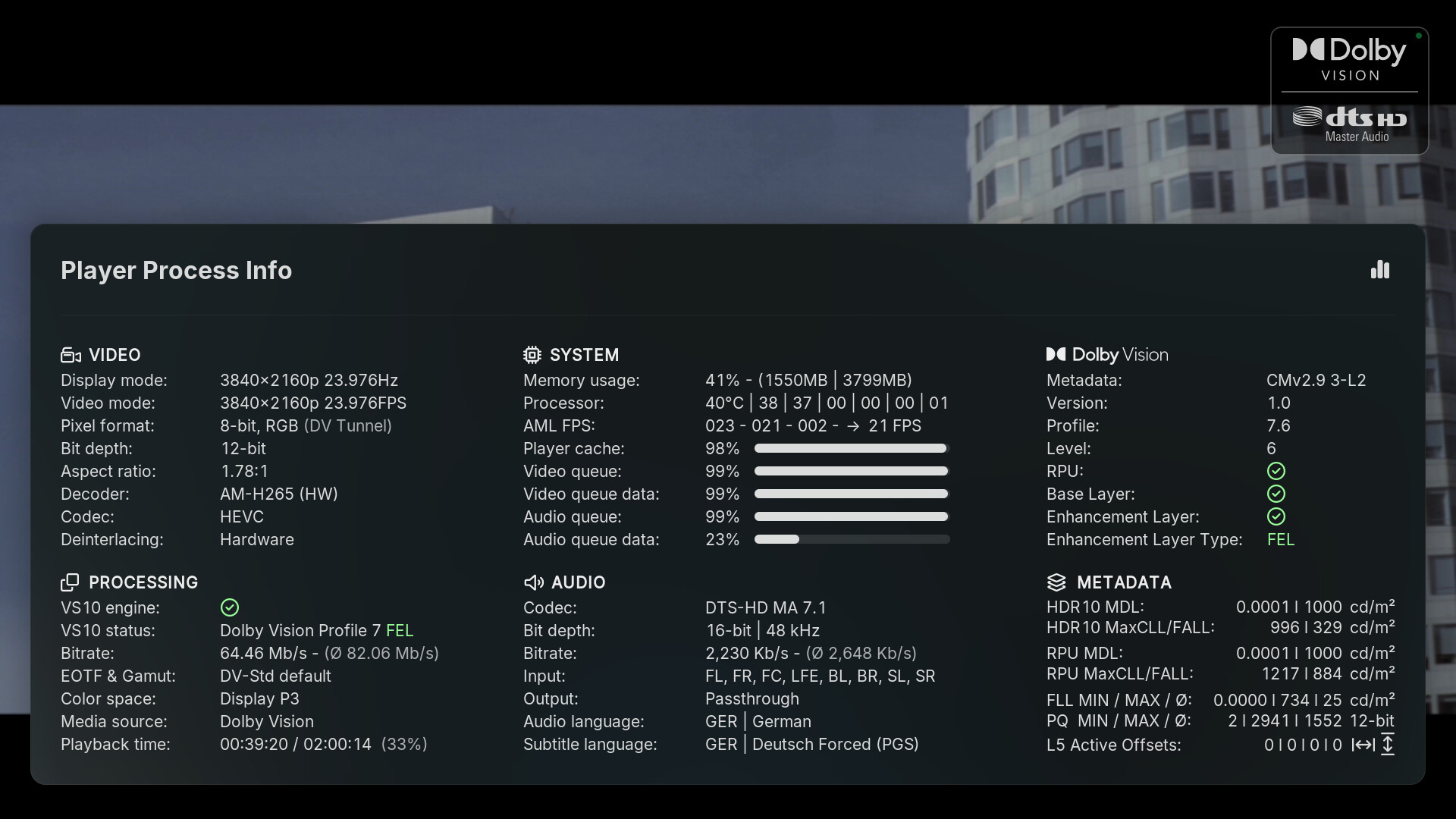
Would it be possible to add the code for PPI from the other sources in order to get extended PPI output? That would make the well-known skins possible again. If don’t have any objections to that, it could perhaps be ported at some point in the future? Of course, someone who submits a PR for it.
Example:
I think it need the second and third commit?Commits
or this?Commits
why don’t you submit upstream at Kodi, is the current playing information going to differ from the scanned information?
master ← jjd-uk:estuary_media_properties
opened 02:51PM - 05 May 26 UTC
## Description
Split from the closed PR https://github.com/xbmc/xbmc/pull/281… 20 **Note -** Media Details from PR28120 will be resubmitted also in a separate PR.
Update the displayed media properties for:
- Flags
- Stream selection
- Player Process -> Media
## Motivation and context
https://github.com/xbmc/xbmc/pull/27914 introduced the ability to show HDR details for files that contain multiple HDR metadata types. So Estuary needed updating where multiple HDR types exists and to show the Dolby Vision profile info introduced. While doing this took the opportunity to take another looks at what we displayed in all areas.
**Changed**
1. Flag info has in some cases now been abbreviated to make the labels shorter, for example Dolby TrueHD has become TrueHD. It was suggest that Dolby Vision could become DoVi however I'm not sure how many would easily identify that as meaning Dolby Vision. Note- added a new `AudioCodecFlagVar` variable for this so the longer label can still be kept where space isn't at such a premium.
2. Change Player Process to show the more user friendly labels
3. Separate object audio flag dropped for Atmos / DTS:X and insteam is combined with audio codec.
**New**
1. Display the HDR infolabels introduced by https://github.com/xbmc/xbmc/pull/27914
2. Audio language added to the audio channel count to create an audio property flag. This is something I've had in the back of my mind to add so I can easily identify which movies have a foriegn language track. Thoughts??
## How has this been tested?
Tested locally with Win 11 using a wide variety of movies/tv shows.
## What is the effect on users?
Improvement of media proterties shown within Estuary to users.
## Screenshots (if appropriate):
**Before - Library Flags**
<img width="1386" height="770" alt="Screenshot 2026-05-05 145301" src="https://github.com/user-attachments/assets/851ef4b6-ad64-46cb-92e5-45ab8552dd45" />
``
**After - Library Flags**
1. For HDR show the added ability to show both HDR types Dolby Vision and HDR10+ belonging to the video.
2. For audio codec shows abbreviated TrueHD combined with Atmos object audio.
5. For audio show the lanaguage & channels together.
<img width="1389" height="767" alt="Screenshot 2026-05-05 144424" src="https://github.com/user-attachments/assets/c8436504-04f3-4d0f-948e-2328acda430d" />
``
**Before - Playback video info flags**
<img width="1390" height="771" alt="Screenshot 2026-05-05 145340" src="https://github.com/user-attachments/assets/8ff35eb5-e3eb-4069-89e2-879ecf0d0f7b" />
``
**After - Playback video info flags**
1. For audio codec shows abbreviated TrueHD combined with Atmos object audio.
2. For audio show the lanaguage & channels together.
<img width="1388" height="766" alt="Screenshot 2026-05-05 144728" src="https://github.com/user-attachments/assets/566b56d4-6462-4857-b04e-9be8b5087511" />
``
**Before - stream selection**
<img width="1387" height="767" alt="Screenshot 2026-05-05 145424" src="https://github.com/user-attachments/assets/ae12d84e-672e-40fa-9ab9-1029b0fd76c7" />
``
**After - stream selection**
Show the added HDR detail giving the Dolby vision profile P7MEL
<img width="1386" height="768" alt="Screenshot 2026-05-05 144816" src="https://github.com/user-attachments/assets/774ee262-89d7-4027-80c1-a715902824c3" />
``
**Before - Player Process -> Media**
<img width="1386" height="767" alt="Screenshot 2026-05-05 145503" src="https://github.com/user-attachments/assets/c2a16f23-2c31-4eb3-986e-ad907fac7494" />
``
**After - Player Process -> Media**
1. Use the more user friendly labels
2. Show the added HDR detail giving the Dolby vision profile P7MEL
<img width="1385" height="767" alt="Screenshot 2026-05-05 144854" src="https://github.com/user-attachments/assets/0c79d742-4dee-4744-8782-b77e6423a921" />
## Types of change
- [ ] **Bug fix** (non-breaking change which fixes an issue)
- [ ] **Clean up** (non-breaking change which removes non-working, unmaintained functionality)
- [x] **Improvement** (non-breaking change which improves existing functionality)
- [x] **New feature** (non-breaking change which adds functionality)
- [ ] **Breaking change** (fix or feature that will cause existing functionality to change)
- [ ] **Cosmetic change** (non-breaking change that doesn't touch code)
- [ ] **Student submission** (PR was done for educational purposes and will be treated as such)
- [ ] **None of the above** (please explain below)
## Checklist:
- [x] My code follows the **[Code Guidelines](https://github.com/xbmc/xbmc/blob/master/docs/CODE_GUIDELINES.md)** of this project
- [ ] My change requires a change to the documentation, either Doxygen or wiki
- [ ] I have updated the documentation accordingly
- [ ] I have read the **[Contributing](https://github.com/xbmc/xbmc/blob/master/docs/CONTRIBUTING.md)** document
- [ ] I have added tests to cover my change
- [ ] All new and existing tests passed
master ← graham8:PRaddDVprofileHDR10p
opened 06:24PM - 25 Feb 26 UTC
## Description
Adds probe of video frames to get DV P7 EL type and hdr10+.
…
Gets DV details from second video stream if there are two tracks
Adds a new field to DB streamdetails table to contain DV profile and EL type (FEL/MEL)
## Motivation and context
Let's users see what type of HDR a file contains without playing it or using MediaInfo.
## How has this been tested?
Tested on LinuxMint with SQLite DB.
I added a signal to update a file by writing "--" to streamdetails strHdrType for testing.
I patched the skin Variables.xml to show the additional data.
## What is the effect on users?
Adds details of Dolby Vision files and identifies HDR10+ in file info.
Useful for troubleshooting HDR playback and/or to satisfy curiosity
## Screenshots (if appropriate):

## Types of change
- [ ] **Bug fix** (non-breaking change which fixes an issue)
- [ ] **Clean up** (non-breaking change which removes non-working, unmaintained functionality)
- [X] **Improvement** (non-breaking change which improves existing functionality)
- [ ] **New feature** (non-breaking change which adds functionality)
- [ ] **Breaking change** (fix or feature that will cause existing functionality to change)
- [ ] **Cosmetic change** (non-breaking change that doesn't touch code)
- [ ] **Student submission** (PR was done for educational purposes and will be treated as such)
- [ ] **None of the above** (please explain below)
## Checklist:
- [X] My code follows the **[Code Guidelines](https://github.com/xbmc/xbmc/blob/master/docs/CODE_GUIDELINES.md)** of this project
- [X] My change requires a change to the documentation, either Doxygen or wiki
- [ ] I have updated the documentation accordingly
- [X] I have read the **[Contributing](https://github.com/xbmc/xbmc/blob/master/docs/CONTRIBUTING.md)** document
- [ ] I have added tests to cover my change
- [ ] All new and existing tests passed
anything specific that can’t be loaded at scan time in the same manner?
That’s not what’s needed. I’m talking about DialogPlayerProcessInfo. The goal is to get the additional information shown in the image above.
ugh
@neqwdtkukwjaanti There’s no point putting this into upstream Kodi because many of these outputs are intended for FEL or Amlogic or can’t be used in standard builds.
Disagree.only the Current player information”
I have no idea what you’re talking about. What you’re referring to is something completely different from what I want.
As I said, I’m talking about PlayerProcessInfo.
Sorry, I thought I was talking to a developer.
If you see me as a developer, that’s fine. I see myself as someone who does this on the side as a hobby.
I hope a developer will take a look at what I’ve described here .
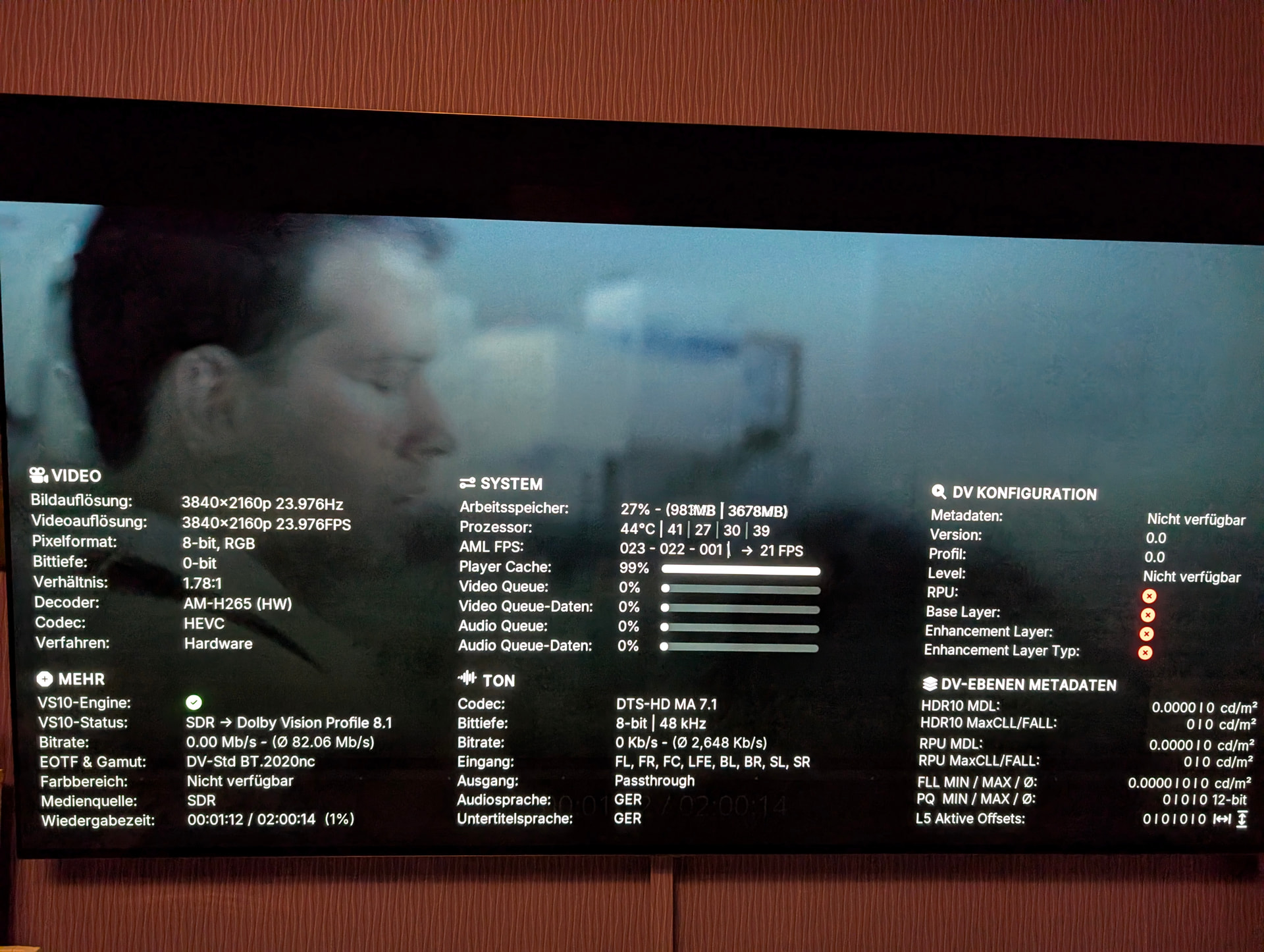
I tried to port it now.
committed 07:00PM - 09 May 26 UTC
It looks much better than before, but I can’t proceed any further because I lack the necessary knowledge.
What could be causing so many values to show up as 0 or empty?
Also, the VS10 status doesn’t seem to be correct. For example, it shows that the content is being converted from SDR to DV 8.1, even though it is P7 FEL material, the output is wrong here. Live Bitrate and Queue cache seems broken too.
I think there’s still something missing in the code…
This is the commit:
committed 10:33PM - 09 May 26 UTC
Current status:
Thanks!
I’ll continue trying today.
vlix
10 May 2026 07:23
13
There are live metadata that needs to be read from current player info, such as RPUs or L5 Data.
These live data could change while the file is being played.
I’ll give it up.
Why you don’t ask such people…
And then the people asking themselves why CE don’t want to corporate…
to hell with those who say stuff like that, you’re doing great stuff.
@Portisch please dont ever reply to such people. CE is the best and you are a Maestro.
Thanks for your efforts Jamal. Hope someone will continue…….
I don’t want anything to do with people who write things like that. Some people make a huge problem out of something that isn’t really a problem at all.
I’ll never understand it.
vlix:
There are live metadata that needs to be read from current player info, such as RPUs or L5 Data.
These live data could change while the file is being played.
Thanks for acknowledging the question.
I still think the static data that is consistent per container/stream (the dolby vision labels in the top right corner) could be scanned in and stored in the HdrType (strHdrType) field of the streamdetails table in the database.
At the same time if there’s a significant amount of HDR data about a file in the database:
it can be used to create more detailed icons in library displays (bottom right corner when highlighting a file).
it can be used in information screens
possible to create an entirely new detailed hdr information dialog in kodi where that information can be displayed
expand variables to playlist filtering so you can have a playlist that lists all DV Profile 7 titles in your library
expand to be used in custom library nodes to do the same
jamel just wanted to dismiss the entire thing because they didn’t understand it though