Anyone here know how to have mediainfo the same as CPM build where we can check the dolby vision profile 7 fel status on Ce-ng.
Hi My device Am6b + using 21.2 with CPM V14
When I play some M2ts UHD DV file , audio and video will losse sync
Video & Audio shutter but I use 21.2 wihtout CPM it seems better , any setting can suggest
My connect is AM6b directly to Denon X3700 AV amplieifer > Panasonic OLED TV Z85a
(post deleted by author)
I’m having trouble getting my device to see a mounted network share. My server is a simple Win11 machine running SMB, and I have my content separated into six folders on a single shared drive. I can see said content via smb and pointing to the win11 IP address, but I can’t figure out why doing this via mounted network share doesn’t work. This is on a fresh AM6B+ CPM build.
I followed the LibreElec wiki and came up with the following for my situation:
mkdir /storage/kids_a-k
nano /storage/.config/system.d/storage-kids_a-k.mount
systemctl enable storage-kids_a-k.mount[Unit]
Description=cifs mount script
Requires=network-online.service
After=network-online.service
Before=kodi.service[Mount]
What=//192.168.1.xxx/x/Videos/Kids Movies A-K/
Where=/storage/kids_a-k
Options=username=,password=,rw,vers=2.1
Type=cifs[Install]
WantedBy=multi-user.target
I can see “kids_a-k” as a local storage option in CE, but it doesn’t pull any content.
I ran these lines of code through chatgpt and it suggested I try the following:
[Unit]
Description=Mount Kids Movies A-K CIFS Share
Requires=network-online.service
After=network-online.service
Before=kodi.service[Mount]
What=//192.168.1.xxx/S/Videos/Kids\040Movies\040A-K
Where=/storage/kids_a-k
Type=cifs
Options=username=,password=,rw,vers=3.0,iocharset=utf8,file_mode=0777,dir_mode=0777[Install]
WantedBy=multi-user.target
Still no dice.
I followed this person’s guide YT Video, but alas, something is not right.
Running a log file gave me this where I searched for “kids”:
: storage-kids_a-k.mount: Where= setting doesn’t match unit name. Refusing.
: storage-kids_a-k.mount: Cannot add dependency job, ignoring: Unit storage-kids_a-k.mount has a bad unit file setting.
Any thoughts or ideas? I’ve spent a couple days trying to figure this out.
I have samsung S90D,CPM can playback profile 7 includ FEL,But profile 8 can’t playback FEL,Profile 5 can’t playback(Color Wrong)
Is anyone actively developing VS10 for This box since CPM disappeared?
Reason being is I had problems with A/V synch with Live TV running through VS10 on A13 and A14 (Due to change in corelec version) and CPM wasn’t interested in looking at a fix for it so I currently run A12.
Thank you.
The VS10 engine is already a year implemented in CE-NO.
Hi everyone,
I am Donnie and I am a new user here on this forum  In the past few days I’ve started exploring this interesting lore and I am quite impressed, since I am a big video enthusiast, I’ve managed to find a local listing for Ugoos AM6+ device (couldn’t find B, but I saw there is not that much difference).
Reading through the guides, I’ve successfully installed the CE nightly 21.2 and CPM build. Everything seems to work just great so far, haven’t had any big issues at all.
My Setup:
- Sony A95L
- Ugoos AM6 plus with CE + CPM
Plex on my PC for direct play over 1gbps wired network.
Now I installed latest beta PM4K also, and updated it using beta branch and use that to connect to my storage and playback videos. I mostly play Bluray remuxes with DV P7. So I want to have full profit of FEL, hence why I gone to play around this device.
If I understood correctly, no matter which mode in coreelec settings I select I am going to get full FEL layer benefits? So even if I select TV led option, I would technically get the benefit of TV’s tone mapping + the full MEL FEL RPU support? Does anybody got any tips for best Sony settings, do you guys turn off Sony tone mapping or keep it active when using TV LED? Any specific settings to turn off in the TV picture settings etc. Generally wondering what is the best quality setup for fully benefit of FEL. Also is the PM4K player best option for plex?
Thanks and sorry if this was asked before, but trying search didn’t give me exact answers.
Alright, after a lot of tinkering, i have found the culprit.
I booted the Homatics Box into Android. After that i changed the display color depth to 8-bit 4:4:4. then, i restarted the box and plugged in the USB stick with a fresh 21.2 NG install on it. Suddenly, it started working, and I had a display.
After that, I removed CoreELEC USB stick again, changed the setting back to 10-bit 4:2:0, and rebooted again with the CoreELEC USB stick, and everything is working now. Happy days.
Now for my last question, which build should I use to start setting everything up?
Should I just use the most up to date NG build that can be downloaded from the CoreELEC site, or should I use a CPM build? wat is the most stable and works well with HDR10+ ( My tv doesnt have DV)
Thanks!
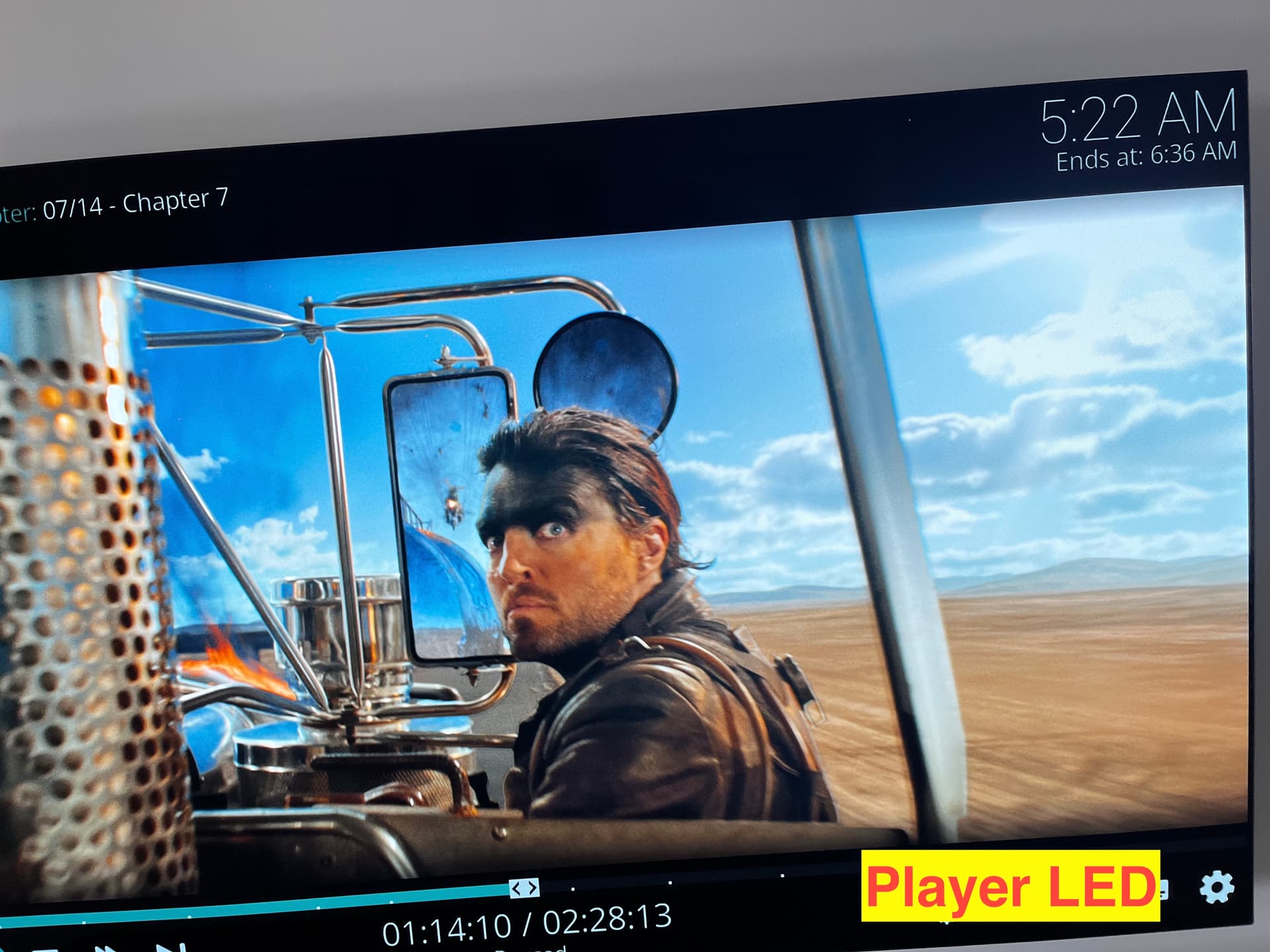
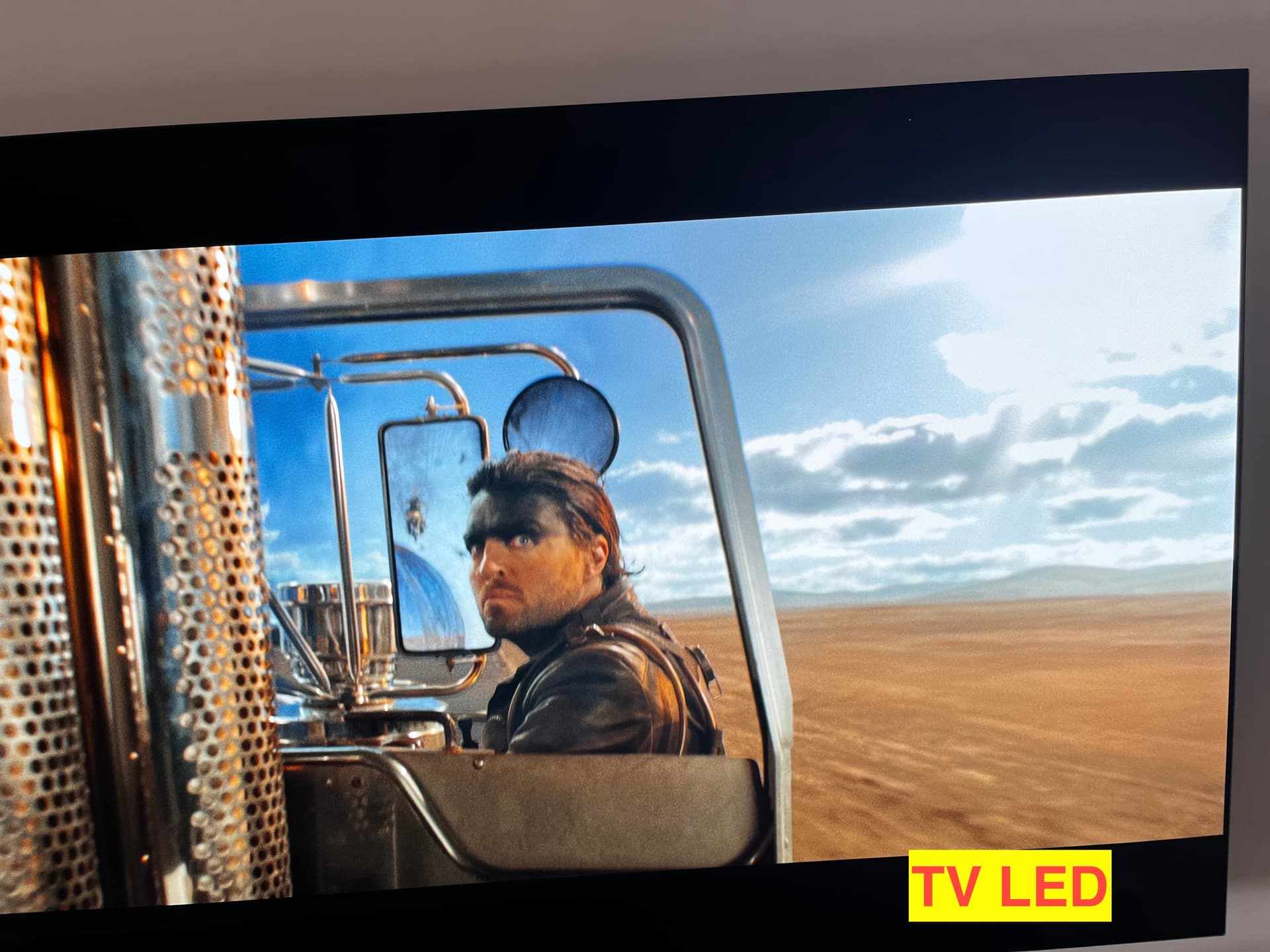
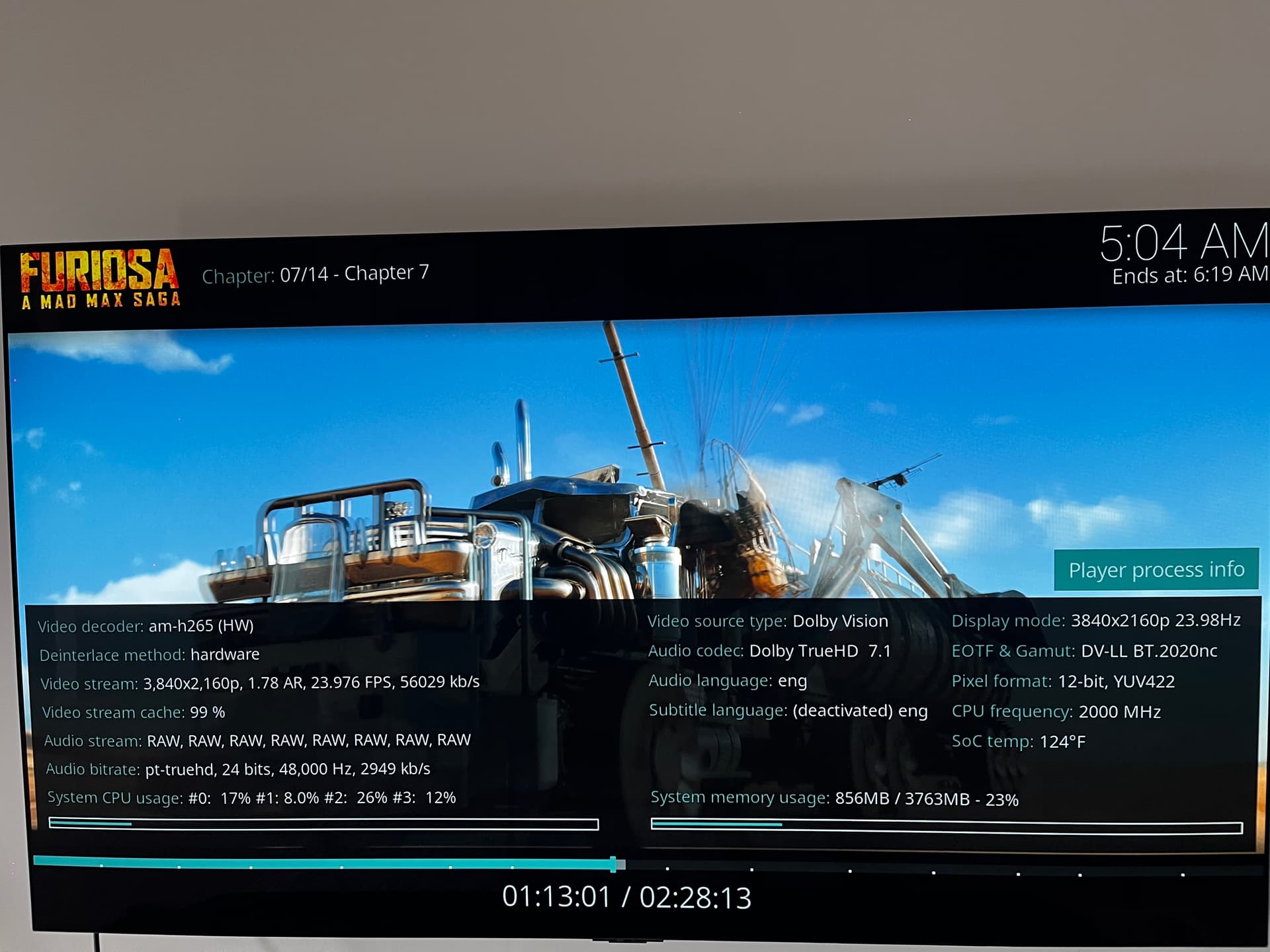
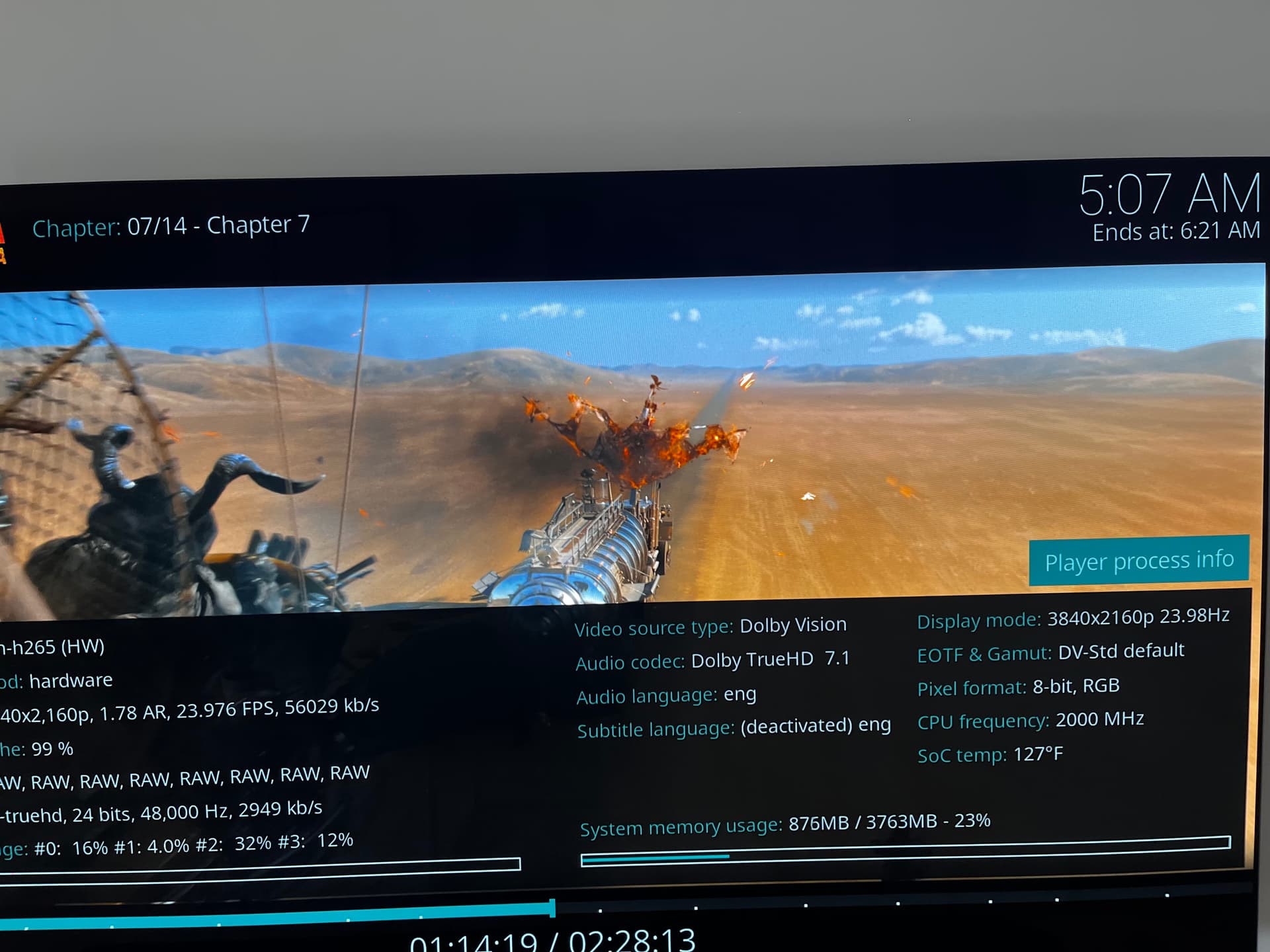
I’ve been testing Dolby Vision playback on my LG C4 OLED using CoreELEC(CPM A14 Build) on a Dune/Homatics box, and I wanted to share some detailed results for discussion. I’ve captured screenshots from Furiosa: A Mad Max Saga (UHD Blu-ray remux) in both Player-LED (12-bit) and TV-LED (8-bit tunneling) modes — and the differences are more interesting than expected.
Display: LG C4 OLED
-
Player: Dune Homatics 4K Plus (CoreELEC)
-
Source: Dolby Vision
-
Audio: Dolby TrueHD 7.1 passthrough
-
Display Mode: 3840×2160p @ 23.976Hz
-
Disable Noise Reduction : Enabled
What’s interesting is that, despite the 12-bit output in Player-LED mode, the TV-LED image is visibly brighter and often more accurate in terms of highlight tone-mapping and perceived PQ. — it’s how Dolby Vision tunneling is supposed to work ?
Notice right top corner in below images . 8-Bit Tv Led looks more brighter than 12 bit , so in my case TV Led is more accurate ?
is PQ and tone-mapping are often better with TV-LED on LG OLED panels, even if the reported output is “only 8-bit” , please clarify
Hello I noticed this issue with Am6B+
If you resume a 4K (UHD ISO or decrypted backup) then it selects the first track sometimes it can be an audio descriptive track and you can’t change the audio track, the only workaround is to stop the video and restat and get back to it. Also noted here:
https://forum.kodi.tv/showthread.php?tid=373528&page=2
It was fixed here -
I’m not sure, if its possible to have an Omega build with this fix? I’m using a CPM Coreelec Build with the box to get DV FEL playback. Any help would be great.
Thank you
CPM is not our build so please stop even mentioning it and spamming our forum.
As a non technician I am using Ugoos AM6B+/CE/CPM A14 for DV FEL on Sony 42A90K.
When connected to LG42C2 OLED, I had sublime image for DV. After first install DV FEL seemed to look very good on Sony A90K, but after a day/restart I was not thát sure anymore if I was looking at the same quality. I am reading about switching between Standard, Enhanced, and Dolby Vision mode for HDMI, and about different HDMi cables. Is there for the average user a solution to be sure I have 100% quality FEL on Sony Bravia?
Is it only these 2 options as an amateur?
“But all i have to do is change hdmi format quite often enhanced to standard which is more stable. Doing this shake the HDCP communication. which gives good picture quality.
“In tv setting clear tv cache while watching movie.”
Hello everyone,
I am seeking assistance regarding a specific boot failure issue on my Minix NEO U22-XJ device. I am trying to run the CoreELEC -ng branch (based on Kernel 4.9) to enable Dolby Vision (CPM) support, but I am unable to get it to boot.
 System Details
| Component | Value | Notes |
|---|---|---|
| Device Model | Minix NEO U22-XJ | S922X-J SoC |
| SoC Revision | 290A Rev A | Confirmed via Android kernel info. |
| Android Firmware | Minix Android P (008) | Have also tested 006 and 004 firmware versions with the same result. |
| Target CE Version | CoreELEC 21.x Omega (Amlogic-ng) |
Attempting to use the recommended base for CPM/DV FEL. |
 The Problem
-
CE-no (Piers 22.x, New Kernel 5.15+): Boots successfully and runs perfectly.
-
CE-ng (Omega 21.x, Old Kernel 4.9): Fails to boot. It goes past the initial Minix splash screen and shows the CoreELEC logo (the “eclipse”), but the loading spinner freezes immediately, or the screen goes black permanently.
 Steps Taken to Troubleshoot CE-ng
-
Device Tree (DTB): I have tried both DTB files available for the -ng branch:
-
g12b_s922x_minix_u22xj.dtb -
g12b_s922x_minix_u22xj_rev_a.dtb -
Result: Both DTBs result in the same freeze/stuck logo.
-
-
Resolution: I edited the
config.inifile and uncommentedvout='1080p60hz'to rule out an HDMI handshake issue.- Result: No change; still freezes.
-
CoreELEC Image: Tried with both the latest 21.x Omega nightly and a stable 21.0/21.3 release (Amlogic-ng).
-
dovi.ko: Have tested installation media with and without thedovi.kofile in the root directory.- Result: The boot failure is independent of the custom DV module.
 Request for Help
Since the newer kernel (CE-no) successfully initializes the hardware but the older kernel (CE-ng) consistently fails, it suggests a driver or kernel initialization conflict specific to the Linux 4.9 base and this hardware revision (290A Rev A) that is not being addressed by the standard DTBs.
Could this be a known issue with the 290A revision’s eMMC or an internal component that the older kernel is struggling to initialize? Is there a known workaround or a modified DTB/kernel that might resolve this specific kernel incompatibility?
Thank you for your time and any guidance.
Wrong forum.
BTW:
NG is EOL
Crucially, I am attempting to run the CE-ng branch because my U22 XJ (S922X-J) requires the older Kernel 4.9 (Amlogic-ng) for Dolby Vision Profile 7 (FEL)
I am a new member to the CoreELEC forum. I recently purchased the Minix NEO U22-XJ specifically to achieve Dolby Vision Profile 7 (FEL) support, as the Ugoos AM6B+ was unavailable in my country. I am migrating from a Homatics Dune HD device which had perfect playback, and I invested heavily in the Minix to retain this capability.
I understand that DV FEL requires the older CoreELEC -ng branch (Kernel 4.9), but I am hitting a consistent roadblock trying to get it to boot.
Any help would be greatly appreciated, as I’ve spent so much on this device just to enable FEL support. Thank you.
But this release is EOL, no more development
is thre any specific build to tryout cause previeosly it has been working with the device