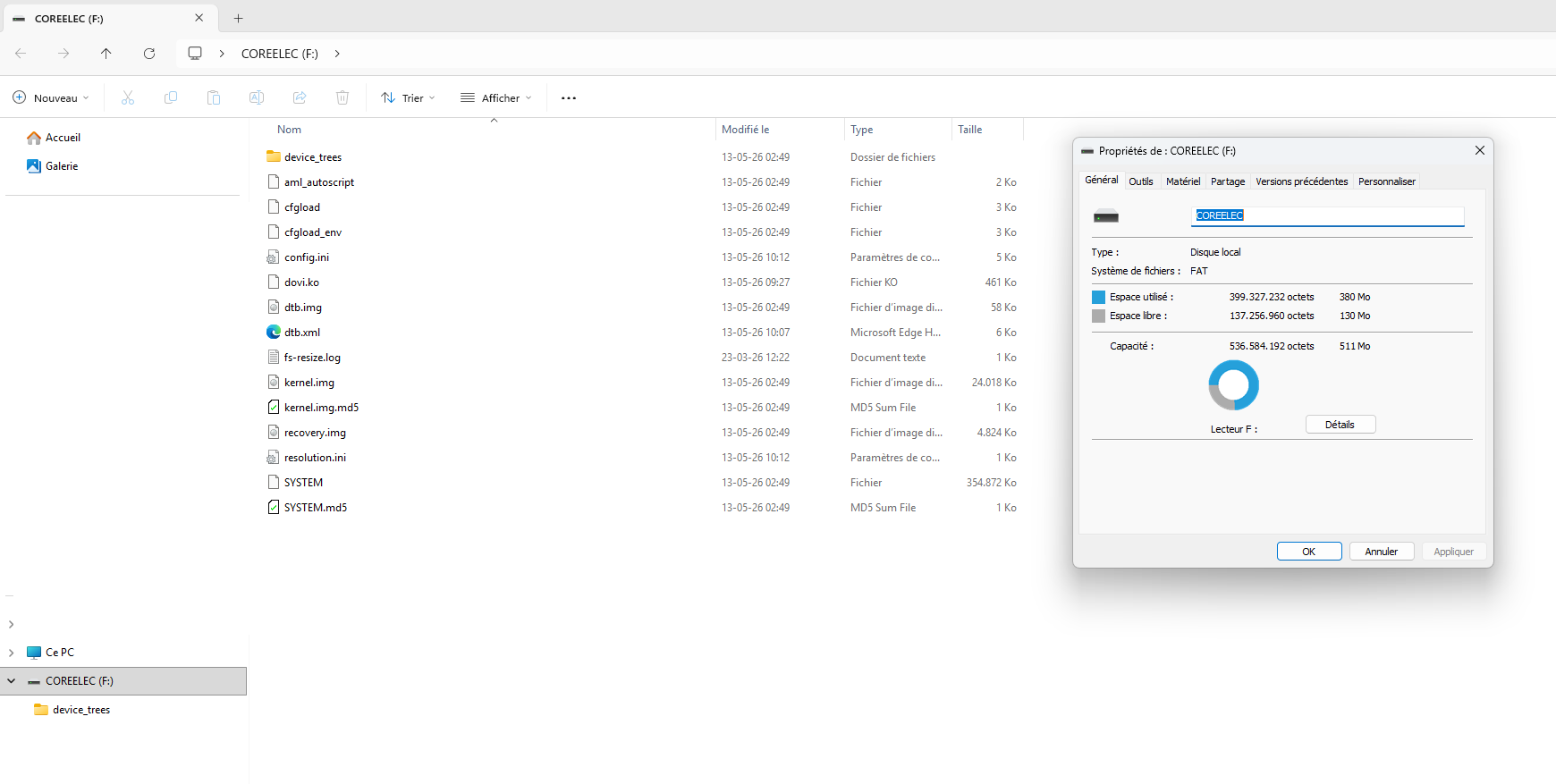
At worst, you can upload your image here and copy and paste the link afterwards: https://imgbox.com/
You need to have the same files as me at the root of the USB drive.
And you have the same dtb as me, so the problem isn’t there 
Without a USB drive, it boots well on Android TV but not in Recovery? Just to make sure your box isn’t bricked ^^
I only have a PC with Windows, not a Mac.
Ideally, it would be best to do it from a Windows PC to ensure everything is fine; I’m not sure if it would work properly through virtualization.
Here are the different steps I would follow:
- download the latest available nightly of CoreElec NO for PC, generic version: CoreELEC nightly builds
- do not decompress the archive, it should be placed as is on the balenaetcher or rufus program.
- burn the file onto the USB drive using BalenaEtcher or Rufus.
- once the files are on the USB drive, you need to remove it from the PC and then reconnect it to see the available content on the drive.
- check that the format of the USB drive is FAT (only a small partition of the drive will be in this format, do not touch the rest of the drive, the remaining part will be formatted by CoreElec into Linux Ext4 partitions)
- make a copy of the dtb file present in the device tree folder: sc2_s905x4_sei_smb_280.dtb
- be sure to display the extensions so that “.dtb” is visible.
- paste this file at the root of the USB drive and rename it to dtb.img, so the extension must be changed. If you do not display the extension, you might end up naming it dtb.img.dtb, which is incorrect.
- (optional) if you have a Dolby Vision compatible TV and you have content in that format, you can also add this file (5.15_2.6_dovi_patched.ko) to the root of the USB drive: FEL - Amlogic NO support
- you need to rename it to “dovi.ko,” also ensuring that the extension is clearly visible.
- safely disconnect the USB drive.
- unplug the power cord from the Homatics.
- insert your USB drive into the USB-A 2.0 port
- press the reset button with a small tool while simultaneously reconnecting the power cable
- you should see the fastboot message appear, followed shortly by the message “USB burning mode.” It is only at this moment that you can release the reset button
- if all the files have been successfully copied to the drive and the box isn’t bricked, it should start up