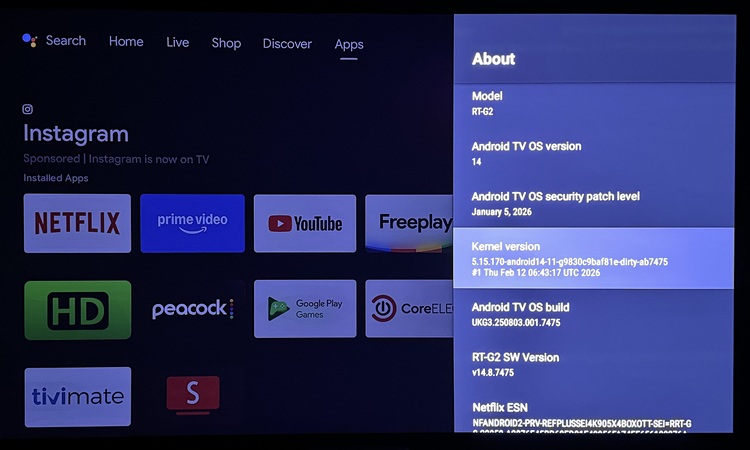
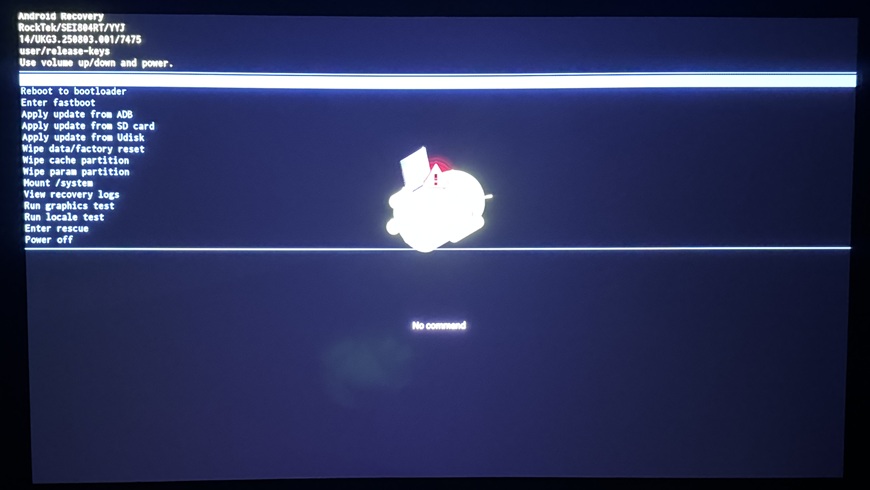
Has something changed w/the latest f/w that came installed? Can’t get CE to install. Tried adb reboot method, toothpick in reset hole method, and using Reboot-to-CoreELEC app choosing ‘First Boot’.
Have OEM Unlocking enabled, and USB Debugging enabled. Tried with both USB host mode enabled and disabled.
There is actually a very relevant recent G2 report from June 2025 where someone had essentially the same behavior: a new RockTek G2 would repeatedly reboot shortly after the RockTek logo with both USB and SD, even after trying different sticks/cards, CE20/CE21, different DTBs, reset-button boot and ADB reboot. They eventually reported that CE22 worked, seemingly without knowing exactly why.
And there are more recent reports showing RockTek G2 + CE22 working from external media, including a G2 running a CE22 nightly with the correct DTB and dovi.ko.
So I would not conclude that USB 3.0 is unsupported on the G2.
What I suspect in your case
Because yours is a new G2 with newer firmware, I would first try CE22 rather than CE21.
CoreELEC’s own announcement specifically identifies the RockTek G2 as an Amlogic-ne/Dolby-Vision-supported device, and CE21+ uses the newer 64-bit Amlogic-ne architecture.
The interesting thing is that the other G2 owner with the boot loop had tried CE20 and CE21 and then reported that CE22 fixed it.
What I’d do next
Don’t change anything on the Android installation yet. I’d test this in the following order:
Use the latest CE22 nightly for Amlogic-no/aarch64.
Write the .img.gz to a different USB stick, preferably a basic USB 2.0 stick if you have one.
Put:
dtb.img = sc2_s905x4_sei_smb_280.dtb
appropriate dovi.ko
in the root of the CE partition.
Try the recovery/reset-button method again.
If it still boot-loops, try the microSD card.
If both USB and SD produce the same loop, then we’re probably dealing with the newer G2 firmware/bootloader rather than the storage medium.
The same 7475 firmware and kernel version is also officially released for the other SEI804 series (Dune) Homatics R Plus, Dune Premier and Nokia 8010. The Dune’s officially even got a higher firmware (8963) and kernel version.
The Dune, Homatics and Nokia 8010 all boot just fine with CE 21.2/3 and 22, and using USB3, these boxes I all have. The Rocktek is the one I can’t try. The NE that shows on the CE download page is not the one to use. It is NG or NO, not NE.
The OEM unlocked setting has no real function
What gives me CE boot issues is when using a M.2 PCIe Gen3 NVMe drive in a USB enclosure, that one almost never boots to CE and mostly goes to Android TV recovery when trying to CE boot with it. Using USB Gen. 3.2 (Sandisk Extreme Pro) works just fine with the same CE installations.
If you mean the USB -C connector port I tried it on my G2 and don’t see anything on lsusb. The manual does say that it is a charging port. Booting from the blue USB port does work.
Not sure if a Homatics tuner would work on it (I don’t see anything in Android when I plug it in.
I am having a hard time believing firmware 7475 can’t load CE 21 but only on the G2.
That report Chat GPT cited dated June 2025, 7475 did not exist then. It did not come out until Feb 2026.
This is a little concerning since I’ve recommended to the G2 a lot lately as the cheapest way to get into CE 21. It was on Amazon for a bit at ~$135 with free shipping for a time.
Don’t know what to say, I tried mSD, USB2.0 and USB3.0 with adb reboot update method, toothpick in reset hole method, and Reboot to CoreELEC app’s First Boot method. None worked.
I believe you but that is very, very strange to me.
p750mmx is the SEI804 guru, maybe he has other ideas but my understanding is the firmware across all of those devices is more or less the same minus the splash screen and I think the Nokia has support for some extra remote functions.
I am running CE 21.3 on my 7475 Homatics just fine. Of course mine didn’t come with that version, I received it as an OTA. Did your G2 ship with it?
Mine came with one f/w before 7475, and I did an OTA update. Only thing I can think of trying is to let the unit sit on the Rocktek logo loop longer and see if that might work. Or take the DTB from the NO image and use that w/NG, but it’s the same DTB.
I wrote before, all other SEI804 ones are running just fine with CE 21.x (and CE 22), and I used NG a lot these past weeks, updated and clean builds. I can’t get my hands on a Rocktek G2 or else I bought one, just out of curiosity.
I could flash a Rocktek firmware on one of my other SEI devices, making it a Rocktek in the Android TV settings, but that is not the same as using the actual device itself of course.
The latest Google certified firmware shared is 8963, but only officially shared for Dune Homatics R Plus and Dune Premier HD Pro, but I have it on all my SEI804 devices, so on Homatics and Nokia 8010 also. NG still works nicely for me, as it did with 7574 and the V14 builds before that one.
I assume a Factory Reset is applied after a device got the first V14 firmware on it, because that is mandatory, not a maybe.
I decided to try 21.3 on a new SD card (it was working at one time before I upgraded to FWIW) and I get the loop on the Rocktek log with the GitHub release. I then tried a fresh nightly and it booted fine, so I manually updated the tar file to the 21 nightly and it did boot and downgrade and CoreELEC does run and Kodi launches and I can “hear” the remote navigate but I don’t see video output https://paste.coreelec.org/RampageSensors
Just out of curiosity, tried CE-NG 21.3 again, but w/sc2_s905x4_sei_smb_280 DTB from NO nightly, and as expected… didn’t work. Same stuck on looping RockTek logo.
I asked G2 owners on Telegram about this, one responded. NG is working just fine for that user with his G2. Currently has V14 8963 firmware on it, but it also worked just fine with 7475 and some older V14 builds.
As there is only one hardware revision (B) of the G2 (if I recall correctly), that can’t be a possible reason. The Homatics R Plus Silver, the Nokia 8010 and the Dune R Plus (with analog AV out on the back), are also revision B, and they both also work with NG. The R Plus RoseGold and Dune R Plus (without analog AV out), are revision D, also no NG boot issues.
My G2 worked 3 years ago and here is my board RockTek G2 - #44 by emveepee with the 7475 If have tested 21.2 and 21.3 and neither boot, they also loop on the RockTek but since 22 boots fine that really isn’t much of a concern since there is no value from a CoreELEC perspective to using the obsolete versions.