What skins do you use?
I’ll take a look at that tomorrow.
What skins do you use?
I’ll take a look at that tomorrow.
The skin is Estuary
OK thanks.
I will look tomorrow.
Hi Jamal please add arctic zephyr 2 resurrection / Reloaded
Did you read the title of the first post?
Any skin in 1080i/p is compatible without needing to be edited.
Version 1.5.4 fixes the problem.
Thanks for reporting.
not install arctic zephyr 2 skin hybrid
yes, ok now. Thank you.
 Changes:
Dear,
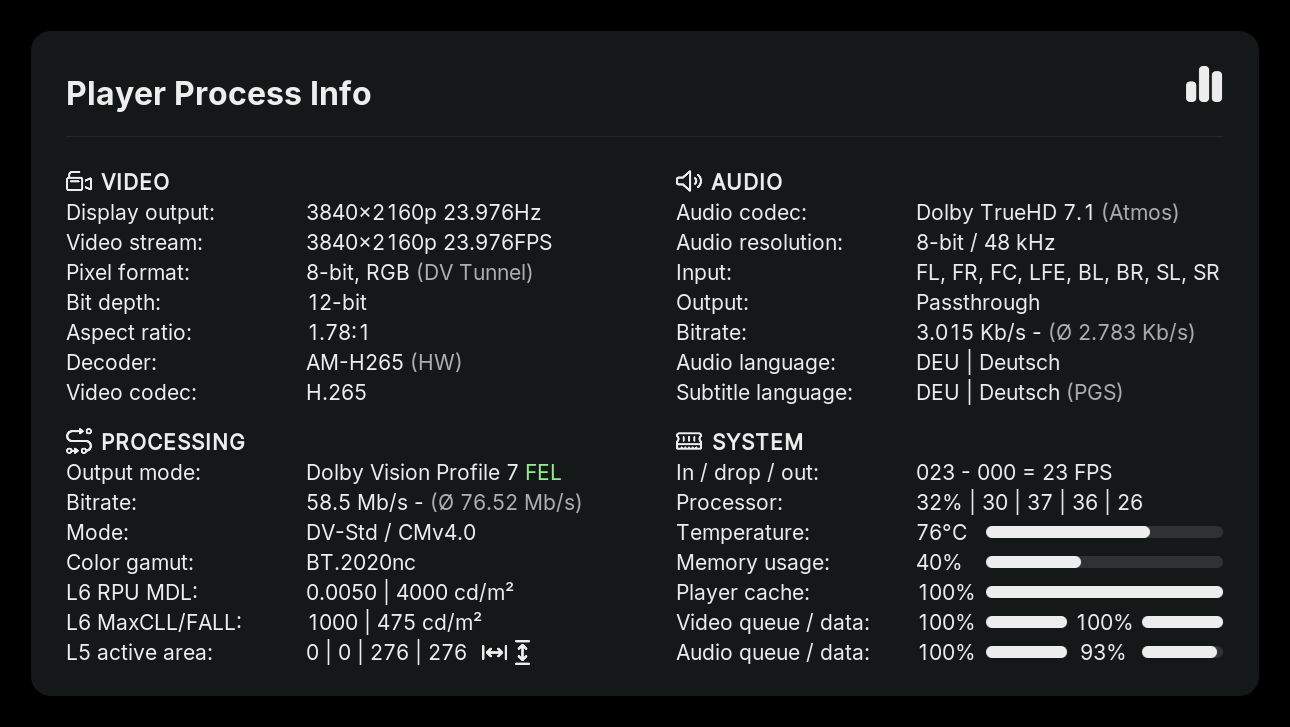
Why does the audio resolution information show “8-bit” instead of “24-bit”?
This is the output I get back as an InfoLabel. I’ve already looked for a solution but haven’t found a reliable one yet to improved this. I’m already aware of that.
Maybe @Portisch can help out. I’m not sure if this is a CoreELEC thing or a Kodi one.
Thanks @jamal2367 for your work.
 Announcement
TinyPPI has pretty much reached the end of its active development.
At this point, I’d like to let the project rest for a while and only touch it again if something needs to be fixed. All planned features are in place and everything is working really well.
The only thing that still bothers me is the bottom left L6 and L5 section. When content isn’t available in Dolby Vision, the three lines at the bottom simply show “Not Available”. I’ve run out of ideas for what else could be displayed there instead.
I could definitely bring back the playback time like before for non DV, but that would still leave me with two empty lines and no good ideas on how to fill them.
I don’t think this is correct and may a error of AESink in Kodi. “Default” is 24Bit float I think.
What is the var name? audio.?
I’m currently using this InfoLabel:
$INFO[Player.Process(audiobitspersample),,-bit]
I hope this helps.
From what I can tell, it always reports 8-bit, regardless of the audio format. The only exception I remember is AAC, where I think I saw a different value at some point.
check this post it should explain that info label concisely for you:
Thanks for the Link. 
If that can’t be fixed, I could define it myself using a Python hack. But I don’t know if there are different bit depths for a single codec like (e.g., DTS-HD MA).
Edit: I can rule out the Python hack, since it seems there isn’t just one bit depth per codec. DTS-HD MA, for example, can be 16, 20, or 24-bit.
Dear, did you find a solution?
No sorry. 
About | FAQ | Terms of Service | Privacy Policy | Legal Notice