With this add-on, it seems the dedicated CPM firmware skin is no longer required. I’ve installed it on CoreELEC NO for the AM8 Pro and set up a key mapping to trigger it. But the startup is slow — sometimes the player processing windows takes 3–5 seconds to pop up. What’s the reason behind this?
TinyPPI is much more than a simple PPI. Alongside the overlay, the add-on includes a web dashboard, an API, codec logos, channel logos, a lot of settings and many more. Queries run continuously in the background. Codec logos are scaled via Python when needed and stored in a cache. Depending on your CPU, this can cause short delays, especially the first time. This is completely normal. Once the cache is built, everything runs more smoothly.
A maintenance update: the web dashboard is safer, many small bugs are fixed, and a lot of work went on behind the scenes to keep TinyPPI reliable.
Web dashboard – safer access
Your access code stays private. The code (token) is no longer part of web addresses. Before, it could end up in your browser history or in log files. Now it is sent in the background only, and the dashboard remembers you with a session cookie that scripts cannot read.
Viewing without the code only works at home. If you allow viewing without the code, this now applies only to devices in your home network – not to devices reaching your box from the internet (for example over IPv6).
Better protection against guessing. Anyone who tries too many wrong codes is locked out for 10 minutes. At home each device counts on its own, so one phone with a typo no longer locks out the whole household. From outside, one device can no longer dodge the lock by switching to a new IPv6 address.
The lock list can’t overflow. The list of locked-out devices now has a size limit, so many senders cannot slowly fill up your box’s memory.
Fixed a security gap with cover pictures. A specially crafted picture name could slip unwanted data into the server’s reply. This is now checked.
Web dashboard – fixes
Film and series lists no longer get mixed up when your library changes while the list is loading (for example during a library scan).
Tapping a title while the list is being rebuilt now works correctly.
Series search works reliably again.
Turning remote control off and on again in the settings no longer leaves the lists in a wrong state.
Lists update properly after changes – some changes (like a watched mark) did not always show up until a full reload.
Cover-based colour tint reads the cover colours more reliably.
The bar colour is correct right after the page loads, not only after the first update.
Connecting to the box: an error reply from the box is now recognised as such instead of being misread.
If the dashboard cannot start on the box (for example when the system is short on resources), this is now handled cleanly.
General fixes
Broken values from Kodi – such as an invalid resume point, frame rate or brightness (luminance) value – no longer break the display.
Colour settings containing non-Latin digits (for example Arabic numerals) are now read correctly.
Missing translations in the web dashboard now fall back to English.
Behind the scenes
These changes are not visible, but they make future updates more reliable:
Every part of TinyPPI is now tested automatically – both the add-on and the web dashboard. Every change is checked before it goes out, including a real browser test of the dashboard. Writing these tests uncovered most of the bugs fixed above.
Automatic quality checks for code style, data types and code complexity run on every change.
Large program parts were split into smaller, clearer pieces, which makes bugs easier to find and fix.
The official Kodi add-on checker now runs on every change.
Development files are no longer shipped – the installed add-on contains only what it needs.
Developer tools are kept up to date automatically.
The progress bar on the web dashboard now marks the chapters of the playing file (e.g. MKV with chapters). Only the chapters still ahead of the playback position are shown, so the part you have already watched stays clean.
Hover over the bar with the mouse or drag it, and all chapters appear, including the ones you have already passed (in a lighter tone), so you can jump back as well.
The current chapter is shown above the progress bar, e.g. Chapter 6 of 13 · The Hunt.
Names that ripping and muxing tools make up (“Chapter 06”, “Kapitel 6”, “06”, “00:57:32” …) are hidden, and “Chapter 6: The Hunt” is shortened to “The Hunt”.
Hover over or tap a marker to see the chapter’s name and start time; click it to jump straight to the start of that chapter.
Page Up / Page Down jump to the previous / next chapter while the progress bar has focus.
Chapter markers can be switched off per device: Settings tab → Show chapter markers.
Progress bar
The progress bar can now be dragged, not just tapped: with a finger on phones and tablets, or with the mouse held down.
While dragging, the time below and the chapter label follow your finger and the bar snaps onto chapter markers. The box only seeks once you let go.
Other changes
The labels on the VS10 buttons are centred.
TinyPPI Mobile 1.5.8 (Android app)
Chapter markers on the progress bar as well: only the chapters ahead are shown, and all of them appear while you drag the slider.
The current chapter is shown above the progress bar.
Dragging snaps onto a chapter marker with a short vibration.
New setting Chapter markers under Appearance.
Fixed: after briefly leaving the app it showed “Offline” until the next connection attempt. It now reconnects immediately when you come back.
The chapter markers need TinyPPI 2.16.0 on the box.
Note: Chapters are read from Kodi itself (new in Kodi 22). Files without chapters simply show no markers.
New “CPU / RAM” row: total CPU load and memory usage now sit side by side, each with its own bar.
“Processor” is now “CPU cores”: this row shows only the load of each core.
The core row adapts to your box:
up to 5 cores: 12% | 08% | 15% | 10% | 11%
6–7 cores: 12 | 08 | 15 | 10 | 11 | 09 | 14
8+ cores: 12, 08, 15, 10, 11, 09, 14, 13
Fixes
No more #0: nan% #1: nan% … in the CPU row. Kodi sometimes reports a core as nan; that core now keeps its last valid value, and Kodi’s raw text never shows up again.
Dolby Vision profile number is now centred properly.
Both the web dashboard and the app now have an Overview card under the
card of what is playing. Everything in it is centred:
Tagline and plot. A long plot is cut to four lines. Show more / Show less opens and closes it.
Cast. The first eight names in billing order, with “…” when there
are more. Episodes list their guest stars first.
Ratings. A row of shields, all the same height:
The age rating comes first. FSK, MPA, TV Parental Guidelines and
BBFC each get a shield: the board’s name on the level’s colour
(“FSK | 12”, “MPA | PG-13”, “TV | MA”, “BBFC | 15”).
One score per source, with its vote count: IMDb, TMDb, Trakt,
TVDB, Letterboxd, Metacritic (critics and users), Rotten Tomatoes
(Tomatometer and Popcornmeter), Roger Ebert and MyAnimeList.
Your own rating and the IMDb Top 250 place.
The card appears whenever there is a plot, a cast or a rating. It folds
like every other card.
New: Ratings from MDBList
Kodi’s library often holds only the TMDb rating. With a free MDBList API
key, the Overview card shows every rating MDBList gathers for a film.
Sign in at mdblist.com, open Preferences → API
and copy your key.
In Kodi, paste it into TinyPPI → Settings → Dashboard → Ratings →
MDBList API key.
One request per film, by its IMDb or TMDb id. The answer is kept for
12 hours, so the free daily limit goes a long way.
Kodi’s own ratings are the fallback. They show when there is no key,
MDBList doesn’t know the film or can’t be reached, the key is wrong, or the
daily limit is spent.
Episodes always show Kodi’s ratings, because MDBList rates shows, not
episodes.
Privacy: only the key and the film’s id are sent to mdblist.com.
Improved: Now playing card
The studio has its own line under the year and genre.
The director sits in the space between those lines and the format
badges.
The genre is cut to the first two.
TinyPPI for Android
The same Overview card on the Live screen. It folds, moves and can be
hidden like every other card.
Studio and director in the now playing card.
Every rating mark is a crisp vector graphic. The badges grow with
your font size.
TalkBack reads each shield as one sentence (“IMDb 8.5, 612,345
votes”).
The MDBList key is set in the add-on, not in the app.
Please note
Update both the add-on and the app. The app needs the new add-on for
the new fields. With an older add-on it only shows what it gets.
A polish release for the Overview card introduced in 2.18.0, on the web dashboard and in the TinyPPI app.
Overview card
Folded by default. The card now starts folded. Only the slogan and the first five lines of the plot show (previously four). Director, cast and ratings are hidden until you open it.
Tap the plot to open and close it. The Show more button is gone: tap anywhere on the plot to open the card, and tap again to fold it.
New title, folded card. Every new title starts folded again, even right after you stopped another one with the card open.
Slogan. It is no longer italic: it’s set bold like the headings and sits right over the plot, so the two read as one text.
Director. It moved from the Now playing card into the Overview, under its own heading above the cast, and every director is named.
Cast. It shows the first 20 names (previously 8), with “…” when there are more.
Ratings. They now sit under the cast with their own Ratings heading, and the divider lines are gone.
Rating badges
IMDb Top 250 works now. Most scrapers no longer fill in the place, so it hardly ever showed. TinyPPI now reads it from a public, daily updated list of IMDb’s chart. No key is needed, and the list is fetched at most twice a day.
Official logos for IMDb, TMDB, Trakt, TheTVDB, Letterboxd, Metacritic, Rotten Tomatoes, the Popcornmeter and MyAnimeList.
New marks: Roger Ebert is now RE, and the IMDb Top 250 is now 250.
Coloured backgrounds: Metacritic, Rotten Tomatoes and the Popcornmeter no longer sit on black or white.
Don’t recognise a logo? Tap the badge to see the service’s name.
No more vote counts (e.g. 2,623,872), just the score.
Other
The Wiki is up to date and is now published automatically from the repository.
The Oscars, Academy Awards, Golden Globes, BAFTAs and Primetime Emmys now show at the end of the ratings row. Each has its own drawn mark (statuette, ringed globe, theatre mask, winged figure).
A gold shield shows how many awards a title won. If it won none, a grey shield shows how many nominations it got.
Tap a shield to see what it was won for, e.g. Oscar: Visual Effects (2015) · 4 nominated.
The award data comes with the add-on (from TheTVDB). No API key and no internet request is needed on the box. Films are matched by their TheTVDB, IMDb or TMDb id, and episodes by their show.
Rotten Tomatoes certificates via WhatsOn
TinyPPI now asks WhatsOn whether Rotten Tomatoes certified a film. It does this for every film, and no key is needed.
A Certified Fresh Tomatometer or a Verified Hot Popcornmeter gets a small red seal with a tick. The tooltip and screen readers name the certificate, e.g. Rotten Tomatoes · Certified Fresh 9.3.
WhatsOn also fills in missing Rotten Tomatoes ratings. MDBList has none for some films (e.g. The Matrix, Interstellar). If neither MDBList nor the library has the Tomatometer or Popcornmeter, WhatsOn’s rating is shown.
Only the film’s IMDb or TMDb id is sent, once per film. Answers are cached for 12 hours. Episodes are never looked up.
New setting: Settings → Dashboard → Ratings → WhatsOn API key (optional).
Without a key: 40 requests per hour and 200 per day, which is plenty at one request per film.
With a free key from the author (pierrevano.github.io): 200 per hour and 1,000 per day.
WhatsOn runs on a free host that sleeps when idle, so the first answer can take up to a minute. Until then the card shows the ratings it already has.
MDBList’s own score
MDBList’s combined score (the figure in the coloured circle on its site) now shows as the last rating, with MDBList’s logo.
Redesigned rating shields
Each shield is now tinted in its service’s colour.
The ratings sit below a thin divider and always stay visible. Folding the card now only hides the director and cast.
Every score is shown out of ten, whatever scale the service uses (e.g. Roger Ebert’s 3.5/4 → 8.8, Letterboxd’s 4.5/5 → 9.0).
Improvements & fixes
MDBList answers are parsed more robustly:
Scores sent as text ("73") are now read.
Ratings that come without a 0–100 score are converted from their service’s own scale (IMDb, Letterboxd, Metacritic, Trakt, Roger Ebert, …).
A rating from an unknown scale is left out instead of guessed.
Rotten Tomatoes’ audience score is recognised under all the names MDBList and OMDb-fed scrapers use (tomatoesaudience, audience, tomatometerallaudience).
An MDBList key now applies to the film that is already playing. Within about a second of entering it, the card fetches the ratings, without waiting for the next film.
More ratings per title can be shown: the old cap of 10 was too low for everything MDBList can return.
Better logging: Kodi’s log now has one line per film looked up, listing the services MDBList rated it on and those it listed without a rating, e.g. TinyPPI [web]: MDBList rated imdb tt0816692: imdb, tmdb, tomatoes, ….
Failed requests and HTTP errors are now logged as warnings instead of debug lines.
Fixed a thread-safety issue when MDBList refuses a key or its daily limit runs out.
Overview card
Rating tooltips are placed correctly again when the shields sit inside the folded area.
Less work in the browser: the plot is only redrawn when it actually changes, and it is re-measured once a window resize has finished, not on every resize event.
 Bigger colour palettes
 Easier colour picker
 Localization
 Wiki
Wiki Web dashboard – safer access
 Web dashboard – fixes
 General fixes
 Behind the scenes
 Chapter markers on the progress bar
 Progress bar
 Other changes
 TinyPPI Mobile 1.5.8 (Android app)
 Note: Chapters are read from Kodi itself (new in Kodi 22). Files without chapters simply show no markers.
 TinyPPI 2.17.0
 Overlay
 Fixes
Fixes New: Ratings from MDBList
 Improved: Now playing card
 Please note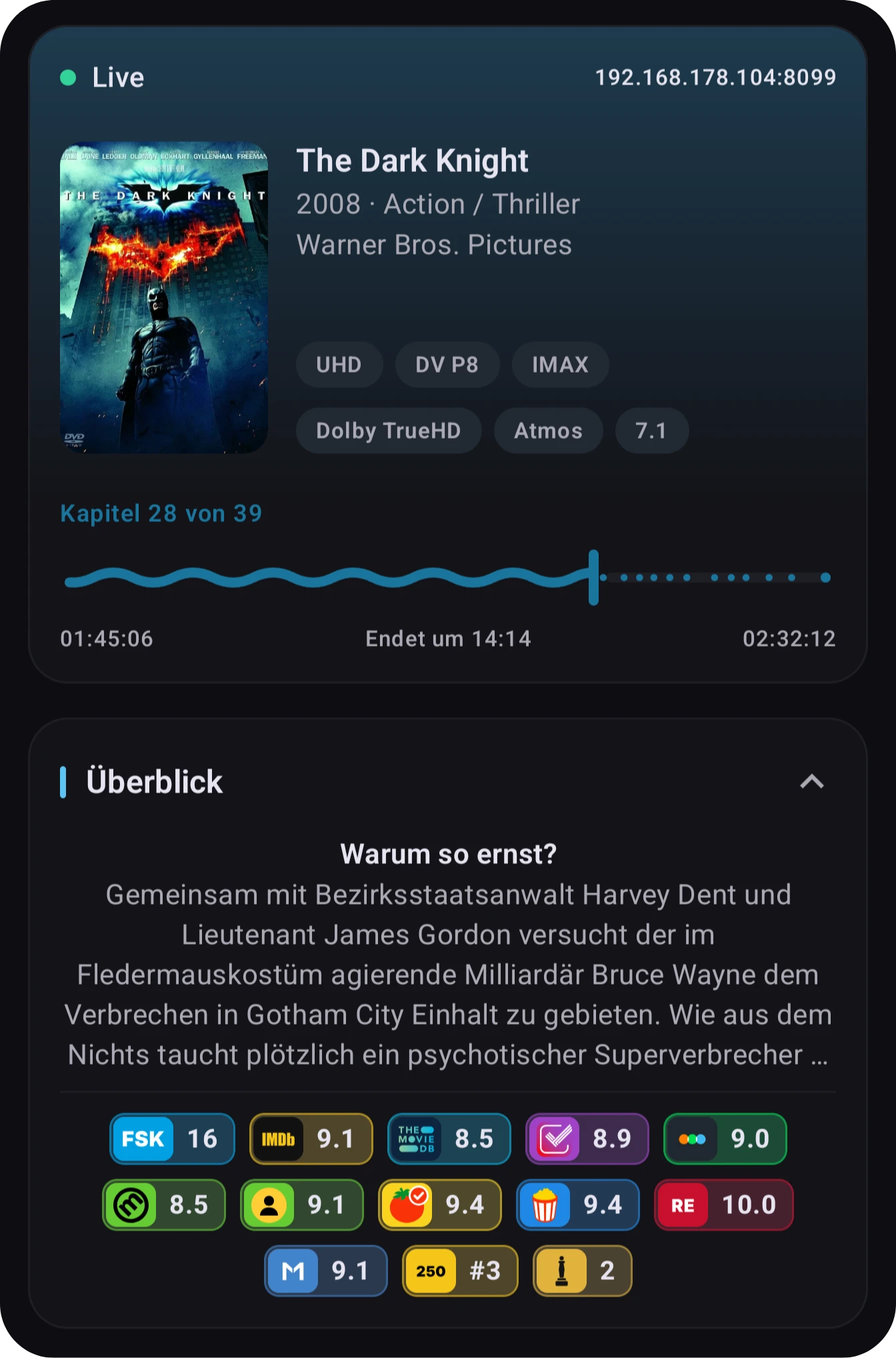
 Awards on the overview card
 Rotten Tomatoes certificates via WhatsOn
 MDBList’s own score
 Redesigned rating shields