The AM9 Pro works with CE via a USB 3.0 drive. It did not work with Type-C.
A little more information would be helpful. Which drive are you using? Are you using a specific USB-A port? Are you using any special cables? Which Android firmware are you running on the AM9 Pro?
Please tell us, the uninformed, more.
Device: AM9 Pro
Android 14, version 2.0.9
CE version 16.05.2026
USB 3.0
32 GB Syrox USB flash drive
No additional accessories required; connects directly to any USB 3.0 port.
I have questions
Is usb 3.0 with corelec faster than the microsd ?
Reason ?
maybe because …
USB 3.0 theoretical transfer speeds of up to 5 Gbps (625 MB/s), while micro SD cards typically achieve speeds of up to 100 MB/s for Class 10 cards and up to 300 MB/s for UHS-I cards.
at least that’s what google told me
I had a search on Claude it says random random IOPS (Input/Output Operations Per Second) what mattress in Core elec as which is high in microsd
But I am not a technical person so I’m not sure it could be wrong
USB3 is faster by far.
The SDcard uses an SDIO controller capped at 4bit x 200Mhz = 800Mbps or 100MB/s. That’s a theoretical 100MB/s so it will be less.
USB3 has a theoretical cap of 5000Mbps but I wouldn’t be surprised if there is a bottleneck somewhere preventing that full bandwidth. Still it’s confirmed that USB3 can at least transfer data at ~300MB/s (real world).
2 Likes
Dear CoreElec Team,
Please help me with my issue:
My direct attached 6 sata III media drives (enclosure) is USB 3.0 “C” powered to the 3.0 USB port AM9 Pro but only 3 of my 6 drivers show in file manger.
I’m running on the latest android 14 2.0.9 fw from Ugoo
I’m using CoreElec 14.05.2026 nightly
My enclosure has no problems showing ALL when connected to:
AM6B+
Dune HD Pro one
Even when my AM9 Pro is in Android, the same enclosure shows all 6 drives in “storage”
Please help me to find why I cannot use all 6 of my media drives with my AM9 Pro?
Your help is greatly appreciated
How you will run a 2s video when all the setup like frame switch will cause more time?
Sure you get only a black screen…
Not sure what you’re talking about. But I opened the file in kodi file manager, and it played successfully with correct video in AM6B Plus and Xbox, but just black screen in AM9 Pro with build 20260516.
Because on one device you have no display mode switch and on the other you have - user config error.
I’m sure there was display mode switch on AM6B Plus, as I saw the Dolby Vision symbol of my TV when played the video. Not sure for Xbox, as Kodi on Xbox only support HDR10, not Dolby Vision.
I saw you replied for the fix of this issue FEL - Amlogic NO support - #222 by ragico I believe that’s the same issue as mine  I’ll test with the upcoming build to confirm.
I got a reply from Ugoos regarding USB device boot support. It seems they don’t plan to fix this issue at all.
Hello,
You can use WiFi ADB (adb connect tvbox_ip_address) is the best and recommended way for debugging on this device.
Regarding the boot mechanism, this is a standard hardware design of the Amlogic S905X5-J platform, not a bug, Android AOSP is installed on the internal eMMC storage, not on USB. The chip’s hardware (Boot ROM) is designed to check the eMMC and SD card slot immediately at power-on using simple, native protocols. Thanks.
1 Like
they said sdcard is still supported though
so create a COREELEC partition for booting on an sdcard without a storage partition
put a STORAGE partition on USB drive for kodi / user data
coreelec is configured to find partitions by name so if it happens to find the partition by name on another device it should still work and you can find the crappiest sdcard without worrying about it
just a thought
2 Likes
I’m using the latest nightly build (20260516) with the AM9 Pro. I have some VC-1 encoded files from older blu-rays. For the NG build, under Settings/Player/Videos … Processing … I set Accelerate VC1 to Exclude 24p. The NO build does not have this option. I tried disabling HW acceleration for all file types and that does fix the video glitches I was seeing in the VC-1 files; however, most of my files need hardware acceleration. An H.265 file without HW acceleration stuttered and the CPUs were pegged at 100%.
Really? Why you just don’t try it?
NG is EOL and VC-1 was fixed like a year ago on CE-NO.
It’s time to make Raid0 over USB,to double up speeds 
I have 3 exact same fake CA-816A-V1.1 micro SD to USB adapters from 2tb drives(real micro SD size around 53gb)
Can I somehow force coreelec to boot from them,plug both of them to 2 USB ports and somehow configure them?
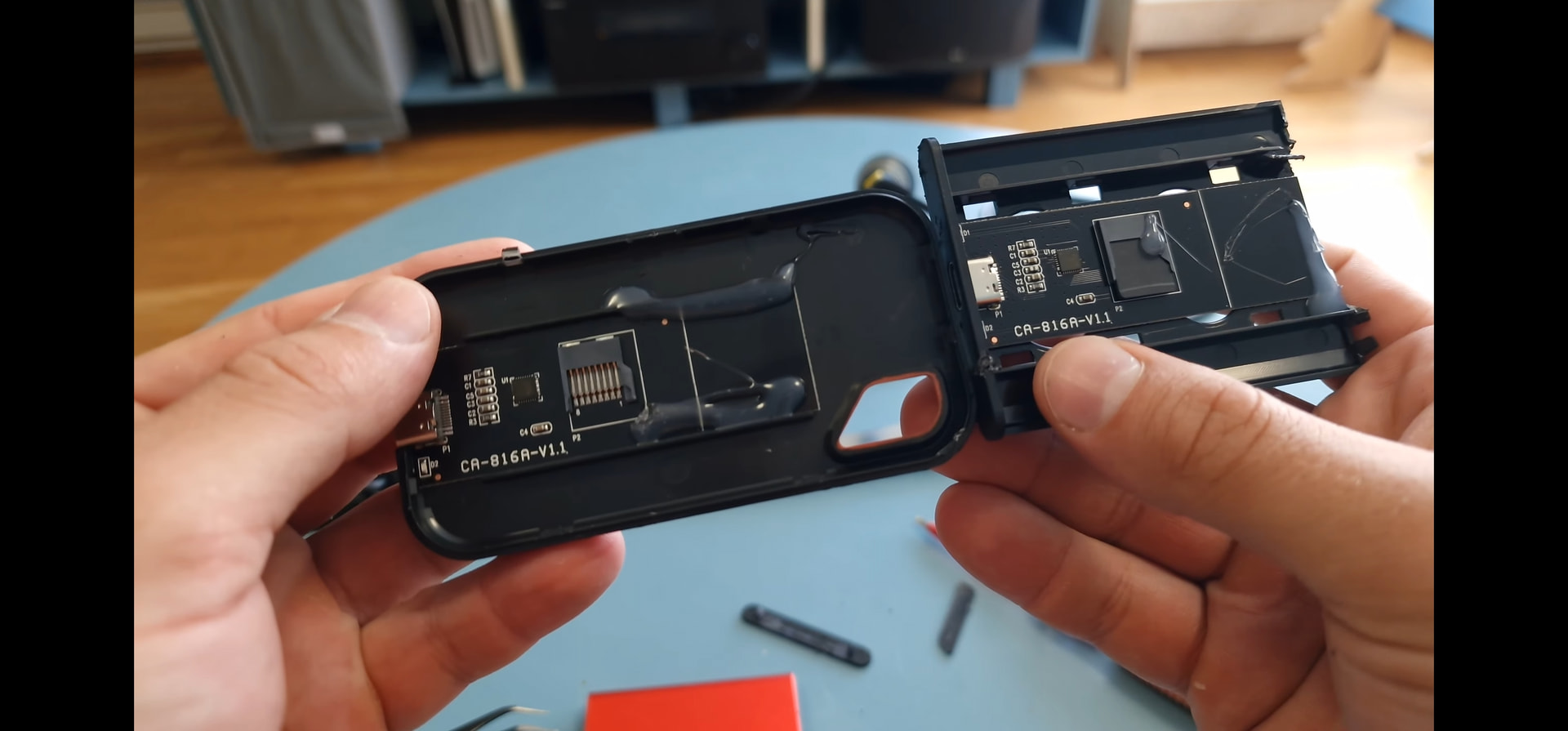
Just use uSD card from it or buy normal uSD/USB card/disk if you need more speed