I just put the UR02 into learning mode, as in the instructions, and pointed my existing remote at it.
1 Like
Hi 
I’m missing the context menu button when the remote is connected on BT (the button with three line) on AMB6+ :
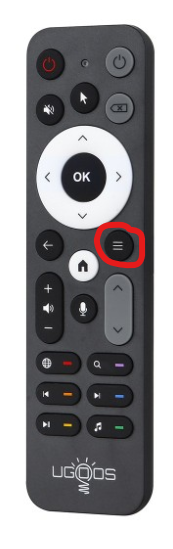
Over the IR, it’s ok, it works 
Can I do something to make it works when connected as BT ?
Thanks.From debug logs : 2025-10-30 19:06:12.155 T:3957    debug <general>: Keyboard: scancode: 0x8b, sym: 0x00 (), unicode: 0x00, modifier: 0x0
2025-10-30 19:06:12.156 T:3957    debug <general>: GetActionCode: Trying Hardy keycode for 0xf200
2025-10-30 19:06:12.156 T:3957     info <general>: Skipped 3 duplicate messages..
2025-10-30 19:06:12.156 T:3957    debug <general>: HandleKey: 0 (0xf200, obc-61697) pressed, window 10016, action is
2025-10-30 19:06:12.329 T:5644    debug <general>: Thread Timer 2799157760 terminating
2025-10-30 19:06:12.364 T:3957    debug <general>: Keyboard: scancode: 0x8b, sym: 0x00 (), unicode: 0x00, modifier: 0x0
2025-10-30 19:06:12.629 T:3963    debug <general>: CLibInputKeyboard::ProcessKey - using delay: 500ms repeat: 33ms
2025-10-30 19:06:12.630 T:5645    debug <general>: Thread Timer start, auto delete: false
2025-10-30 19:06:12.657 T:3957    debug <general>: Keyboard: scancode: 0x8b, sym: 0x00 (), unicode: 0x00, modifier: 0x0
2025-10-30 19:06:12.657 T:3957    debug <general>: GetActionCode: Trying Hardy keycode for 0xf200
2025-10-30 19:06:12.657 T:3957     info <general>: Skipped 3 duplicate messages..
2025-10-30 19:06:12.657 T:3957    debug <general>: HandleKey: 0 (0xf200, obc-61697) pressed, window 10016, action is
2025-10-30 19:06:12.799 T:5645    debug <general>: Thread Timer 2799157760 terminating
2025-10-30 19:06:12.815 T:3957    debug <general>: Keyboard: scancode: 0x8b, sym: 0x00 (), unicode: 0x00, modifier: 0x0
2025-10-30 19:06:13.079 T:3963    debug <general>: CLibInputKeyboard::ProcessKey - using delay: 500ms repeat: 33ms
2025-10-30 19:06:13.080 T:5646    debug <general>: Thread Timer start, auto delete: false
2025-10-30 19:06:13.114 T:3957    debug <general>: Keyboard: scancode: 0x8b, sym: 0x00 (), unicode: 0x00, modifier: 0x0
2025-10-30 19:06:13.114 T:3957    debug <general>: GetActionCode: Trying Hardy keycode for 0xf200
2025-10-30 19:06:13.114 T:3957     info <general>: Skipped 3 duplicate messages..
2025-10-30 19:06:13.114 T:3957    debug <general>: HandleKey: 0 (0xf200, obc-61697) pressed, window 10016, action is
2025-10-30 19:06:13.280 T:5646    debug <general>: Thread Timer 2799157760 terminating
2025-10-30 19:06:13.315 T:3957    debug <general>: Keyboard: scancode: 0x8b, sym: 0x00 (), unicode: 0x00, modifier: 0x0
2025-10-30 19:06:13.720 T:3963    debug <general>: CLibInputKeyboard::ProcessKey - using delay: 500ms repeat: 33ms
From remote.conf :
key_begin

    0x0e 14  # del
    0x74 116 # power
    0x41 582 # voice
    0x67 103 # up
    0x6c 108 # down
    0x69 105 # left
    0x6a 106 # right
    0x61 97  # ok
    0x9e 158 # back
    0xac 102 # home
    0x8b 139 # menu
    0x73 115 # vol+
    0x72 114 # vol-
    0x71 113 # mute
    0x92 146 # ch+
    0x93 147 # ch-
    0xa4 119 # play/pause
    0xa3 123 # next
    0xa5 122 # previous
    0xd9 217 # search
    0xab 171 # music
    0x17 140 # mouse
    0x96 70  # browser

key_end
So “0x8b 139 # menu” is present and match the log test with remote configured as BT.
But I don’t know what does it mean : debug : GetActionCode: Trying Hardy keycode for 0xf200
Edit : Logs from IR :
2025-10-30 19:50:05.945 T:6707 debug : Keyboard: scancode: 0x2e, sym: 0x63 (c), unicode: 0x63, modifier: 0x0
2025-10-30 19:50:05.945 T:6707 debug : HandleKey: c (0xf043) pressed, window 10106, action is Back
On IR, it seems to be 0x2e
I think when I tested this remote, long press ‘OK’ worked.
1 Like
Yes, the long press on “OK” button works hopefully
Thanks for mentioned it, I forgot to tell it 
But the specific button “menu” that works with IR (when not connected as BT) doesn’t work when UR02 is associate.
It did in my case but I did not use any remote.conf.
Maybe interfering, I don’t think BT relies on it (no expert in this area, though)
Do you mean this button menu works on your side without copying the remote.conf and in BT ?
Thanks anyway👍
I thought so and since i still have this remote lying around (not using it daily) I did a test.
Removed all existing mappings for the ‘menu’ key. It doesn’t work 
It does however get recognized as you already discovered, so you can assign any action to it I guess
/edit assigning ‘c’ for context menu worked fine. I used keymap editor, very nice little tool
1 Like
1 Like
Thanks both, I didn’t read the BT page yet, I was trying and installed the add-on “Keymap editor” and by reading other post on internet, I finally succeed
I have created a remote.xml file to copy in folder “keymaps” from “userdata” with this inside below.
I did try with “menu” instead of “contextmenu” and it wasn’t working but at force of trying the tool “Keymap” give me the right name
<keymap>
   <global>
     <keyboard>
      <key id='0xf200'>contextmenu</key>
     </keyboard>
   </global>
</keymap>
Glad you got it working.
1 Like
My AM6b came with ur-02 only , it works , but when i turn the box off with remote im unable to turn box back on ?? how do you get ur-02 remote to turn box on ??
Thanks
I’ve noticed a strange issue on my remote. I have coreelec on my am6b+. Earlier I had remote.conf of UR01 remote and replaced it with this remote’s conf file and I connected it to bluetooth in coreelec.
Problem is whenever I press any button, it continuously blinks red and blue light and after some time, it stops. The functionality works, but sometimes it doesn’t work. IIRC this is something to do with remote trying to use both IR and bluetooth together. If thats’ the case, is there any way to stop using IR entirely and only use bluetooth?
Thanks in advance!