At CE21NG and at CE22NO play CD only after longer time of freezing (download information for cd was disabled in both cases):
I’m not sure why you are referencing me in relation to your CD freezing issues. Maybe you meant to reply to some other post?
@Portisch @vpeter @Sebastiii @freddy . problem solved finally. Thanks guys.
Ugoos released Android 14 for the AM8 and SK1, and I updated my SK1 device to Android 14.
Android version 14, kernel version 5.15.170
CoreElec worked with the SD card. First impression wireless is not working.
I haven’t updated AM8 to Android 14 yet.
https://paste.coreelec.org/KoreanKneeling
https://paste.coreelec.org/RedoingInsult
dmesg
https://paste.coreelec.org/MindingSweeten
CoreELEC:~ # ls /dev
amaudio                   mapper                    tty38
amaudio_ctl               measure_summary           tty39
amaudio_utils             media                     tty4
amdolby_vision            media.amports             tty40
amhdmitx0                 media.audio               tty41
aml_crypto                media.codec_mm            tty42
amremote                  media.decoder             tty43
amresource_mgr            media.dmabuf_manage       tty44
amstream_abuf             media.parser              tty45
amstream_dves_av1         media.tsync               tty46
amstream_dves_avc         media.vfm                 tty47
amstream_dves_avc_frame   media.video               tty48
amstream_dves_hevc        mem                       tty49
amstream_dves_hevc_frame  metadata                  tty5
amstream_hevc             misc                      tty50
amstream_hevc_frame       mmcblk0                   tty51
amstream_hevc_sched       mmcblk0boot0              tty52
amstream_mpts             mmcblk0boot1              tty53
amstream_mpts_sched       mmcblk0rpmb               tty54
amstream_sub              mqueue                    tty55
amstream_sub_read         net                       tty56
amstream_userdata         null                      tty57
amstream_vbuf             odm_ext_a                 tty58
amstream_vbuf_sched       odm_ext_b                 tty59
amstream_vframe           param                     tty6
amsubtitle                picdec                    tty60
amvecm                    pmsg0                     tty61
amvideo                   ppmgr                     tty62
amvideo_poll              ppp                       tty63
amvideocap0               ptmx                      tty7
aocec                     pts                       tty8
ashmem                    ptsserver                 tty9
audio_data_debug          ram0                      ttyS0
audio_utils               ram1                      ttyS1
autofs                    ram10                     uhid
block                     ram11                     uinput
boot_a                    ram12                     uio0
boot_b                    ram13                     unifykeys
bootloader_a              ram14                     urandom
bootloader_b              ram15                     userdata
bsg                       ram2                      uvm
btrfs-control             ram3                      v4l
bus                       ram4                      v4lvideo
char                      ram5                      vad
console                   ram6                      vbmeta_a
core                      ram7                      vbmeta_b
cpu_dma_latency           ram8                      vbmeta_system_a
cri_data                  ram9                      vbmeta_system_b
di0                       random                    vcs
di_process.0              reserved                  vcs1
di_process.1              rfkill                    vcs2
disk                      rsv                       vcs3
display                   rtc                       vcs4
dma_heap                  rtc0                      vcs5
dmaheap                   sda                       vcs6
dri                       sdb                       vcsa
dtb                       sdb1                      vcsa1
dtbo_a                    sdb2                      vcsa2
dtbo_b                    secmem                    vcsa3
dvb                       sg0                       vcsa4
efuse                     sg1                       vcsa5
env                       shm                       vcsa6
esm                       snd                       vcsu
esm_rx                    stderr                    vcsu1
factory                   stdin                     vcsu2
fb0                       stdout                    vcsu3
fd                        super                     vcsu4
firmware_vdec             tee                       vcsu5
frp                       tee0                      vcsu6
fsck.log                  tee_comm_hdcp             vdin1
full                      teepriv0                  vendor_boot_a
fuse                      tsync                     vendor_boot_b
ge2d                      tty                       vfm
gpiochip0                 tty0                      vga_arbiter
gpiochip1                 tty1                      vhci
hwrng                     tty10                     vicp
i2c-1                     tty11                     video10
i2c-2                     tty12                     video11
i2c-6                     tty13                     video12
init_boot_a               tty14                     video13
init_boot_b               tty15                     video14
input                     tty16                     video15
ion                       tty17                     video16
ionvideo                  tty18                     video17
kmsg                      tty19                     video18
log                       tty2                      video19
logo                      tty20                     video20
loop-control              tty21                     video21
loop0                     tty22                     video23
loop1                     tty23                     video30
loop10                    tty24                     video31
loop11                    tty25                     video32
loop12                    tty26                     video33
loop13                    tty27                     video34
loop14                    tty28                     video35
loop15                    tty29                     video36
loop2                     tty3                      video37
loop3                     tty30                     video38
loop4                     tty31                     video71
loop5                     tty32                     video_composer.0
loop6                     tty33                     video_composer.1
loop7                     tty34                     videosync
loop8                     tty35                     wifi_mac
loop9                     tty36                     wifi_power
mali0                     tty37                     zero
CoreELEC:~ #
1 Like
https://paste.coreelec.org/WinchTrend
https://paste.coreelec.org/VariableAgain
https://paste.coreelec.org/CatalogInsider
https://paste.coreelec.org/LaughBette
udevadm info /sys/bus/sdio/devices/* | paste
https://paste.coreelec.org/EmptyPaste
How else can I help?
Really cool that Ugoos decided to roll out a android 14 update for these devices.
Curious to see if it brings any performance updates for the am8 pro under ce-no as i always felt no to have a much lower frame rate on a 4k gui compared to ne.
There is also an Android 14 update for AM8.
They provided the download links via Telegram.
Android 14 update link for AM8
Android 14 update link for SK1
2 Likes
Thanks, I will give it a try this weekend!
I did some more testing tonight. SK1 has a wired network connection issue with the new Android 14 on CE. After a while, the network becomes inactive.
Unfortunately, there are still problems and the system is unstable.
It freezes on the CE logo or restarts.
I can’t execute the “paste” command, so the logs I’ve captured are from pastebin.
dmesg: dmesg-20251021 - Pastebin.com
kodi log: kodi-log-20251021 - Pastebin.com
You will need to try clean fresh install without any addon installed first:
2025-10-21 18:17:28.549 T:1006    error <general>: SQL: [Epg20.db] SQLite error SQLITE_ERROR (no such table: version)
                                                   Query: SELECT idVersion FROM version

2025-10-21 18:17:28.575 T:1006    error <general>: virtual void CJobManager::CJobWorker::Process(): Error processing job
This is a fresh install.
The 20251021 img file is loaded onto the USB drive.
The box is booted, but there’s no way to configure Kodi due to the lack of a screen. The screen freezes at the CE logo.
I just change the option in “/flash/config.ini” from:
coreelec=‘quiet’ to coreelec=‘ssh’.
I can connect via SSH and take these screenshots (dmesg, kodi.log).
Often, during these attempts (e.g., dmesg|kodi), the box restarts.
No idea, then I it’s maybe your boot media what is defect. Radxa Zero, g12a with 2GB RAM do just boot fine.
2025-10-23 10:01:39.154 T:2745    debug <general>: CAESinkALSA::GetChannelLayout - Input Channel Count: 5 Output Channel Count: 5
2025-10-23 10:01:39.154 T:2745    debug <general>: CAESinkALSA::GetChannelLayout - Requested Layout: FL, FR, FC, SL, SR
2025-10-23 10:01:39.154 T:2745    debug <general>: CAESinkALSA::GetChannelLayout - Got Layout: FL, FR, FC, SL, SR (ALSA: FL FR FC RL RR)
Is this wrong?
The input is 5.0, but should be the output not 5.1 like set in audio settings?
This is why it might work in CE-NG as it take the next available channel allocation with channel 6 and use 5.1.
That layout is not wrong @Portisch . In fact, it is more technically correct than the NG layout which shows 6 channels and uses a 5.1 mapping which mostly works (as per my post on 18th October). However, in NO the the SL and SR (or RL and RR - which is the terminology in the table) channels are silent. This seems to make no difference whatever Kodi speaker mappings I set.
This is what I mean. Independend from the source it should always use the layout what user did match up with his used sound system.
So like when have a 5.1 system user must set 5.1 in audio settings.
Then kodi should map all formats with any channel count to this 5.1 setup.
Like FL, FR, FC, SL, SR → FL, FR, LFE, FC, SL, SR, what mean LFE is quiet.
Same with 2.0: FL, FR → FL, FR, LFE, FC, SL, SR, so only FL & FR, others should be quiet.
Yes - that’s what I assume should happen - that FL, FR, FC, SL, SR should play as FL, FR, FC, SL and SR on a six channel system and LFE should be quiet.
What is actually playing is FL, FR, and FC. SL and SR are quiet.
I appreciate that Kodi will map the actual input data to the configured output and should silence any unused channels. It works fine for 2.0 input files and for 5.1 input, but not for 5.0 input. I still think that what is happening in the mapping is that 5.0 input is being matched to
channels = 5, .speakers = { RC, FC, LFE, FR, FL } }, // 4.1 0x07
instead of
channels = 5, .speakers = { RR, RL, FC, FR, FL } }, // AE_CH_LAYOUT_5_0 0x0a
which comes later in the ALSA mapping table.
I am not sure and need to read more about FLAC as example how the channel is descripted which one is which one on ouput.
Like your example:
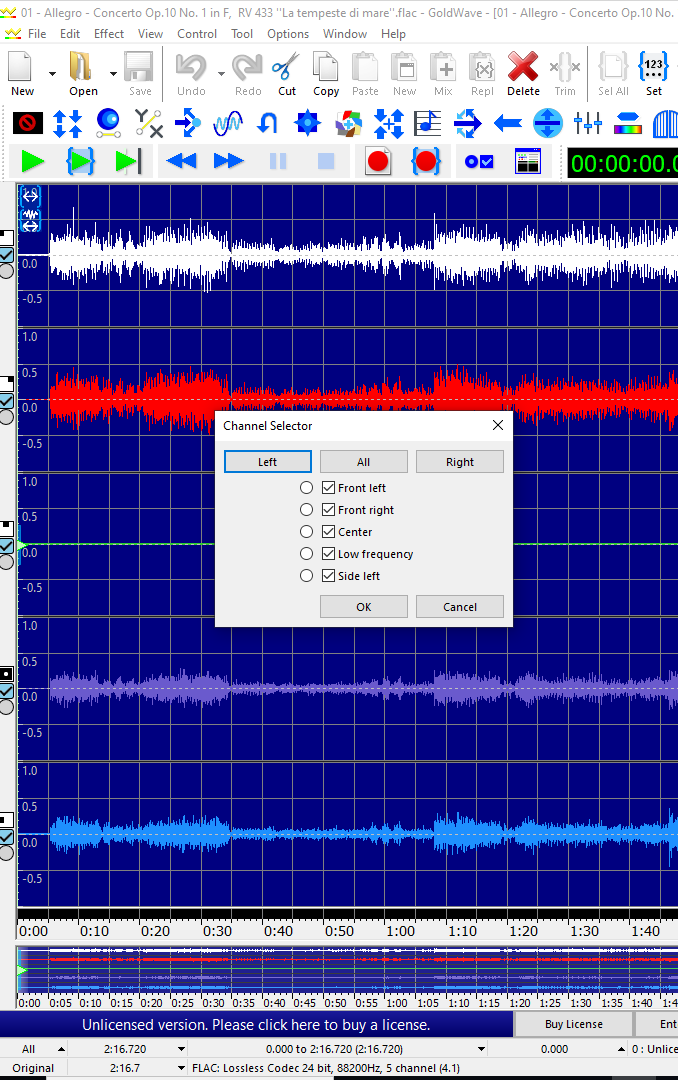
But as you can see by the Tool Goldwav the Center is empty. So only 4 channels. But it say the LFE and SL is next.
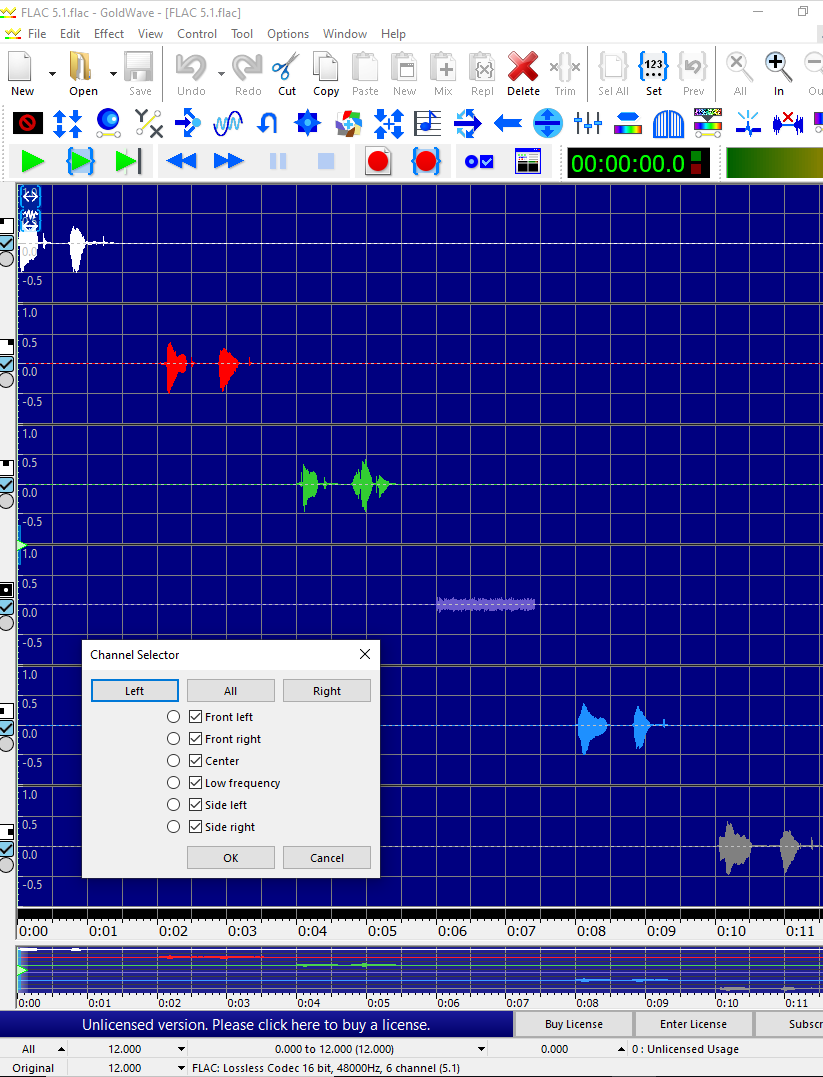
But I guess this is about a “fixed” channel order.
Like a example with 5.1 does show this where it looks correct to me:
I installed the newly released Android 14 version on the AM8.
The network issues I experienced with CoreELEC on SK1 are also present on AM8.
I downgraded to Android 11 on AM8
1 Like