I have Ugoos am9. Subtitles are fine for me.
What device?
I encountered two issues in recent builds, and both are still present in the latest 20260619 build.
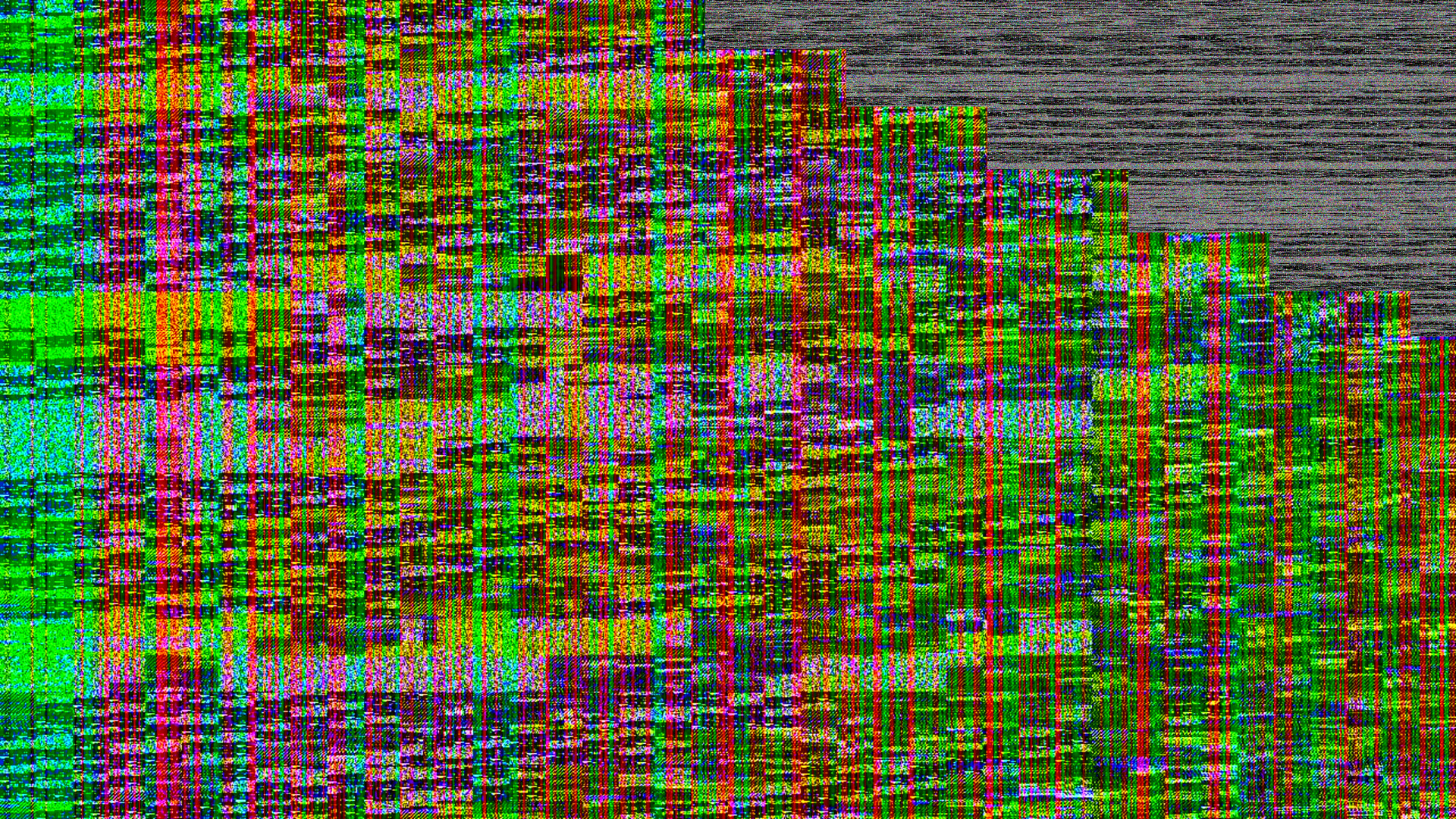
External subtitles: I tested multiple ASS subtitle files, the subtitle lines do not disappear at their designated end time. Instead, they remain on screen until the next subtitle line appears. This does not seem to be an issue with the subtitle files themselves, as I tested several different files and also modified subtitle timings in Aegisub to verify the behavior. This issue only started occurring in the last few builds.YouTube add-on: When playing videos in the YouTube add-on, the screen switches to the CoreELEC logo after a few seconds of playback (usually within 5 seconds). Pressing any button on the remote restores the video playback screen. I tried taking screenshots when the issue occurred, but surprisingly, the screenshots did not capture the CoreELEC logo. Instead, they showed a corrupted image. For example:
Hii. Guys I wanna say thank you, I am impressed. I didn’t know much about CoreELEC, but made some research after my shiny new TCL TV updated itself a few months ago, I was pissed. I could not watch large remuxes anymore, a lot of stuttering all the time…
But back to you, I like that this os runs on flash disk, no install needed! So cool! And it made my umax ubox a9 useful again! Playback is smooth asf on S905x3 chip, HDR10+ working like a charm, only no DV. I really appreciate your work here, thanks!
TK focus on GBM GUI only.
FBDEV will be dropped maybe in future.
@Portisch
Mine stuttering in all movies, when the GUI or playerprocessinfo open..
This breaks CoreELEC on G12B:
master ← reardonia:gbm-hdr-fbo-idle-skip
opened 11:07PM - 27 May 26 UTC
## Description
GUI rendering is expensive; it's particularly expensive when com… bined with GL-based compositing. On D2P HDR the cost is acute: each idle frame still does an FBO bind, clear, full GUI tree draw, sRGB-to-PQ composite shader pass, and EGL swap. RPi4 can't keep up with this during 4K HDR playback and stutters.
*What this PR does*
Two things. First, the renderer now actually honors MarkDirty: when nothing on the GUI has changed, the render pass is skipped instead of redrawing identical pixels. Second, overlays (subtitles, debug OSD) are taught to MarkDirty when they change. Previously they relied on the always-running render pass and never participated in the dirty system at all.
For D2P video playback this means idle GUI frames cost nothing: no control tree walk, no FBO clear, no PQ composite shader, no EGL swap. The video plane keeps updating on its own hardware plane; the GUI plane stays cached.
The HDR FBO compositing path picks up a few additional shortcuts: skip the FBO clear when it's already clean, skip the composite shader when the GUI produced no draws, preserve the prior PQ buffer across skipped frames.
The new overlay plumbing: a PrepareOverlays pre-render hook runs libass once per frame and MarkDirty's on detect_change. Image subtitles (PGS/DVB/SPU) MarkDirty on arrival and disappearance via per-frame state tracking. Debug OSD MarkDirty's at Initialize, Dispose, and per-frame from Render. HasVisibleOverlay is added and is per-frame accurate, replacing a coarse signal that was true for an entire video any time a libass track was loaded.
Single-plane renderers (VAAPI, LinuxRendererGLES, DRMPRIMEGLES) are excluded from the skip - their video shader runs inside the render pass, so the pass must keep firing. They still get the FBO shortcuts.
*Dirty architecture* - overlays: pre-PR, overlays didn't MarkDirty because the render pass ran unconditionally. Now they must.
- A new pre-render hook OVERLAY::CRenderer::PrepareOverlays runs once per CRenderManager::FrameMove on the GUI/main thread. It calls ass_render_frame for each active libass overlay at the current PTS, caches the returned ASS_Image* on SElement.renderedImages, and calls OVERLAY::MarkDirty() when libass reports detect_change > 0. ConvertLibass is reworked to consume from this cache during the render pass instead of re-entering libass.
- A new m_pendingChange flag on CDVDOverlayLibass carries libass's change signal across the PrepareOverlays-vs-ConvertLibass timing gap: when the render pass is skipped a frame after PrepareOverlays cached new images, the flag survives on the persistent overlay so the next render pass's ConvertLibass rebuilds the COverlay correctly.
- Subtitle dirty-marking now happens on the main thread (previously the video thread's AddOverlay reached cross-thread into CGUIWindowManager to MarkDirty when a subtitle arrived)
- PGS/DVB image subtitles and DVD SPU: same PrepareOverlays hook detects arrival via m_textureid == 0 and disappearance via a m_prevHadImageSpu transition. Either fires MarkDirty.
- Debug OSD (CDebugRenderer): calls OVERLAY::MarkDirty() from Initialize, Dispose, and per-frame from Render. Without Initialize's call, toggling the OSD on an idle screen wouldn't fire the first render.
Per-frame visibility signal: OVERLAY::CRenderer::HasVisibleOverlay() is new and per-frame accurate (PGS/DVB/SPU: any entry in m_buffers; libass: e.renderedImages != nullptr). Forwarded up through IPlayer::HasVisibleOverlay (new virtual) -> CVideoPlayer -> CApplicationPlayer -> CRenderManager. The old coarse HasOverlay path returned true for the entire video any time a libass track was loaded (the container lives the whole video with iPTSStopTime = DVD_NOPTS_VALUE); it's gone.
Gate consumers of the new signal:
- DRMAtomic::FlipPage re-enables the GUI-plane detach optimization on D2P when !HasVisibleControls() && !HasVisibleOverlay(). Without the per-frame-accurate visibility check this would blank subtitles on idle frames.
- CGUIVideoControl::Process, CGUIWindowFullScreen::Process, and CGUIWindowSlideShow::Process MarkDirty every frame when !IsRenderingVideoLayer() (single-plane). In D2P these are silent because the overlay-driven MarkDirty above is sufficient.
*Terminology*
The codebase uses "process" and "render" inconsistently. This PR uses:
- Walk / Process pass = CGUIWindowManager::Process -> CGUIControl::DoProcess tree traversal. Always runs every frame in this PR. Animations advance, timers tick, controls call MarkDirtyRegion when their state changes.
- Render pass = CGUIWindowManager::Render -> CGUIControl::Render tree traversal that issues GL/GLES draws. CONDITIONALLY SKIPPED via m_skipGuiRender.
- D2P = Direct-to-Plane: video has its own DRM hardware plane (RendererDRMPRIME). GUI lives on a separate gui_plane. `IsRenderingVideoLayer()==true`.
- Single-plane = video composited with GUI on the same plane via the render pass. `IsRenderingVideoLayer()==false`.
Added member variable `CRenderSystemBase::m_GUIElementCount` that globally tracks the number of GL/GLES renderable events that have happened per frame. This is a nice-to-have for diagnostics that has runtime function in the HDR scenario.
This PR addresses the overuse of compositing when it's not needed. Further PR's are necessary to make the remaining uses more efficient.
*Scope notes (intentionally NOT in this PR)*
The following cleanups are deferred to dedicated follow-up PRs to keep this one reviewable:
- Delete the dead IsRenderingGuiLayer polled-status chain (10 files, render manager + IPlayer + CVideoPlayer + CDataCacheCore + 3 callers). Three call sites were already converted to !IsRenderingVideoLayer() here; the rest of the chain is unused after that and will be removed in its own PR.
- Reduce global singleton use and increase class-layer separation: Parameterize CDRMAtomic::FlipPage to eliminate the CServiceBroker fan-out into GetWindowManager().HasVisibleControls() and
GetAppComponents().GetComponent<CApplicationPlayer>().HasVisibleOverlay() from inside the DRM layer (flagged with a @todo at DRMAtomic.cpp). The decision should be computed at the WinSystem caller and passed in.
- A smarter ass_step_sub-based libass MarkDirty that fires only on actual subtitle transitions (rather than the current per-detect_change heuristic) is noted as a future refinement.
**Known issue: TEMP debug-hack to be removed before merge**
CApplication::Render carries a temporary diagnostic block that counts video / controls-visible / overlay-visible / skip-gui / skip-any frames and logs every 240 frames. This was added to verify skip-rate during draft testing and must be removed before merge. It does not affect behavior, only adds a periodic log line.
## Motivation and context
Overworked GPU. RPi4 is struggling to keep up with the load. of HDR compositing during normal playback.
## How has this been tested?
Intel N250 and "DRMPRIME" D2P mode as well as VAAPIGLES.
## What is the effect on users?
RPi4 users should experience fewer (none?) stuttering during 4K HDR playback.
## Screenshots (if appropriate):
n/a
## Types of change
- [X] **Bug fix** (non-breaking change which fixes an issue)
- [ ] **Clean up** (non-breaking change which removes non-working, unmaintained functionality)
- [X] **Improvement** (non-breaking change which improves existing functionality)
- [ ] **New feature** (non-breaking change which adds functionality)
- [ ] **Breaking change** (fix or feature that will cause existing functionality to change)
- [ ] **Cosmetic change** (non-breaking change that doesn't touch code)
- [ ] **Student submission** (PR was done for educational purposes and will be treated as such)
- [ ] **None of the above** (please explain below)
## Checklist:
- [X] My code follows the **[Code Guidelines](https://github.com/xbmc/xbmc/blob/master/docs/CODE_GUIDELINES.md)** of this project
- [ ] My change requires a change to the documentation, either Doxygen or wiki
- [ ] I have updated the documentation accordingly
- [X] I have read the **[Contributing](https://github.com/xbmc/xbmc/blob/master/docs/CONTRIBUTING.md)** document
- [ ] I have added tests to cover my change
- [ ] All new and existing tests passed
But they have no issues and beta 1 come up soon…
Hi Portisch,
I noticed that the Skin (OSD framebuffer) is often not cleared when stopping Kodi. It keeps visible. Setting 1 to /sys/class/graphics/fb0/blank makes the OSD invisible, but setting it to 0 when exiting, let the OSD reappear. This is different to ng and I believe it also did not happen with earlier versiosn of no.
This fixes the problem:
echo 1 > /sys/class/graphics/fb0/blank || true
echo 1 > /sys/class/graphics/fb0/force_free_mem || true
echo 0 > /sys/class/graphics/fb0/force_free_mem || true
echo 0 > /sys/class/graphics/fb0/blank || true
So are you saying this is not fixable going forward and all users with “older” devices are just SOL?
Oh no, EOL again? The subtitle bug still hasn’t been fixed.
That’s probably how it’ll be if he doesn’t reply
bazzle
20 June 2026 21:14
3792
Sometimes you just have to go back to an earlier build that works and turn off updating.
Baz
Crunt
20 June 2026 21:31
3793
Not sure if this is the right place but is there anyway to fix the audio delay that gradually drifts over time? I use the audio offset manager addon but it just drifts, seems worse with truehd audio
Vasco
20 June 2026 22:27
3794
Be patient and try again tomorrow.
Thanks. I wasn’t being impatient, just worried that we might get stuck with some choice that TK made that would prevent us from running CE22 properly
This is the problem. You try to fix something does not exist…
Crunt
21 June 2026 10:47
3797
Disabled it, still a delay
That’s not a solution in the long run