Many thanks for b4fe174. All playback issues with subtitles/osd seem to be gone with my AM6B+. 
Not with my Ugoos AM9 pro. Stutter in every movie now sinds last nightly. Go back a few versions till its fixed.
Which build is that commit in? 20260621 still stutters for me.
Went back to 20260601 for now
Tomorrow’s build - 20260622
Same here stutter in movies so i am also going back to 0601 or 0529 these are better
Dropping 5-6 sometime 09 frames in movies
The faults are still present on my AM6B+ units
Hi,
I discovered two issues.
- The media type labels used to be displayed correctly: SDR content was shown as SDR, HDR content as HDR, and Dolby Vision content as DV. However, for the last few nightly builds, everything is being reported as SDR, even though my library contains HDR10 and Dolby Vision media. Unfortunately, I can’t pinpoint exactly when this started happening. Under Windows, the same media files are detected and displayed correctly, so the issue appears to be specific to CoreELEC.
-–
- Also, starting with the 21.06.2026 nightly, there’s been a micro stuttering issue with the AM9 Pro when I open TinyPPI or watching an movie. That wasn’t the case before. It looks like this was triggered by the GBM change. It was still working fine with 20.06.2026 nightly build.
Could someone take a look at this?
Thanks!
With this new build, unfortunately, the problem of no Wi-Fi after startup has returned. (GT-King)
I’m also at my wit’s end, experiencing everything from stuttering and freezing to having to restart the box.
On top of that, there are micro-stutters in the picture, and DTS-HD MA 2.0 has a 325ms delay. Other formats don’t seem to have this issue. On my PC, using VLC, DTS-HD MA 2.0 has no delay.
The last version that was acceptably stable for me was 20260609.
Nothing in commits to be cause of it: CoreELEC nightly builds
Unfortunately, reverting to the old build has no effect either.
The kodi changed lot of the infolabels. Maybe thats your issue.
These are the new:
<variable name="VideoHDRType1Var">
	<value condition="String.IsEqual(ListItem.Property(HdrType.1),dolbyvision)">Dolby Vision</value>
	<value condition="String.IsEqual(ListItem.Property(HdrType.1),hdr10plus)">HDR10+</value>
	<value condition="String.IsEqual(ListItem.Property(HdrType.1),hdr10)">HDR10</value>
	<value condition="String.IsEqual(ListItem.Property(HdrType.1),hlg)">HLG</value>
	<value>$INFO[ListItem.Property(HdrType.1)]</value>
</variable>
Thank you very much in advance! I’ll try it out right away later.
There are two places for the info, the static metadata from database and the live metadata, CoreELEC only. So a switch between these two is missed when video playback is active or not.
Should work again with next nightly.
Great!
That’s the case with every skin. But it’s good to know it’ll be fixed in the next nightly build.
Thanks!
With my AM9 Pro and Homatics box r 4k plus wifi works.
Happy to see you back here, Jamal
Problems with 8K HDMI output on S928X
Hi, I’m trying to set up a 8K playback chain with coreELEC, and have run into some issues.
Environment
-
Device: Ugoos SK1, Amlogic S928X-K
-
Build: CoreELEC (official) 22.0-Piers_nightly_20260622, branch Amlogic-NO
-
DV module:
ugoos.am8.dovi.ko(am8 variant), renameddovi.ko -
GUI/display resolution: 3840×2160 @ 60.000 Hz (4K60 4:2:0 10-bit BT709 SDR at the sink)
-
Player setting: Settings → Player → Videos → Adjust display refresh rate = On start / stop
-
Whitelist: all modes enabled, including all 8K entries
-
Signal chain: SK1 → HDFury VRROOM 8K → JVC DLA-RS4100 (8K). EDID = Automix. All “signal” readouts below are from the VRROOM input diagnostics.
-
Reference: the identical files on the same chain under stock Android 14 (same SK1) negotiate 8K with DSC and play correctly, so the sink/chain are confirmed 8K + DSC capable.
Test procedure
GUI at 4K60, all 4K and 8K modes whitelisted, Adjust refresh rate = On start/stop, debug logging on. Reboot before each test. Play an 8K clip, observe the VRROOM input, stop after a few seconds, observe again.
Results
| #§ | Test file | Switches to 8K? | Signal during playback | On stop | Recovery |
|---|---|---|---|---|---|
| 1 | ... 8K AV1 10bit 100M [4320p][SDR][AV1][60fps] |
No | 4K60, 371 MHz, 4:2:0 10-bit, BT709 SDR — cropped, no controls | Black screen; signal still 4K60 4:2:0 10b SDR; box responsive | reboot required |
| 2 | ... 8K AV1 HDR10 100M [4320p][HDR10][AV1][60fps] |
No | 4K60, 371 MHz, 4:2:0 10-bit, BT2020 HDR — cropped, no controls | Black screen; signal drops to 4K60 BT709 SDR; box responsive | reboot required |
| 3 | 8K shot on red [4320p][SDR][HEVC][23.976fps] |
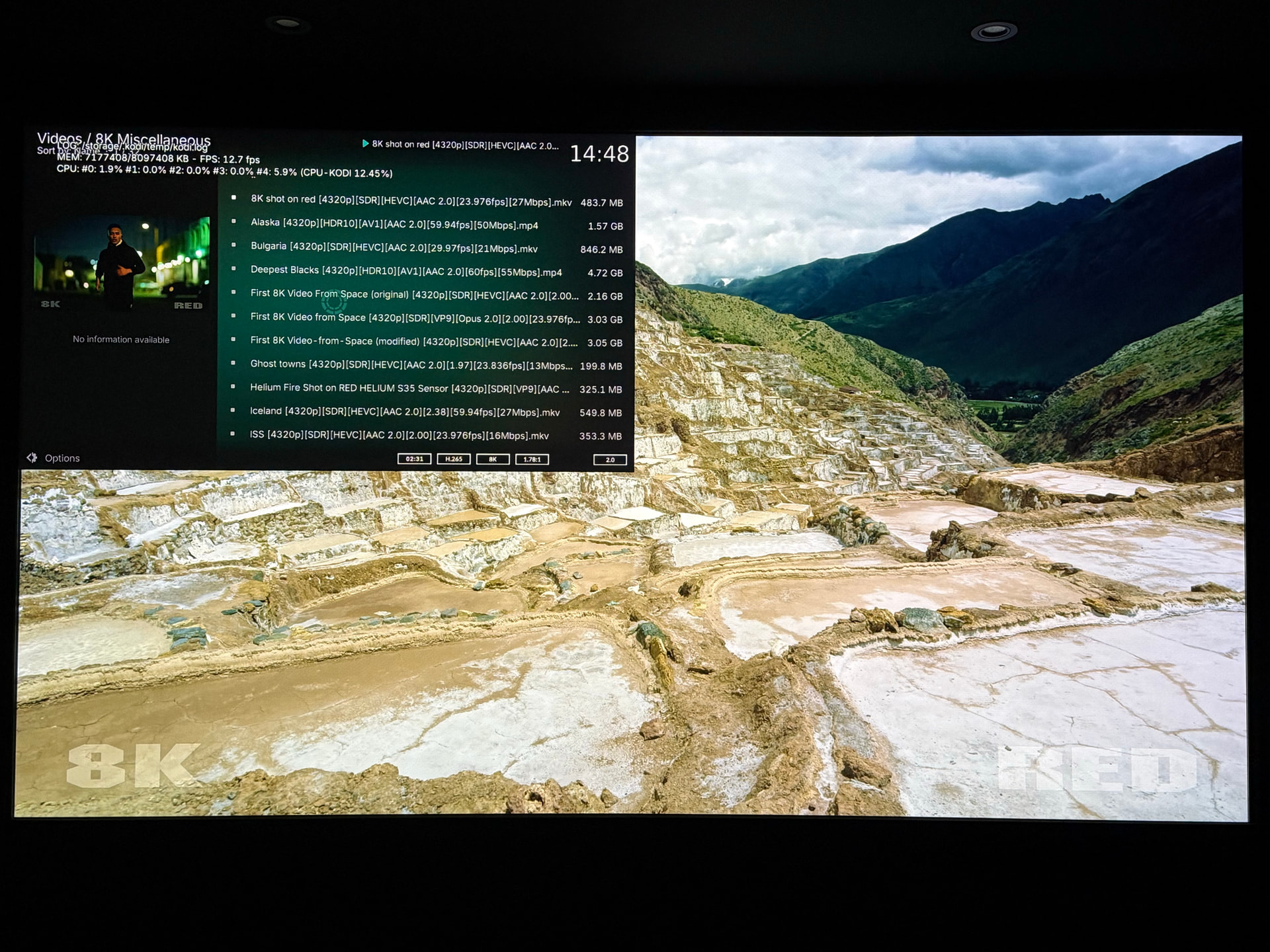
Yes | 8K23.976, FRL5, 4:4:4 10-bit, BT709 SDR — frozen video-list overlay top-left quadrant, no controls | Switches back to 4K60 | clean |
| 4 | LG NATURE [4320p][SDR][VP9][29.97fps] |
Yes | 8K29.970, FRL5, 4:4:4 10-bit, BT709 SDR — frozen video-list overlay top-left quadrant, no controls | Switches back to 4K60 | clean |
| 5 | ARIZONA TIMELAPSE [4320p][HDR10][AV1][29.97fps][40Mbps] |
Yes | 8K29.970, FRL5, 4:4:4 10-bit, BT2020 10-bit HDR — HDR metadata carried correctly on the 8K output | (not separately recorded) | — |
Kodi logs (debug): test 2 → https://paste.coreelec.org/ChairmanBooze · test 4 → https://paste.coreelec.org/TurnsStranded
Snapshot of test 3: