Yes, but why does DuneOS show 160+ Mbps for the same file? The physical position of the box didn’t change, nor did anything else. The maximum RAM consumption during playback was about 55% of 4GB.
I was addressing …
For this part …
I have no information to base on such as Dune vs CE : Driver, Kernel version, Power config
I’ll defer to team CE to answer why is it slower than dune os.
We are not the provider of the WiFi driver source code. So please ask your vendor or better as always use LAN. LAN is LAN, working. WiFi is WiFi, maybe working,. maybe not…
When ever I get issues like that I always verify by using an ethernet cable to my router to rule out wifi etc before fault finding.
Baz
Love the Easter Logo, Happy Easter 
On my X96 X10 Pro (S928X-J), I receive the following message after startup:
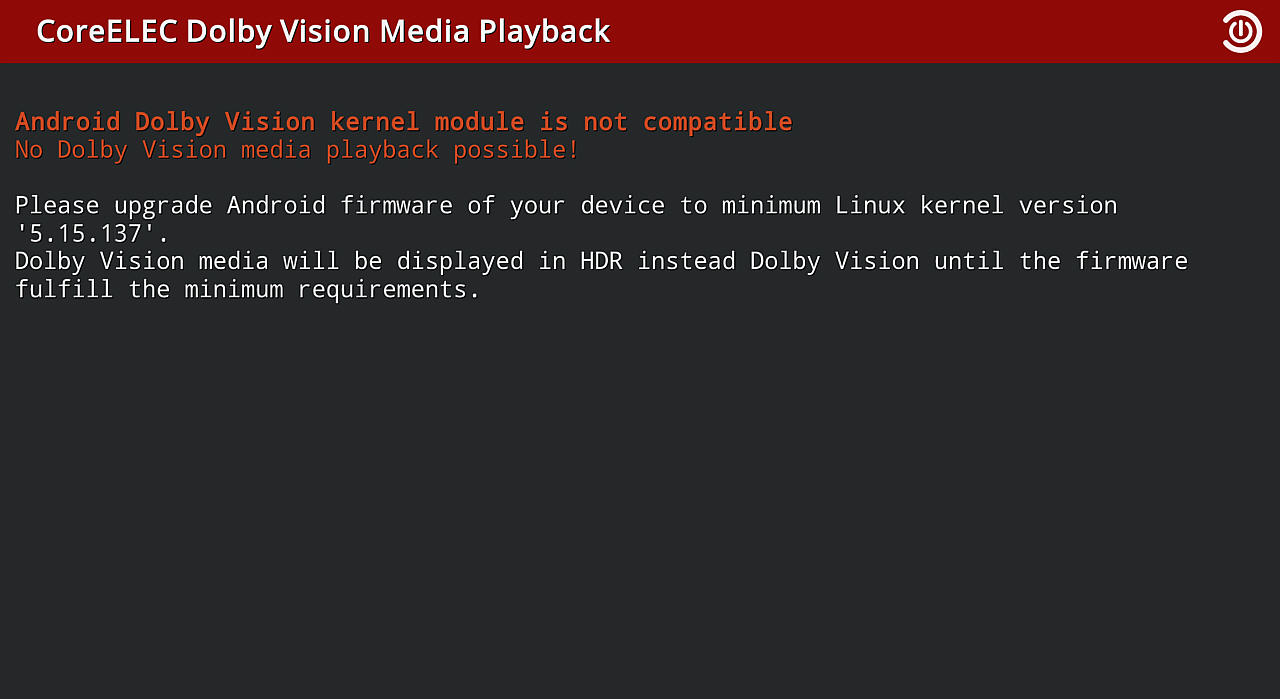
I installed the latest firmware (20240803-1308) from the manufacturer’s website, x96mini.com, but the kernel is only version 5.4.210. Since I don’t own a Dolby Vision-compatible TV, this isn’t currently a problem for me. Is there a way to disable this message when the receiver starts up?
And: Does this mean that Dolby Vision playback would be possible with NE 21.3? However, I have another problem with NE: Many AV1 videos cannot be hardware-decoded. They stutter and exhibit numerous decoding errors, which appear as vertical lines. Software decoding works, with increased CPU usage, at least up to 1080p. Hardware decoding works for the affected files with NO. However, these progressive videos are incorrectly displayed as interlaced in the player process info. The aspect ratio is listed as 0.00 for all AV1 videos, but the aspect ratio displayed on the TV is correct. With software decoding, both pieces of information are displayed correctly in the player process info.
I also noticed that the DTB for X88 King is missing from the device trees for the S922X. Is this device no longer supported?
Use dovi.ko for CE-NO, search forum.
Thanks for the quick help. After some searching, I found the file, copied it to /storage/.config, and it works.
In Audio settings, available options for number of channels are very limited vs previous versions of Kodi. Just 2.0, 3.1, 5.1 and 7.1. I’ve previously been using 2.1 for a soundbar system but the option isn’t currently available. Will this be updated before official release?
Only options supported by the ALSA soundcard are available. And only even channel number are correct.
thanks, so that’s a change vs CE 21 on the Ugoos AM6B+ where more channel layout options were available.
It’s not a “change”, it’s a bug fix.
I’ve been using this latest version for a few weeks now and for the most part it’s been pretty stable and brought new life to my N2+.
I’m not sure where the issues I’m having come from though.
Some videos usually 2160p but sometimes 1080p make the screen go black and the TV osd reports that the video being sent is 7680x2160p.
It seems to be okay when I stop the video and play something else but certain files it always does this with, as far as I can tell.
There’s another issue which might be HDR related where the screen colours are all messed up and overly red on both HDR and SDR content. This is fixed by a reboot and then everything is fine again for a while.
I attached the logs hopefully the correct ones.
Is this the correct logs?
As usually the start is to test the nightly build first where development is happening.
On the nightly it’s doing it with every 2160p file.
However, I found it doesn’t do it if I run the interface at 1080p.
Seems to be running the interface at 2160p that makes it do it.
I think I remember this used to be an issue before on earlier versions but I thought it was a thing of the past, or maybe it was a different issue with the interface 
The HDR issue only seemed to happen if it’s on for a long time so I’ll keep a watch for it on the nightly.
Just leave the interface at 1080p. I dont see any reason to run it at 2160p its only text and background graphics running before you play a file etc?
Edit: Or is it. I just ran an 2160p video with interface at at 1080. CE outputted 1080p?
Changed it to 2160p and CE outputted 2160? Now I’m confused. I need to search more to see if that’s correct.
edit: aah, needed to turn on “on start/stop” in player and set a whitelist, no idea how that changed?