thanks but no. not now. my system was absolutely 100% perfect for my needs. I never had an issue, not one. from watching 100gig remuxes to the perfect azr skin. I’m not using it for much else. or better, for absolutely nothing else. no streaming addons no live TV no sports no nothing..
I’m interested in understanding the ce standard reset function. looks like the easiest way for an non it guy like me.
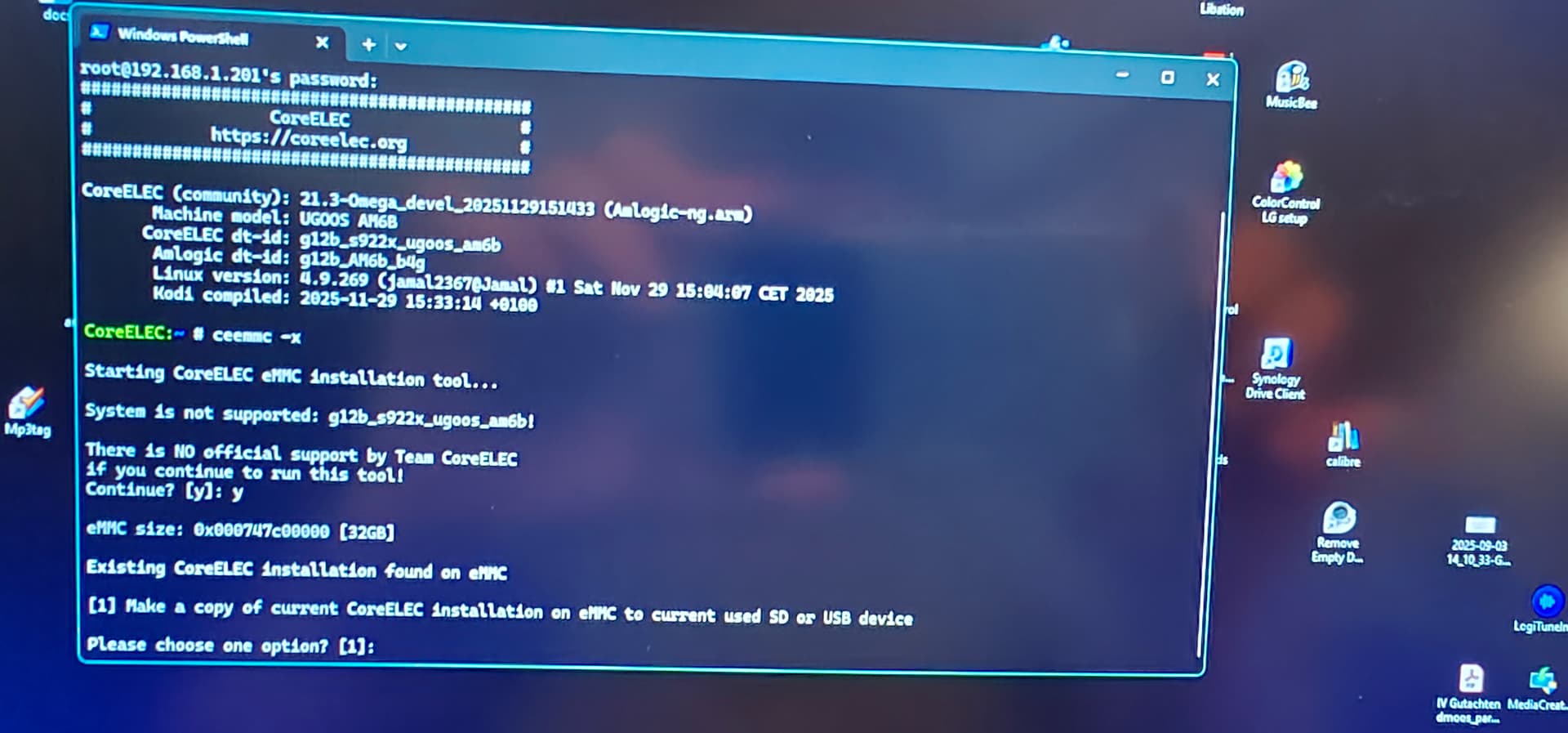
if not good, next step would be my sd backup. I found my usb stick adapter with the SD card in as well as my notes how to ssh into the box and then run command ceemmc -x
I just don’t remember if I have to press the reset button at the back at some point in the process
sorry!!! with coreelec tool you mean ceemmc -x correct? I removed the usb no difference i end up in the android update screen. I know im stupid, I did that 8 months ago.
but its not working now. only option is 1 - make a copy of the current CE installation to sd - what i did already
Ok I wasn’t implying your stupid, you still have CoreELEC on internal all you have done is make a copy. Remove all external media SD card/USBdrive ,and boot CoreELEC. Then insert your Backup SD Card, and in CoreELEC settings use the restore Backup, use File Manager to navigate to the drive that has the backup on it
yeah I know you haven’t. I’m not stupid with my 3 studies but I’m def stupid with Linux / CE and many other things..
thanks again!! really appreciate that you take the time to answer!!
now I’m finally confused. the copied USB stick I just created with ssh contains a system that doesn’t work.
so I guess you mean my old USB stick, with an older perfectly running system. also created via ssh but the option was called backup, not copy. 6 months ago I had at least 4 options as admin via ceemmc - x. today only one
I didn’t know I have an coreelec internal backup setting? I only know my backup addon, also via azr skin (which was not fixing my problems)
I will search in ce settings! I’m back in 1h.
besides that, I don’t understand how fast the android upgrade screen comes up when I press the button, with the chip logo. I wonder if at this point an usb recognition is even possible. and how the hell I did that with my usb stick, 6 months ago on another ugoos. maybe the whole device is crippled. why are there no options anymore via ssh
I’ve resetted ce to default settings just to rule out everything.
with restore in ce I can find my USB Stick (have checked both), but I cannot choose something in it. I see the folders device tree and volume information, but no files and ok is greyed out.
in windows both usb sticks have a lot of files, incl the img and dovi.
as I said. I’m so stupid. no hairs anymore but topic closed. I just saw that this old good backup from me is a SD card in a USB stick adapter. from that you can obviously not boot or do anything.
I put the SD card in and now all options with ssh are back transfer to emmc is already in progress. over and out good night
There are no new nightlies for CE-NG anymore. Last one is from Nov-02 and the stable is from Nov-04. As it says in your quoted mesage “Development of -ng has ceased”.
I got to look at the box last night. The hub, which is all USB 2.0 ports, is connected to the AM6’s sole OTG port (blue rather than black). Might that be USB 3.0 or was it 2.1? Box was purchased around 10 or 11 years ago.
I just ordered a replacement powered hub with all ports being 3.0. I really should have considered upgrading to a NAS. Old habits die hard…
On a slightly different subject, my current AM6+ was practically bricked after an update. Works perfectly with CE on an SD card, but if I boot into eMMC it takes a few minutes to load the interface, no apps are ever displayed, and the remote has no control over it, so I have to do a hard shutdown, then boot into CE.
I would like to give this box to my wife to use with her TV. Is there any way to unbrick the original Ugoos interface?
 as well as my notes how to ssh into the box and then run command ceemmc -x